VPN is one of those terms that gets thrown around a lot in business—but it rarely means exactly the same thing. Some say, "We need a connection between offices," others, "Employees need access from home." Everyone uses the word "VPN" in a meeting, but they're actually talking about two different solutions.
The result? Poorly chosen technology, unnecessary costs, or—worse still—overly broad access to the corporate network. And in IT security, excess is not a luxury, but a risk.
In this article, we'll break it down clearly and concisely. You'll learn what the real difference is. site-to-site VPN and remote access, when to choose one, and what to watch out for to avoid opening a "back door" to your company's infrastructure. No jargon, no theory for engineers – just from the perspective of an SME owner or management.

Site-to-site, a remote access
Let's start with a simple question: do you want to connect two networks, or give access to specific individuals? This is where the line between these two types of VPNs is drawn.
Site-to-site VPN – tunnel between locations
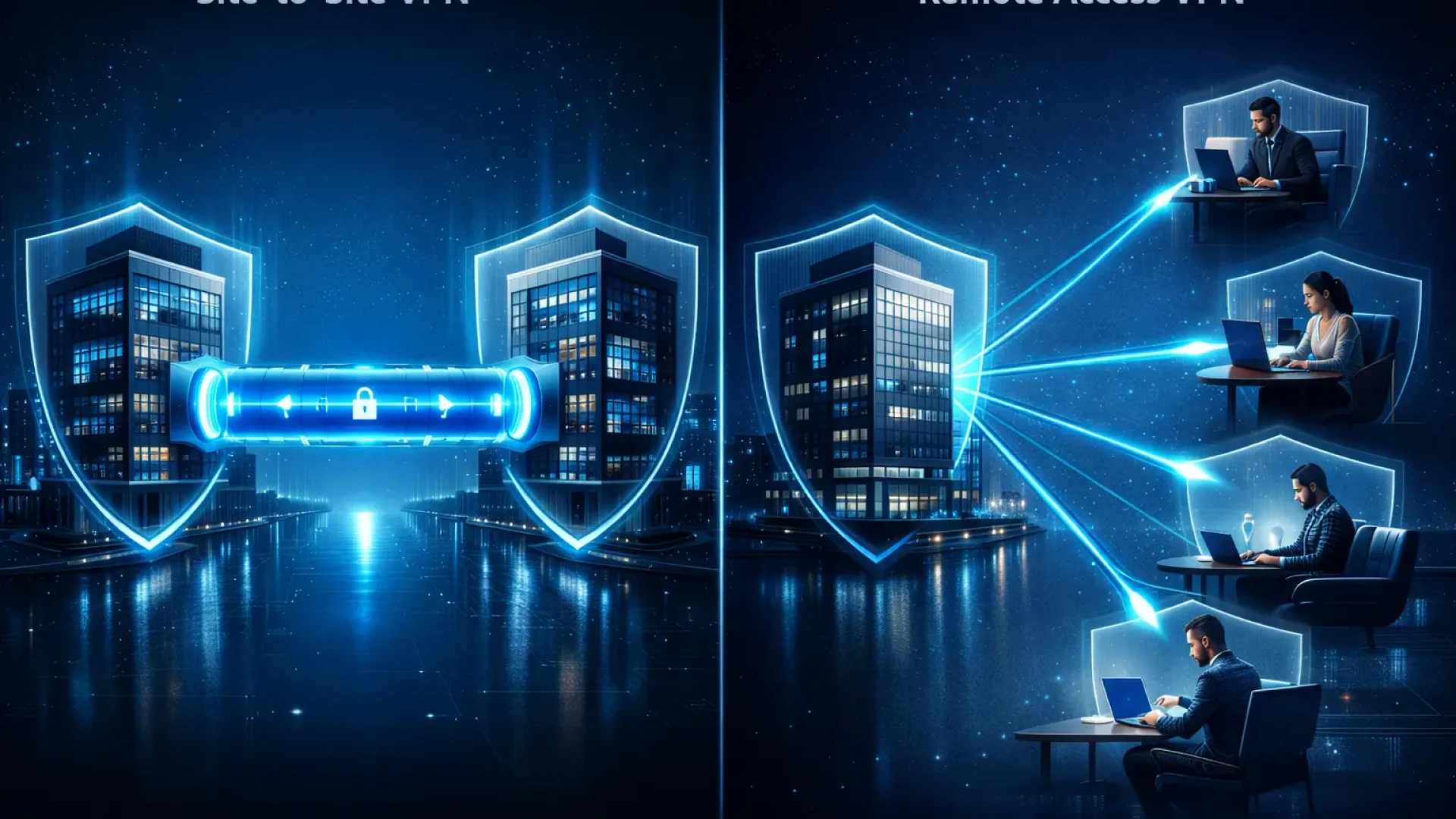
Site-to-site VPN connects entire networks With each other. Most often, this involves connecting an office to a warehouse, branch, server room, or cloud environment. Once the tunnel is established, computers in both locations "see" each other as if they were on a single corporate network.
Technically, the most common use here is IPsec – an encrypted tunnel established between edge devices such as a firewall or router. The end user doesn't need to click anything. The connection runs in the background.
This is an infrastructure solution. Not for people – but for the network.
Remote access VPN – user tunnel
Remote access VPN works differently. Here, we don't connect offices to each other, but employee with the company. A salesperson at home, an accountant working remotely, a service technician on a business trip – each of them establishes an individual, encrypted connection to the company network.
This is most often done through a VPN client (app) or a browser in the case of an SSL VPN. The user logs in, often using MFA, and gains access to specific resources.
This is an access solution. For specific people and devices.
Summary
If you want to connect two locations – you are thinking about site-to-site.
If you want to give remote access for employees – we are talking about remote access.
This distinction seems simple, but in practice, this is where most design mistakes begin. In the next step, we'll demonstrate this in a comparison table that will allow you to quickly assess which solution is right for your company.
Site-to-site VPN vs. remote access VPN – key differences, uses, and risks in one place
Wondering which solution is right for your company? Instead of reading pages of technical descriptions, take a look at the comparison below. This comparison highlights not only the functional differences but also the business implications.
Comparison table: site-to-site VPN and remote access VPN
| Comparison area | Site-to-site VPN | Remote access VPN |
|---|---|---|
| What is being combined? | Two entire networks (e.g. office - branch) | User/Device - Corporate Network |
| Typical goal | Permanent location connection | Remote worker access |
| Who is building the tunnel? | Edge devices (firewall, router) | VPN client on laptop/phone |
| The most common technology | IPsec (tunnel between VPN gateways) | SSL VPN or IPsec client-to-site |
| Scale of implementation | Branches, warehouses, server rooms, cloud | Employees, contractors, service technicians |
| Access management | Typically wide, between subnets | Individual accounts, access policies |
| Main risk | „Flat access between networks without segmentation | Unsecured user device |
| Additional requirements | Permanent connection, public IP or NAT configuration | MFA, password policies, device control |
| Operational maintenance | Network side configuration | Account and permission management |
What does this mean in practice?
Site-to-site VPN is an infrastructure solution. It's useful where systems need to communicate continuously—for example, ERP at headquarters and a warehouse in another location.
Remote access VPN is an access solution that allows people to work remotely and access company resources from outside the office.
That's why the question isn't "which VPN is better?", but rather: what problem do you want to solve? If you're thinking about connecting offices, a VPN client on a laptop isn't the answer. However, if you're working from home, a tunnel between firewalls won't solve anything.
Well-designed architecture often combines both approaches. The key lies in conscious choice, not in random configurations "because they work.".

When to Choose Which Solution? 4 Quick Scenarios
Theory is theory, but in practice, business context matters. Below are the four most common situations in which business owners face a choice between site-to-site VPN and remote access.
1) Two locations, one system – choose site-to-site VPN
You have a headquarters and a branch office. Both locations run the same ERP system, a shared file server, or network printers. You need constant, automatic communication between networks—no user logins or VPN clicks.
This is a classic case of site-to-site VPNs. The tunnel runs in the background, and users work as if everything was in one building.
2) Remote and hybrid work – choose remote access VPN
Some of the team works from home, on business trips, or at a client's site. They need access to a file server, accounting software, or resources on the company network.
This is where a remote access VPN comes in handy. Each user logs in individually, preferably with MFA, and access can be limited to only the resources needed. This is a more flexible and secure solution for distributed workflows.
3) Cloud or data center integration – typically site-to-site VPN
You have a local server room and some systems in the cloud—for example, backups, virtual machines, or business applications. These systems must communicate constantly, without human intervention.
In this case, a site-to-site VPN is the foundation. It connects environments via infrastructure and allows applications to "talk" to each other without interruption.
4) Access for contractors or service technicians – most often remote access
You need to provide temporary access to an external company, accounting firm, or IT service provider. However, you don't want to open up the entire network between locations.
Remote access VPN allows for precise access control. You create an account, limit the resources visible, and simply disable access if necessary. This is a more controlled and auditable solution.
Summary
If the problem concerns infrastructure and constant communication systems – think site-to-site VPN.
If applicable people and their access to company resources – select remote access.
In many companies, both solutions operate in parallel. The key isn't which one you choose, but whether you understand the true purpose of each.
Security and typical pitfalls – this is where companies most often pay for shortcuts
A VPN doesn't guarantee security on its own. It's just an encrypted tunnel. What truly determines the level of protection is how it's configured, the scope of access, and the user controls.
In practice, most problems do not stem from technology, but from oversimplification of the design.
1) "VPN works" - but without MFA
In the case of remote access VPNs, the lack of multi-factor authentication is a serious risk. Passwords can be leaked, guessed, or reused from another service.
MFA should be the standard, not an option. It's one of the simplest and most effective methods of reducing the risk of access hijacking.
2) Too broad access to the entire network
A common mistake: after logging in, users see the entire company infrastructure. Servers, departments, and systems they don't need.
The principle of least privilege should always apply. Access should be limited to what is necessary for work. Nothing more.
3) No segmentation with site-to-site VPN
With site-to-site VPNs, it's easy to fall into the trap of "full trust" between locations. If one location becomes infected, the threat can spread further.
Network segmentation—that is, limiting traffic between specific subnets and services—should be standard. A tunnel doesn't guarantee complete freedom of communication.
4) Split tunneling without risk analysis
Split tunneling allows some traffic to be directed outside the VPN, for example, directly to the internet. This improves performance but can increase risk if not properly managed.
The decision to enable it should result from an analysis of needs and the environment, and not from the desire to "make it work faster.".
5) No logs or monitoring
A VPN without monitoring is like a door without a peephole. You don't know who logged in, when, or from where.
Event logging, alerts on unusual access attempts, and regular activity reviews allow you to respond before a problem becomes an incident.
6) No policy for end devices
Especially with remote access VPNs, the device the user is connecting from is crucial. A company-managed laptop is one thing, but a private computer without updates is quite another.
It's important to establish clear policies: system updates, antivirus software, disk encryption, and access control. Without these, a VPN becomes merely a "conduit" for infiltrating threats.
Summary
The biggest threat isn't the VPN itself, but oversimplification. Lack of MFA, lack of segmentation, excessive access, and lack of monitoring are shortcuts that will sooner or later cost you money.
A well-designed site-to-site VPN or remote access VPN can be a secure foundation for a company's operations. A poorly designed one can quickly lead to a serious incident.
Is a classic VPN the only solution? Modern alternatives – Zero Trust (ZTNA)
Many companies automatically assume that remote access equals VPN. However, the classic model—"let the user into the network and then limit what they can see"—isn't always the best approach.
The question that is becoming more and more relevant is: does a user really need access to the entire network, or just to one specific application?
Classic VPN – When It Still Makes Sense
Site-to-site VPN remains a very good solution for connecting locations, integrating with the cloud, and communicating with systems. It provides a stable and proven infrastructure foundation.
Remote access VPN also makes sense when employees need access to many internal resources – file servers, ERP systems, printers, and locally running applications.
The problem arises when VPN becomes the „default answer” to every remote access scenario.
Zero Trust and ZTNA – access to applications, not the entire network
A modern approach, often referred to as Zero Trust or ZTNA, reverses the logic. Instead of allowing the user into the network and trusting them after logging in, the system:
• verifies identity upon each access,
• limits visibility only to a specific application,
• does not expose the entire infrastructure "behind the VPN".
Users don't see the entire network, don't scan it, and don't have technical access to it. They only connect to the specific service they've been authorized to use.
From a security perspective, this makes a significant difference.
When does an alternative make more sense than a VPN?
Consider a Zero Trust approach instead of a classic remote access VPN if:
Employees mainly use several web applications.
You want to limit the risk of lateral movement of threats across the network.
You have many external contractors with temporary access.
You want precise logging and auditing of access to specific services.
In such scenarios, a classic VPN may be a solution that is too broad for the real need.
Mixed model – the most common practice in SMEs
In practice, many companies combine approaches. Site-to-site VPNs support communication between locations and systems. Remote workers benefit from controlled access to applications rather than full access to the network.
This approach maintains infrastructure stability while limiting the attack surface.
If you are wondering whether classic in your company VPN is actually needed in its current form – it is worth analyzing it architecturally before a solution is established that will be difficult to change in a year or two.
Frequently asked questions
In a classic configuration, yes, at least on one side of the tunnel. A fixed IP address facilitates establishing a stable connection between locations. Alternative solutions exist (e.g., dynamic DNS), but in a business environment, it's best to rely on predictable, fixed addressing.
Yes, provided it's configured correctly. Key elements include MFA, strong passwords, endpoint control, and limiting access to only essential resources. VPN alone isn't enough—security depends on the entire access policy.
Not only is it possible—it's standard in many companies. Site-to-site connects locations and systems, while remote access provides access to remote workers. Both solutions serve different roles and often complement each other.
Every VPN introduces a small overhead related to traffic encryption. In practice, with well-matched hardware and connectivity, the difference is usually negligible. Performance issues most often stem from misconfiguration or an underpowered edge device, not the VPN technology itself.