In recent years VPN for Business has become a given – almost every organization now has some kind of "remote connection." The problem is that these connections differ more than many businesses realize. One tunnel protects data like a bank vault, another opens the door wide to cybercriminals.
On paper, all solutions look similar: encryption, remote access, authentication. In practice, the differences between WireGuard, IPsec, OpenVPN, Fortinet SSL VPN, Teleport, or the old PPTP is a huge gap – especially when it comes to security and compliance with company policies. The most risky thing is the lack of any VPN when employees connect via public RDP on port 3389.
This article won't be another theoretical introduction. You won't find an explanation of what "a VPN is" here - you already know that (and if not, check out our previous article). Now let's focus on what really determines safety: how individual protocols behave in practice, what are their weaknesses, what are their hardware requirements and what are their costs.
You'll learn which solution is best to choose so your company avoids not only attacks but also unnecessary expenses and complexity. Because in the world of VPNs, it's no longer just about "tunneling data," but also conscious risk management.

WireGuard – modern cryptography, low attack surface
What is this solution and why is it worth considering?
WireGuard is a relatively new VPN protocol that was designed from the ground up with simplicity, efficiency, and security in mind. For small and medium-sized businesses, this combination can be crucial – less complex configuration, reduced risk of errors, yet high-quality encryption and low operational overhead.
Main security features
• Cryptography. WireGuard uses, among others, the Noise framework (handshake "Noise_IK"), the Curve25519 curve, the ChaCha20-Poly1305 cipher, the BLAKE2 hash function and the SipHash24 hash function.
• Minimal attack surface. The designers made it clear that the code should be auditable by a single specialist, which reduces the risk of the "giant code base" becoming a source of unknown vulnerabilities.
• Efficiency and lightness. Due to the fact that the implementation runs in the kernel layer (at least on Linux systems) and focuses on UDP and a simple IP tunneling model (Layer 3), the performance is very good.
• IPv6 interoperability and simple routing approach. The protocol is familiar with both IPv4 and IPv6, and the interface configuration resembles a "regular" network interface - which reduces the barrier for the IT department.
Why this benefits SMEs in practice
For SMEs, this means, in short: less time for complicated configuration, less risk of errors (e.g. leaving unnecessary settings, bad encryption, unpatched components), and visible performance benefits when remote access or tunneling traffic between locations.
Limitations and points to note
• Those who prefer AES-NI hardware accelerators should check the performance of ChaCha20 vs AES on a given platform. While ChaCha20-Poly1305 is the recognized standard, in high-usage environments it can be a bottleneck if the hardware does not support optimization.
• It is not a “complete VPN stack” with all enterprise features included out of the box. WireGuard focuses on IP tunneling, not on features such as an application portal, granular application layer access, or extensive Logs/Audit – these elements must be added as an operational layer.
• Key management and distributed environment. While the setup is simple (public-private key exchange), with more users and locations, automation and management policies need to be planned – otherwise the system may be prone to operational errors.
Technical and implementation details for companies
• The installation is very quick: there is a sample "Quick Start" on the manufacturer's website.
• A client/server configuration file typically contains [Interface] and [Peer] sections – which makes it easier to standardize procedures.
• MTU Selection: For WireGuard tunnel, 1420 bytes is suggested with standard IPv4/IPv6 subnet to avoid fragmentation and PMTUD issues.
• UDP-based: eliminates many of the common issues with TCP-over-TCP tunneling (which can be a problem with older VPN protocols, for example).
Is this a universal choice? When should you use it?
From our experience, we can say: if your company is looking for efficient, secure, simple remote user access, tunneling between branches, or building a lightweight site-to-site VPN, WireGuard is a very strong candidate.
However, if you need enterprise features such as an application portal, deep application layer analysis, integration with large fw/NGFWs and granular L7 traffic control – you may need to use WireGuard as one of the layers, but not the only solution.

IPsec/IKEv2 – network layer standard, high compatibility and compliance
What does "IPsec/IKEv2" mean and why is it important to understand it?
Before we go into details, it is worth explaining at a simple level what this term means:
• IPsec (Internet Protocol Security) is a set of protocols that enables encryption, integrity verification and authentication of IP traffic – i.e. data sent over the network.
• IKEv2 (Internet Key Exchange version 2) is a protocol that is responsible for key negotiation, party authentication and establishing an IPsec tunnel.
In practice, we speak of "IPsec/IKEv2" because IKEv2 prepares a secured channel (tunnel) and cooperates with IPsec to transmit data in an encrypted manner.
In a corporate environment, this means: when users or departments connect to corporate resources via the Internet, IPsec/IKEv2 can be a choice that offers high compatibility, maturity and security.
Main advantages from a security and business perspective
• Maturity and compliance – IPsec is a proven technology widely used in corporations and network devices. As a result, many devices and systems support it out-of-the-box.
• Strong Cryptography and PFS – The IKEv2/IPsec protocol can use algorithms such as AES (Advanced Encryption Standard) and SHA-2 (Secure Hash Algorithm), and also supports Perfect Forward Secrecy (PFS), meaning that if one key is compromised, previous and future registrations will not be decrypted.
• Connection stability and mobility – IKEv2 supports the MOBIKE (Mobility and Multi-homing) mechanism, which means that the VPN session can persist even when the IP address or network changes (e.g. WiFi → cellular).
• Transparency for applications – Because IPsec operates at the network layer (layer 3), it can protect virtually any type of IP traffic (TCP, UDP, etc.), regardless of the application.
For SMEs, this means the ability to implement a solution that:
• works with a wide range of hardware and systems,
• ensures high quality security,
• works well with situations where employees change networks (home office, business trips),
• protects all IP communications, not just a specific application.
Challenges and aspects to consider
• Configuration complexity – While the standard is well known, different devices and implementations may require precise settings: encryption policy, Diffie-Hellman groups, tunnel vs. transport mode, NAT-Traversal.
• Operating costs – For complete security, discipline is required: proper settings, tunnel monitoring, and device firmware updates. Otherwise, potential vulnerabilities can be exploited.
• Performance and hardware specificity – Although IPsec is supported by hardware accelerators (AES-NI, off-load in firewalls/VPN Gateway), in environments with less powerful hardware, a higher load may occur.
• Authentication and access policies – Tunneling technology alone is not a substitute for good user access policies, network segmentation, or proper key/certificate management.
Practical aspects of implementation in the company
• Connection modes: For remote workers, "tunnel" mode is typically used – VPN client → VPN gateway → corporate network. For branch-to-branch connections, tunnel mode is also used. Transport mode is less commonly used in SMEs.
• Key configuration parameters: selection of algorithms (e.g. AES-256-GCM, SHA-2), PFS enforcement, setting SA (Security Association) lifetime, NAT Traversal (UDP 4500).
• Authentication: Options include X.509 certificates, pre-shared keys (PSK), or EAP/user authentication. In practice, certificates + MFA are recommended in the company.
• Mobile connection security: IKEv2 thanks to MOBIKE allows you to maintain the connection when the employee changes networks – this is an advantage in hybrid work.
• Monitoring and logging: The VPN gateway should log events (login, IP change, tunnel errors) and be integrated with the SIEM/alerts system to quickly respond to irregularities.
When is it best to choose IPsec/IKEv2 for an SME?
• When you already have VPN/Firewall hardware that supports IPsec and want to maintain compatibility with your existing infrastructure.
• When you are connecting branches or building site-to-site and you care about interoperability (e.g. different locations, different hardware manufacturers).
• When you need a “reliable” solution with strong technical support and documentation – IPsec/IKEv2 meets these conditions.
• However, if you expect a very lightweight client, simple configuration, or have a mainly remote worker scenario without the need for site-to-site, there may be alternatives (such as WireGuard) that will be easier to use.
OpenVPN – Maturity and Flexibility vs. Complexity
What is OpenVPN
OpenVPN is an open-source VPN software and protocol that allows you to create encrypted tunnels between devices and networks.
Its strength lies in its great flexibility – it runs on many systems and can be configured in a variety of ways – but this flexibility can also mean greater complexity in maintenance.
Strengths from a security and implementation perspective
• Wide compatibility and versatility – OpenVPN works both as a network layer tunnel (TUN) and layer 2 tunnel (TAP), supports UDP and TCP, which allows it to work well even in environments with firewall or NAT restrictions.
• Strong security – uses the OpenSSL/TLS library to authenticate and encrypt the control channel and data; X.509 certificates, shared keys, and login-password authentication are possible.
• Rich documentation and community – thanks to over 20 years of presence on the market, we have a lot of materials, examples, implementations and experiences from real organizations.
• Flexible scenarios – it can be used for both remote employee access and site-to-site connections, cloud connectivity, LDAP/RADIUS integration, etc.
Main challenges and aspects worth paying attention to
• Configuration complexity Flexibility also means more work: you have to decide on modes (UDP vs. TCP), interfaces (TUN vs. TAP), encryption algorithms, and certificate/key management. This requires good planning and knowledge.
• Maintenance and Operations – The more configuration options, the more you need to manage: updates, tunnel monitoring, log integration, and key security. For SMEs, this can be a challenge without the appropriate resources.
• Efficiency vs. Simplicity – running over TCP can cause problems known as "TCP-over-TCP" (massive performance degradation on retransmissions).
• Movement and blocking recognition – research has shown that following certain traffic patterns, the OpenVPN protocol can be easily detected and blocked by DPI (deep packet inspection).
Practical aspects of implementation in the company
• Mode and protocol selection: UDP mode recommended for tunnels – provides less overhead and better performance; TCP can be used with network restrictions, but limitations need to be considered.
• TUN vs. TAP interfaces:
– TUN: Layer 3 – forwarding IP packets, most typical remote access implementations.
– TAP: Layer 2 – forwarding Ethernet frames, useful if you need e.g. broadcasts or legacy protocols in the tunnel.
• Authentication and certificates: distinguished by its excellent security – X.509 + MFA certificates are a strong choice for remote workers.
• License Management/Editions: In addition to the Community (open-source) version, there is also a commercial version of OpenVPN Access Server that offers a Web UI, LDAP integration, and simplified deployment.
• Monitoring and auditing: fundamentales – the tunnel is only part of it, you need to track logs, connections, failed logins, possible IP changes or other anomalies.
When should an SME choose OpenVPN?
• When you need a proven solution with high flexibility that can work in various hardware and system environments.
• When you have an IT department or external partner who can handle the configuration, management and monitoring of tunnels.
• When the scenario includes both remote workers and cross-site connections, perhaps even with elements of integration with LDAP/AD or access portals.
• However, if you care about maximum simplicity, minimal administration and the highest performance for remote access, you may want to consider lighter protocols (e.g. WireGuard) or a holo-mixed solution.

SSL VPN (TLS VPN) – application and portal access
What is it and why is it worth considering?
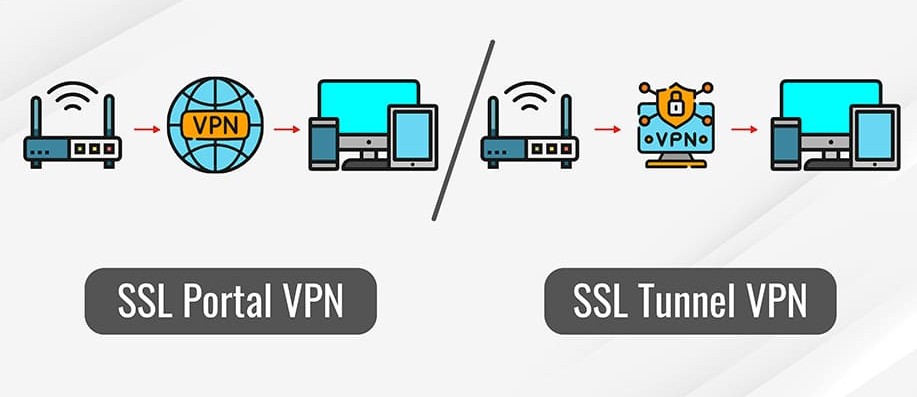
In short: an SSL VPN solution (sometimes also called TLS VPN) enables secure access to a company's internal systems using a standard web browser or lightweight client – without the need for a full installation of a classic VPN client.
For SMEs, this means the ability to quickly and easily implement remote access – especially when you do not need a full network tunnel, but only access to an application or a company portal.
Advantages from a security and operations perspective
• Quick start-up and lower user requirements – the user logs in via a browser, eliminating the need to install and configure a VPN client.
• Application and portal access – The administrator can configure access to specific applications or services within the company network, rather than the entire network. This limits the attack surface.
• Strong SSL/TLS encryption – traffic between the user and the VPN gateway is encrypted using TLS protocols, which secures data sent over the Internet.
Challenges and limitations – what to keep in mind
• Since SSL VPNs typically run on the application (or portal) layer or use a client for tunneling, they may not cover all which works in a traditional network tunnel. The user may have a limited scope of access.
• An SSL VPN gateway becomes a critical security element in itself—if compromised or misconfigured, it can allow access to internal services. Updates, strong authentication, and segmentation are essential.
• Use via a browser or client may result in functional limitations – for example, older application protocols that require low-level access may not work without additional configuration.
Practical aspects of implementation in the company (3 key points)
Authentication and access policies
• Implement MFA (multi-factor authentication) for users connecting via SSL VPN.
• Apply the "least privilege" principle – the user only gets access to those applications he really needs.
• Integration with the company's user directory (e.g. LDAP, Azure AD) allows you to manage access centrally.
Segmentation and access restriction
• Instead of granting full access to the internal network, configure access only to specific applications or portals. This reduces the risk if a user account is compromised.
• Monitor and log activity – all access through the SSL VPN portal should be logged so that abnormal behavior can be addressed.
Secure Gateway Updates and Maintenance
• The SSL VPN gateway must be kept up-to-date—TLS protocols, certificates, and drivers. An outdated version may be vulnerable.
• Review your configuration: what apps are published, whether access policies are still valid, whether the user account still has legitimate access.
When is it best to choose SSL VPN for an SME?
• When users need fast remote access to specific web applications or portals, rather than a full tunnel to the entire network.
• When you want simplicity on the user side (browser-based), fewer installations and easier management.
• When you host internal services that need to be accessible from the outside, but you want to minimize the risk of opening up the entire network.
• However, if your company requires full user access to internal resources, client applications, and connections between branches, you may need a full network layer VPN (e.g. IPsec/IKEv2) or an additional solution alongside SSL VPN.
Fortinet VPN (FortiGate SSL/IPsec) – Ecosystem, but be careful with patch hygiene
A short introduction
Solutions Fortinet VPN (For example, FortiGate series hardware and software) offer an intelligent security suite: next-generation firewall (NGFW), SSL VPN, IPsec, application control, traffic inspection, and more in a single device. This allows enterprises to build a broad and integrated security system—not just the VPN tunnel itself.
However, there is one key “but”: such a system requires very good security hygiene – regular updates, proper configuration and conscious management – otherwise it becomes a potential target for attack.
What brings value from an SME perspective
• Consolidation of functions FortiGate enables simultaneous IPsec and SSL VPN deployments, firewalls, application filtering, and TLS traffic inspection. According to the vendor, "carrier-grade IPsec/IPv4/IPv6... in a single platform."
• High performance – Example: FortiGate 200F-series devices declare SSL-VPN Throughput ~2 Gb/s.
• A wide range of remote access features – According to the product documentation, the VPN client (FortiClient) supports both IPsec and SSL VPN, as well as features such as "always-on VPN", split-tunnel, MFA, and directory integration.
For an SME, this means you can have one platform, fewer devices, and a unified security policy – which simplifies management.
What to be aware of – “patch hygiene” and other challenges
• A History of Serious Loopholes – Fortinet has repeatedly issued warnings: for example, the CVE-2024-21762 vulnerability in the FortiOS SSL-VPN module allowed remote code execution on an unpatched device.
• Post-exploitation and persistent access – One investigation found that attackers, despite patching the initial vulnerabilities, left symbolic links in the file system of FortiGate devices allowing "persistent" access.
• Performance vs. Configuration – Community users reported that the SSL VPN tunnel on smaller devices was significantly slower than IPsec, which is due to the lack of hardware acceleration for SSL VPN on some models.
In short: you have a powerful platform – but if you don't keep it updated, configure it properly, and monitor activity, its security potential can be turned against you.
Practical aspects of implementation in the company (3 key points)
Updating and patching
• Establish a procedure for regular firmware (FortiOS) and FortiClient status checks.
• After each significant vulnerability/CVE, perform a password reset, check device configuration logs, and access. ([turn0search18] – case of password leaks from unpatched devices)
Segmentation and Least Privilege
• Use a “least privilege” policy – grant access only to specific services or users.
• Turn on MFA on the VPN gateway, limit the number of simultaneous sessions, block brute-force attempts.
Monitoring and checking connections
• Enable VPN activity logging, track anomalies (unrecognized IP, login attempts outside business hours, multiple sessions).
• Perform a periodic audit of the device – check whether old certificates/keys have been left behind, whether logs have been reviewed, whether the configuration does not contain default accounts.
When should an SME choose Fortinet VPN?
• When your infrastructure is already based on Fortinet solutions or you intend to build a single "security fabric" platform that includes not only VPN, but also firewall, application control, and auditing.
• When you need high-performance VPN tunnels + advanced traffic inspection + integration with other security features.
• This solution is less suitable if: Your IT resources cannot guarantee regular updates and monitoring – because then the risk of a “system hole” may outweigh the benefits.
Teleport – “Alternative VPN” (identity access, short-term certificates)
What is it and why it might be an interesting option?
Teleport is a platform focused on identity-based access and ephemeral certificates – designed for companies that want to go beyond the classic VPN tunnel, towards a "who has access to what and when" model.
In simple terms: instead of opening an entire VPN tunnel and assigning a permanent connection to the network, Teleport allows you to assign access specifically to servers, databases, applications – with full control, auditing and a short certificate validity period.
For SMEs, this can mean: reduced risk of “going away” from unnecessary persistent connections, better visibility of who is doing what, and stronger protection of critical assets.
Advantages from a security and management perspective
• Short-lived certificates and no permanent keys – Teleport works with time-based certificates, which reduces the risk: even if a certificate is compromised, its validity period expires quickly.
• Identity Management + MFA + RBAC – Integration with identity providers (SSO, OIDC, SAML) + multi-level roles (RBAC) allows you to precisely allocate access – who, when, to what.
• Audit and session recording – Teleport allows you to record sessions (SSH, RDP, databases), review user activity logs, which helps with compliance and abuse detection.
For an SME, this means: greater security in accessing key resources, reduced risk of “too much access” and better operational control.
Challenges and limitations – what to keep in mind
• This isn't your typical "tunneling the entire network" VPN. – Teleport focuses mainly on access to specific resources and is reluctant to fully replace the site-to-site or remote user-to-network scenario.
• Requires a certain level of infrastructure and management – Integrating certificates, identities, auditing, and sessions requires preparation and procedures; for a company without an IT department, it can be a burden.
• Costs and licenses – Although there is an open-source version, enterprise solutions and full functionality (session recording, support, high availability) involve costs that must be included in the budget.
Practical aspects of implementation in the company (3 key points)
Identity Integration and the Principle of Least Privilege
• Connect Teleport to SSO (e.g. Azure AD, Okta) and enable MFA.
• Define roles (RBAC) for users based on "who needs what" instead of "everyone has everything."
Issuing certificates and auditing activities
• Set up automatic issuance of short-lived certificates to users instead of static passwords or keys.
• Enable logging and recording of access sessions – who logged in, from where, what they did.
Replacing VPN/Bastion fragments or as a supplement
• Consider using Teleport where you have critical resources (servers, bases, K8s) and want better control.
• You can leave the traditional VPN for "regular" users and Teleport for the "higher" access layer - this is how the hybrid works.
When is it best to choose Teleport for an SME?
• When your company has critical resources (production servers, databases, cloud infrastructure) and you care about strict access control – who, when, what did he do?
• When you want to reduce the number of open VPN tunnels, limit persistent connections, and implement a "Just-in-Time" access model.
• When you have (or are planning) a hybrid or multi-cloud environment, where a classic VPN might be too heavy or imprecise.
• However, if your needs are limited to simple remote access for employees to a company computer or application, and you don't have the IT resources, then it may be better to start with a simpler VPN and possibly consider Teleport later.

PPTP – Outdated and Unsafe, Why Not Use It
PPTP (Point-to-Point Tunneling Protocol) is one of the oldest VPN protocols – today more of a relic than a security tool. Once popular because it was simple and quick to configure, but now does not meet any data protection standards.
Why? Because it is based on weak MS-CHAPv2 authentication mechanism, which can be cracked in a few hours using commonly available tools. Data sent via PPTP is encrypted with an outdated algorithm. RC4, which does not protect against eavesdropping or man-in-the-middle attacks. In practice, someone observing your network traffic can decrypt your password and access the corporate network.
Even Microsoft, which created PPTP, advises against its use and recommends migrating to newer solutions: IKEv2/IPsec, WireGuard or OpenVPN.
In short:
PPTP is a false sense of security. It works, but it doesn't protect.
If your company still has such a tunnel in operation, it's a warning sign. It's worth disabling it as soon as possible and replacing it with a modern, secure protocol.
No VPN and Public RDP on 3389 – Risk Analysis
Sharing a remote desktop (RDP) directly to the Internet – on the default port 3389 – is one of the the most serious threats for the security of the company network. It's like leaving the office door open and the key stuck in the lock.
RDP itself isn't bad—it's a remote work tool. The problem begins when access isn't protected. VPN, multi-factor authentication (MFA) or IP filtering. It only takes a few minutes for a botnet scanner to detect open port 3389 and launch a dictionary attack or exploit a known vulnerability (e.g. BlueKeep CVE-2019-0708). Such attacks often end ransomware or full server takeover.
Companies that use unsecure RDP not only risk data loss – they often unknowingly provide cybercriminals with a path to their entire IT infrastructure.
The simplest solution: Close port 3389 to the internet, move remote access behind a VPN (WireGuard, IPsec, Fortinet), and enable MFA. It's a small effort that can save your company from the most common attack scenario in small organizations.
No VPN + public RDP = open door to ransomware.
Costs and Licenses – How Much Does Security Really Cost?
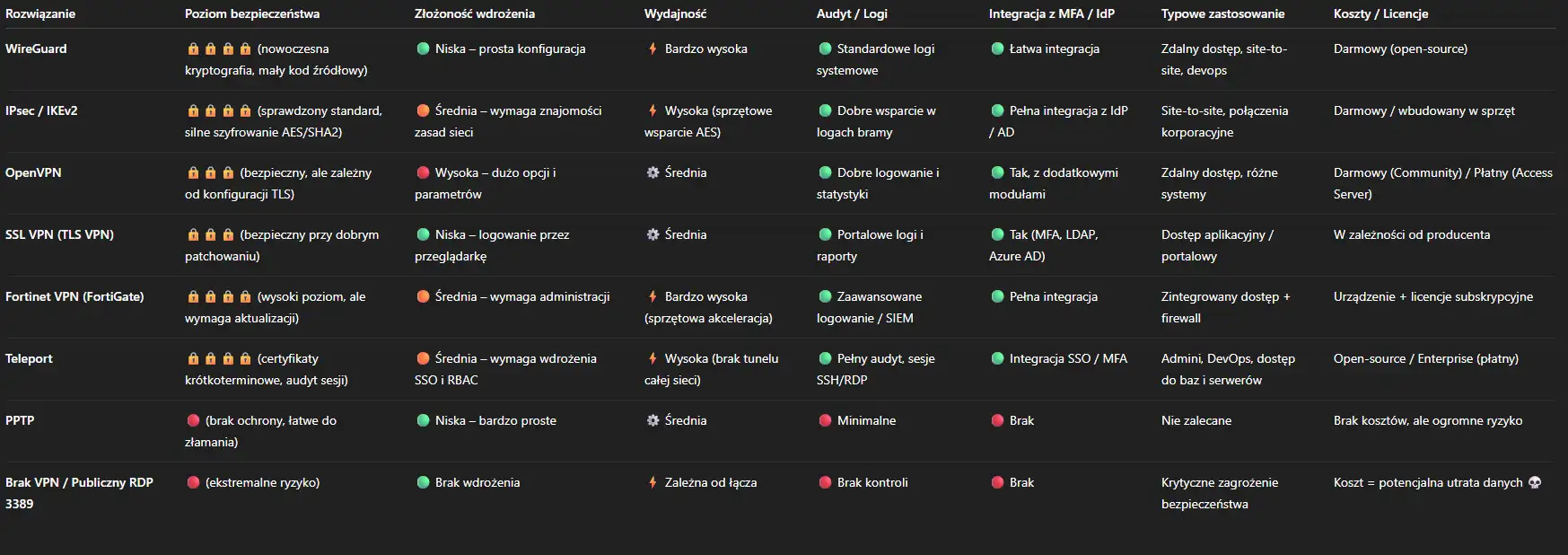
The costs of VPNs vary not only in the license price, but also in what actually needs to be maintained – server, hardware, support, updates and admin time.
• WireGuard - open source, no licensing. The only costs are implementation time, maintenance, and any server monitoring.
• IPsec / IKEv2 - also free standard, often built into routers and firewalls. The cost is limited to configuration and maintenance.
• OpenVPN – Community version is open source, whereas Access Server requires a license per simultaneous connection (approx. a few dollars per month per user).
• SSL VPN (TLS VPN) – usually part of a larger solution (e.g., Fortinet, Sophos, Palo Alto). Costs vary by vendor, number of users, and security subscription.
• Fortinet VPN (FortiGate SSL/IPsec) – Paid hardware or virtual solution. Licenses include the appliance + FortiCare/FortiGuard subscriptions. Medium to high cost, but includes a full security suite.
• Teleport - has open source version with basic functions; editing Enterprise is billed per user (MAU) or server, with an individually determined price list.
– Highest security included: Fortinet VPN or Teleport Enterprise.
Final recommendations for SMEs
Choosing the right VPN is one of the most important decisions for corporate data security today. It's not just about the technology, but also about how your company operates. manages access and risk.
For most small and medium-sized businesses, the best results are achieved with a simple but well-thought-out set:
WireGuard or IPsec/IKEv2 – as a basic VPN for employees and inter-branch connections.
MFA + Access Policy – mandatory, regardless of the solution chosen.
Regular updates and monitoring – especially if you use Fortinet or SSL VPN.
Teleport or similar solutions – worth considering for administrators and access to production servers.
Zero public RDP – this is the basic principle of cybersecurity.
Remember – a simple, well-maintained VPN is better than the most advanced system that no one monitors.
If you want to choose a solution that suits the size and nature of your company – we will help you evaluate, plan and implement them step by step.
Frequently asked questions
Yes, if you need technical support, central management, and auditing. Well-configured for smaller companies. WireGuard or IPsec/IKEv2 enough, but in larger corporate environments it is worth considering Fortinet or Teleportwhich offer more administrative tools.
Yes – e.g. IPsec/IKEv2 and Fortinet VPN They enable the creation of site-to-site tunnels and remote access from a single device. However, appropriate network segmentation and access control are necessary to avoid combining these traffic into a single user profile.
Best regularly, every month – or immediately after a critical security patch is released. The Fortinet example shows that delaying an update can result in device compromise even without a user logging in.
No - it's just first line of defense. A VPN encrypts traffic and protects against eavesdropping, but it is not a substitute MFA, backups, antivirus and up-to-date operating systemOnly the combination of these elements creates a coherent security system.