
Every company sooner or later reaches this point. Something stops working, systems take on a life of their own, and IT, instead of supporting the business, begins to slow it down. And then a question arises that we hear exceptionally often: Is IT outsourcing actually a good investment or just another fixed cost?
The problem is that not all outsourcing is created equal. For some companies, it's a real saving of time, stress, and risk. For others, it's a disappointment because the service was poorly chosen and expectations didn't match reality. Therefore, instead of a simple "yes" or "no," it's worth looking at this topic from the perspective of a business owner and asking yourself a few relevant questions.
In this article we will show you, when IT outsourcing actually pays off, what services it actually covers, what its pros and cons are – especially for startups and smaller companies – and how to approach the topic of automation and AI without marketing exaggeration, without promising miracles and without scaring people with technology.
If you run a business in the capital or surrounding areas and are wondering whether IT outsourcing Warsaw makes sense for you, this text will help you make an informed decision. No rushing, no jargon, and no reading between the lines.

What IT Outsourcing Is in Practice (and What It Isn't)
Is IT outsourcing simply „an external IT specialist on call”?
This is one of the most common simplifications and, at the same time, a source of many disappointments. In practice, well-designed IT outsourcing is not a one-time solution to a breakdown, but constant, orderly care for the entire IT environment in the company. With clear rules, responsibility and predictability.
What IT outsourcing really is
In practice, outsourcing means that we take responsibility for ensuring that the company's IT:
• worked stably on a daily basis,
• was safe and up to date,
• kept up with business development, not blocked it.
It is not only about responding to reports, but also proactive actions: monitoring, updates, access management, backups, change planning. In other words – ensuring as few problems as possible, not just quickly putting out fires.
Well-run IT services for businesses are a bit like a good car service. You don't wait for the engine to seize up. You check regularly, replace worn-out components, and intervene before a breakdown occurs on the road.
What IT outsourcing is not
To be completely clear, IT outsourcing is not:
• one-time help "if something breaks",
• a random set of services without a coherent concept,
• the magical solution to all business problems,
• a substitute for strategy and decisions on the part of the business owner.
If a company expects someone to "just get the computers working" without establishing the scope, priorities, and rules of cooperation, the results can be poor – regardless of the supplier.
Two models that are often confused
It is also worth distinguishing between two approaches:
• ad hoc IT assistance – responding to specific reports, without long-term responsibility,
• IT outsourcing – constant care, SLA agreement, clearly defined response times and scope of activities.
We (in most cases) work with the latter model, as it's the only one that provides companies with a true sense of control and security. This allows clients to know what to expect, and IT ceases to be an unpredictable problem and becomes a business-supporting tool.

Is it worth it? A quick test of the profitability of IT outsourcing.
How do I actually know if IT outsourcing makes sense for my company?
This is one of the most sensible questions you can ask yourself before making a decision. The truth is, IT outsourcing isn't a "one size fits all" solution and doesn't always deliver value from day one. Profitability depends on scale, workflow, and the real-world challenges you face today.
Instead of comparing outsourcing solely to the cost of a full-time position or hourly rate, it's worth looking at the broader picture. In practice, you're paying not only for IT services, but also for reducing the risk of downtime, better work organization and peace of mind when making decisions. These are things that are difficult to price on an invoice, but very easy to feel in the day-to-day operations of the company.
8 Signs That IT Outsourcing Will Start Paying Off for You
If you recognize several of the following points, IT outsourcing is most likely an investment, not a cost:
IT regularly interrupts the team's work
Even minor breakdowns that are „quickly fixed” add up to lost hours and employee frustration.Employees solve IT problems on their own
Improvised solutions, private accounts, files on flash drives – this is the first step towards chaos and security problems.You're not sure if your backups actually work
Backup exists, but no one checks whether data can be successfully restored from it. "Companies that neglect a solid backup strategy often lose critical data – in 2025. until 76% organization experienced serious data loss, and almost half of them did not recover them fully, which shows that the mere presence of a backup is not always enough without a proper recovery process.”The company is seeing more and more tools, access points and accounts that no one controls.
Former employees still have access, and privileges are granted on a reserve basis.Onboarding new people takes too long
A new employee waits several days for equipment, access to email, files and systems.IT security is based mainly on hope
Antivirus is there, but no one knows if security policies are up-to-date and consistent. "The costs of cybersecurity incidents are rising – the average global cost of a data breach continues to reach million dollars, and even smaller organizations often spend from 120,000 to over $1.2 million to remove the effects of a single attack, which may be a difficult burden for many companies to bear.”You have Microsoft 365, but you only use the basics
Email works, but Teams is chaotic and files are scattered across different locations.The company is growing and IT is no longer able to keep up with the changes.
More people, more equipment, more data – and still the same makeshift solutions.
Why outsourcing often beats a full-time IT specialist„
In small and medium-sized companies, the comparison most often looks like this: one internal specialist versus an external team. The difference is that outsourcing provides access to various competences, not one person for "everything." Networks, security, Microsoft 365, backups, and automation—these can't be reasonably covered by a single full-time job without significant costs or compromises.
Importantly, outsourcing doesn't mean a lack of control. Well-established collaboration is based on a clear scope of services, SLAs, and regular communication. This eliminates IT from being a "black box," and makes decisions simpler and more predictable.
What services does typical IT outsourcing include?
„IT outsourcing sounds good, but what does it actually involve?”
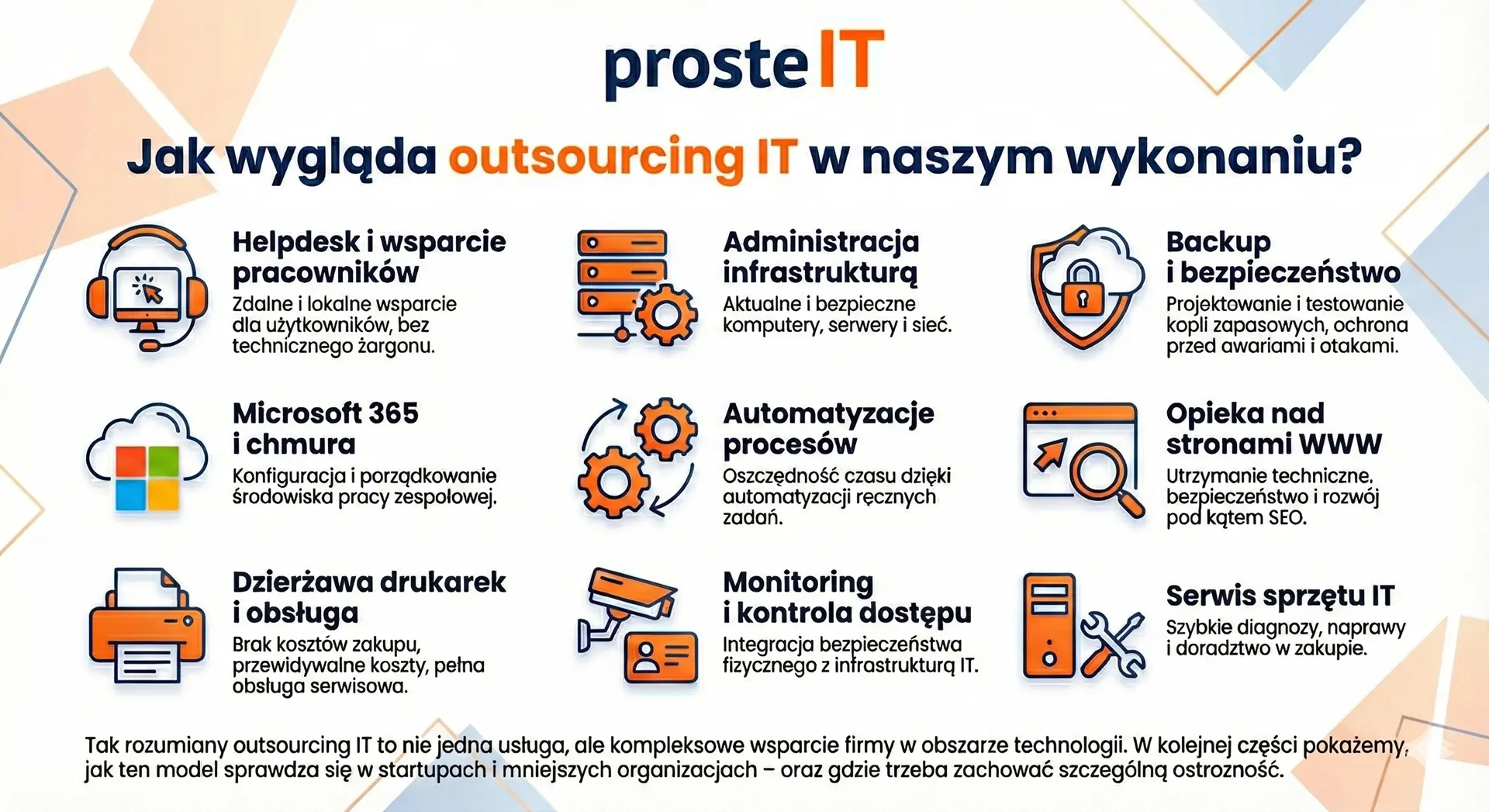
In practice, it is not about one "ready-made package", but about a set of IT services tailored to the real needs of the company. Well-designed outsourcing combines ongoing support, security, and development – so that IT supports the business, not hinders it.
Ongoing IT support and administration
The foundation of outsourcing is day-to-day employee support and the maintenance of the entire IT environment. We provide helpdesk support, computer, server, and network administration, access management, and system updates. This ensures stable IT operations and ensures that issues are resolved quickly and predictably.
Security, backup and business continuity
We ensure that company data is truly protected. We implement backups, we are testing their recovery, we protect systems against threats and help meet GDPR requirements. This is an element of outsourcing that often remains invisible – until it determines continuity. company activities.
Microsoft 365, cloud and order in tools
We help companies organize and manage their business effectively use Microsoft 365. We configure mail, Teams and SharePoint, we manage licenses and prepare the environment for automation and AI. The result is better team collaboration and less chaos in daily work.
Automation and process development
IT outsourcing is not only maintenance, but also development. We design automation in Power Automate and n8n, that eliminate manual, repetitive activities – from document workflows to reminders and system integration.
Websites, Hosting and SEO
As part of outsourcing, we provide website maintenance: hosting, domains, updates, security and website development in terms of performance and SEO. Thanks to this, the website operates stably and truly supports sales and the company's image.
Hardware, Printing, and Physical Security
The offer is complemented by hardware services: computer service, printer rental with full service, as well as installation and configuration CCTV systems and access control. This allows you to have a single IT partner instead of several inconsistent vendors.
If you want to check which of these services actually make sense for your company, a short conversation is all it takes. Based on this, we can propose a range of IT outsourcing solutions tailored to your scale, workflow, and real needs – without pre-packaged packages or unnecessary elements.
Advantages and disadvantages of IT outsourcing for startups
Does a startup even need IT outsourcing if it "needs to be fast and cheap"?
It depends. For young companies, IT outsourcing can be a significant support, but only when chosen carefully. Below, without marketing, are the specifics, pros and cons.
Advantages of IT outsourcing in a startup
No employment or recruitment costs
A startup gains access to a team of specialists without building an IT department from scratch.Quick start and scalability
New people, equipment, tools – everything can be launched quickly and without chaos.Better security from day one
Backups, access, and basic security rules are implemented from the beginning, not „someday.”.Organize your Microsoft 365 and work tools
Less improvisation, less technical debt, which later costs a lot.Team focus on product and sales
Instead of fixing IT problems, the team does what truly grows the company.Support in process automation
Simple early automations save time and grow with your business.
Disadvantages and real risks
Poorly selected scope of services
Too little and the problems return. Too much and you feel like you're overpaying.Lack of clearly defined rules of cooperation
Without SLAs and priorities, it's easy to get frustrated on both sides.Expecting IT to "handle everything"„
Outsourcing supports the business, but does not replace the owner's decision or product strategy.Too fast pace on the startup side
Not every supplier is ready for yesterday's mode - this needs to be clearly established at the outset.
The most important conclusion
IT outsourcing in a startup makes sense when it is light, flexible and adapted to the stage of development. Not as a "side-hustle" expense, but as a tool that organizes IT and allows for growth without technical chaos.

IT outsourcing, automation and AI – when does it make sense and when is it just a fad?
„"Why do I need an IT specialist when I have ChatGPT, who will solve every problem for me?”
This question is increasingly coming up in conversations with business owners—and it's worth taking seriously. AI can actually do a lot today. The problem begins when we expect it to replace real-world computing. IT support.
What AI can and can't do
There is no point in pretending – AI-based tools work great as support in problem analysis. They can help you understand the error message, suggest possible causes, explain how a particular feature works, or suggest a few solutions. In many simple cases, this is sufficient.
But AI doesn't see your IT environment. It doesn't know your network configuration, what your permissions are, what your infrastructure looks like, or what was changed "quickly" a month ago. And this is where the line gets crossed.
Imagine a situation: file access suddenly stops for several people in a company. ChatGPT can suggest 10 possible causes. The IT specialist will check logs, permissions, recent changes, security policies and within a few minutes will identify the specific cause, instead of guessing. AI operates on probability, the IT team – on knowledge about your company.
Where AI is ending sooner than you think
There are areas where AI simply won't help:
• physical hardware or network failure,
• poorly designed infrastructure,
• lack of documentation and order "by eye",
• backup, access or security problems,
• crisis situations where time and responsibility count.
AI won't take responsibility for the consequences of decisions. Nor will it say, "This solution is wrong for you because I see how your company operates." And this is where the role of an experienced IT team is irreplaceable.
AI as a tool, not a replacement for IT
The best results occur when AI supports specialists, not trying to replace them. The IT team can assess which AI suggestions make sense and which are risky or simply inappropriate for a given environment. This is the difference between theory and practice.
Briefly about automation – when it makes sense
Automation is an area where technology can actually deliver quick results, especially in startups and SMEs. Provided that automation is achieved specific, repeatable processes, and not everything "by force".
A good example of sensible automation is something very simple that we use every day. Instead of "mentally remembering" deadlines, we created list in SharePoint, where we keep information about licenses, contracts, and important dates. Then we built a simple flow in Power Automate, which sends a daily email reminder about upcoming contract deadlines, licenses, etc. This eliminates the human factor of forgetfulness – there is no need to check anything manually, just look at the email.
That's what automation is all about. It doesn't always have to be spectacular, complicated, or AI-based. Often, the greatest value comes from simple solutions tailored to real business needs, that run in the background and just do their thing.
The most important conclusion
AI is a powerful tool, but will not replace a responsible IT partner, who knows your company, its risks, and the realities of its operations. Automation makes sense when it's well-thought-out and tailored to the process. The rest is often just a fad that looks good in presentations but adds little to the day-to-day work.
Frequently asked questions about IT outsourcing
Yes, especially if you run a small or medium-sized business and don't want to build your own IT department. IT Outsourcing Warsaw It provides quick access to specialists, local support when needed, and the ability to respond both remotely and on-site. It's a good solution for companies that want stable IT without the hassle of day-to-day technology management.
In practice, the scope can vary greatly, so it's crucial to tailor it to the company. In our case, IT outsourcing includes ongoing user support, computer and server administration, security and backups, Microsoft 365, process automation, website management (hosting, maintenance, SEO), printer leasing, hardware maintenance, and solutions such as monitoring and access control. This comprehensive solution IT services, not just helpdesk.
There's no single, universal price. The cost of IT outsourcing depends on factors such as the number of users and devices, the scope of services, the expected response time (SLA), and the complexity of the infrastructure. Therefore, after a brief conversation and understanding the company's real needs, we can propose a reasonable scope and a transparent cooperation model, instead of a rigid "blind package.".
The best outsourcing company is one that understands your business and takes real responsibility for IT. We stand out for our broad range of services, proactive approach, and experience working with SMEs and startups. We don't limit ourselves to a single area – we combine IT support, security, cloud, automation, and technological development into a cohesive whole, tailored to the specific needs of your company.
Yes, as long as it's flexible. Startups most often use IT outsourcing to quickly get the basics in order—hardware, access to tools, security, and processes—without incurring the cost of a full-time position. Well-chosen outsourcing grows with the company and doesn't hinder its pace of development.
No, quite the opposite. Well-managed IT outsourcing increases control over the environment – thanks to documentation, clear rules of cooperation, and regular communication. The client always knows what's happening in their IT, and technological decisions are made consciously, not under the pressure of failure.
IT outsourcing is neither a miracle cure for all problems nor an unnecessary expense. When chosen correctly, it can make a real difference. relieve the company, reduce the risk of downtime and organize technology, which today is the foundation of everyday work. If it's poorly tailored, it can be a source of frustration and the feeling that "it was supposed to work differently.".
The key is not the phrase "IT outsourcing" itself, but scope, method of cooperation and responsibility of the supplier. Companies that approach this consciously gain predictability, security, and time to develop their business—instead of constantly putting out fires.
If you're wondering whether IT outsourcing in Warsaw makes sense for your company, the most sensible first step is a calm conversation about your real needs, rather than prepackaged packages. We're happy to help you assess whether this solution will work for you and what it should look like to truly be cost-effective.