A server in a company rarely attracts attention. It has no interface, sends no notifications, and doesn't remind anyone of its existence. It's a bit like the electrical wiring in an office – as long as it's working, everyone assumes it's "meant to be.".
The problem begins when something stops working. Files open slowly, applications fail to launch, logging in takes forever, or it suddenly becomes clear that no one knows who has access to key data. And then the question becomes no longer "is the server running?" but "who's actually in control?".
This article shows what it really is administration of servers in the company. No jargon, no tech scares. We'll explain what's on company servers, what the daily work of IT administrators looks like, and why good administration isn't a cost, but a key element of a stable business. If you want a sense of control instead of hoping that "it'll all work out somehow," read on.
What is server administration and why do SMEs often „underestimate” it?
If server administration is it just reacting when something breaks?
In many companies, this is precisely how it's perceived. The server is up, so the issue disappears from the priority list. Until a problem arises, administration is reduced to "someone to take a look if necessary." And that's where things get tricky.
Server administration in a company isn't a one-time effort or firefighting. It's an ongoing process of maintaining the systems that underpin the team's daily work. It's about updates, monitoring, security, backups, service availability, and orderly configuration. In short, it's about ensuring the server is predictable, not just "up and running.".
In SMEs, the problem isn't a lack of goodwill, but rather the illusion of simplicity. If a company has one or two servers, it's easy to assume there's "nothing to administer." However, even a small environment handles user logins, files, accounting applications, and sales systems. Any one of these elements can become a single point of failure if no one is keeping an eye on the whole.
The second reason for underestimation is the lack of visible results. Well-managed server administration is… boring. There are no failures, no anxious phone calls, no downtime. From a business perspective, it looks as if "nothing is happening." But in practice, that's exactly the point – for problems to be resolved before anyone notices them.
It's also worth separating the concepts of "server running" from "server being managed." A server can be running, responding to queries, and serving users, while also:
• do not have current security patches,
• have accounts with excessive privileges,
• make backups that no one has ever tested,
• not be monitored for errors or performance.
It's a bit like a car without maintenance. It runs until it stops in the middle of the road—usually at the most inconvenient moment.
Good server management shifts perspective: from reactive to planned. From "if something goes down" to "we know what we have, who's responsible, and what can go wrong." For small and medium-sized businesses, this is often one of the simplest ways to mitigate risk, organize IT, and regain a sense of control over the technology that truly drives the business.
What Might Be on Company Servers (and Why It Matters to Risk)
Do you know exactly what your server is responsible for – or is it just „out there somewhere and working”?
Many companies treat a server as a single, undefined box. In practice, however, it's a collection of key services that determine business continuity, data security, and team comfort. The more activity on a server, the more important its conscious management becomes.
Company servers often contain data without which a company simply can't function. These include not just files but entire business processes that "pass" through the IT infrastructure—often without the owner or management even realizing how dependent they are on it.
The most common server roles in companies
In small and medium-sized businesses, a server rarely performs a single function. It typically performs several roles simultaneously, which automatically increases the risk if something goes wrong.
Most often we encounter:
• File server – documents, contracts, spreadsheets, projects, often with access granted „on the fly”.
• Login server (Active Directory) – user accounts, passwords, security policies, access to computers and resources.
• Application servers – ERP systems, accounting programs, CRM, warehouse or production tools.
• Databases – the heart of the application, sensitive to performance, errors and lack of backups.
From a risk perspective, one thing is important: the failure of a single server often means the simultaneous shutdown of several areas of the company. This is no longer an "IT problem," but a real business downtime.
Virtualization – several servers in one
Virtualization is increasingly allowing a single physical server to "pretend" to be several separate machines. This is a very good solution, but only if someone is in control.
If the virtualization host is not monitored, updated, and secured, the failure of one component can disable:
• file server,
• accounting system,
• applications for the entire team.
From a user perspective, it feels like "everything went down at once." From an administration perspective, it feels like there's no single point of control.
Cloud, on-premises or hybrid – it's still one environment
A common mistake is thinking, "We have some of our services in the cloud, so the server isn't as important anymore." In practice, most companies today operate in a hybrid model. Some services are on-premises, some in the cloud, and everything must work together.
This means:
• synchronization of user accounts,
• application integration,
• dependencies that are difficult to notice without documentation and monitoring.
The lack of administration doesn't disappear just because something is "in the cloud." It simply becomes less visible—and therefore easier to neglect.
Why does all this increase risk?
The more services on a server, the greater the responsibility. Without clear management, the risk increases:
• uncontrolled access to data,
• failure at the least appropriate moment,
• problems with restoring systems after an incident,
• chaos when something needs to be changed or restored quickly.
The server then stops being a business support and starts to be a ticking clock.
If you're not completely clear on the roles servers play in your company and what exactly is stored on them, now's a good time to get things sorted out. We help companies take a holistic look at their server environment—both remotely and on-site, including in Warsaw and the surrounding area. This means IT support is no longer a source of anxiety, but rather operates predictably and securely.
What does server administration look like on a daily basis (i.e. "what do you pay for")
What does a server administrator actually do if „nothing goes wrong” most of the time?
This is one of the most common questions in SMEs. And it's very logical – because good server management in a company means precisely that problems are invisible. The daily work of an administrator isn't about spectacular rescue operations, but rather calm, planned activities with a single goal: to keep the company running without interruptions and stress.
Below we show what this work looks like in practice – without technical jargon, but from the perspective of real value for business.
Monitoring, i.e. before the user notices the problem
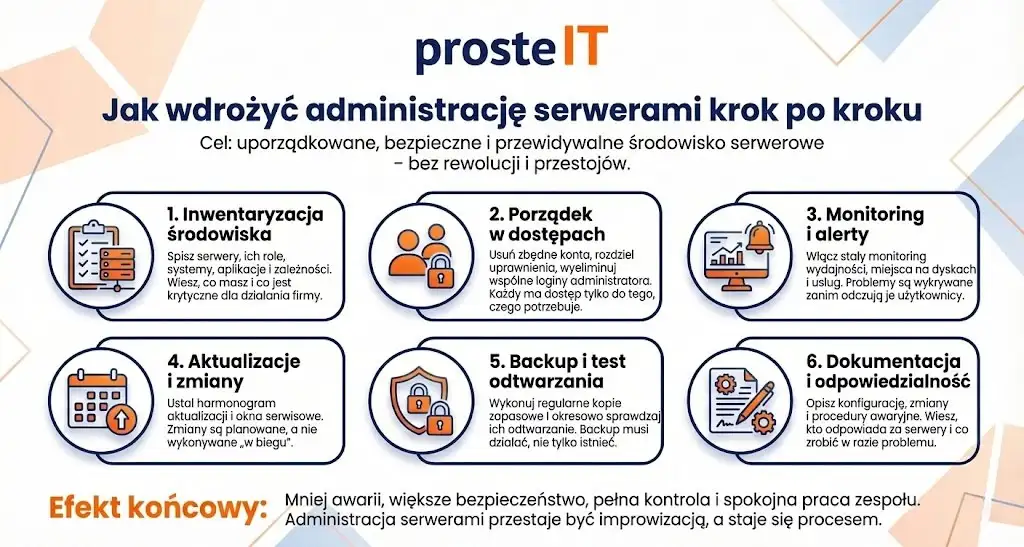
The first pillar of daily administration is monitoring. Servers are monitored for performance, load, free disk space, and the status of key services. If something begins to slow down or approaches a security threshold, the administrator receives an alert.
This ensures a response before employees report that "everything is slow." This means less downtime for the company, and often, no one even realizes a problem has occurred. And that's exactly how it should be.
Updates and changes – no surprises
The second, much-overlooked area is system and application updates. This isn't a random click on "install all," but a planned process. The administrator decides what to update, when, and in what order, so as not to disrupt business operations.
Changes are implemented during specific maintenance windows, often after prior verification that they won't impact critical systems. This ensures that updates enhance security rather than cause disruption.
Backups – and making sure they really work
Backup This is a topic that almost everyone "has," but few actually control. In daily server administration, backups are regularly monitored and their accuracy is verified. Importantly, data recovery is also tested from time to time.
Why is this so important? Because a backup that can't be restored is only an illusion of security. The administrator ensures that in the event of a failure, work can be restored within a predictable timeframe, rather than having to improvise under pressure.
Access, permissions and account organization
A lot of daily work is also consumed by matters that are rarely visible at first glance. Creating and deleting accounts, changing permissions, blocking access for former employees, and organizing administrative roles.
This is an element that directly impacts data security. The principle is simple: everyone has access only to what they actually need. No "universal accounts," no shared passwords, and no guesswork about who has access to what.
Documentation and predictability
The final element of daily administration is documentation and planning. Well-run administration means someone knows:
• what servers are running in the company,
• what roles they play,
• what was changed and why,
• what to do in the event of a breakdown.
This makes a huge difference for businesses. Instead of frantically searching for "someone who remembers something," there's a clear plan and accountability.
In short: You pay not for reacting to crises, but for preventing them from happening. Server administration is a daily, peaceful, background job that turns IT from being a source of stress to a stable foundation for company operations.
Security in administration – the minimum that should be the standard
How can you be sure that your company's server is truly secured and not just "not yet attacked"?
In SMEs, IT security is often based on hope. Since nothing bad has happened, it's easy to assume everything is fine. However, in server management, security isn't about reacting after an incident, but about mitigating risk before a problem occurs.
The good news is that basic safety standards don't have to be complicated or expensive. The key is consistent application.
Access control and the principle of least privilege
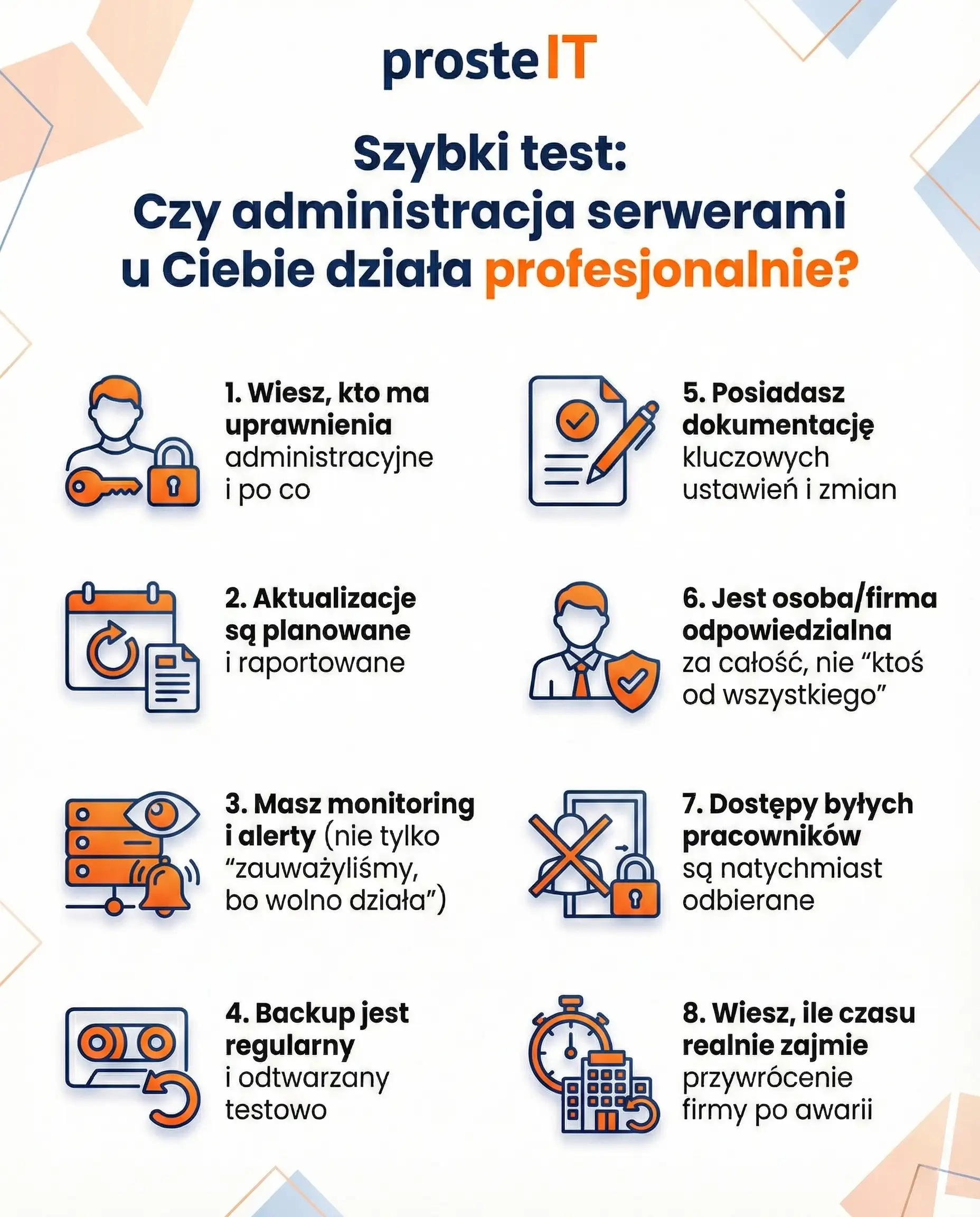
The first and most important element is ensuring orderly access. Each user, including administrators, should have only the permissions they actually need to perform their work. In practice, this means an end to a single shared "admin" account with a password known only to half the company.
Thanks to the principle minimum privileges Even user error or an infected computer doesn't give an attacker full control of the server. Risk is minimized, rather than spilling over into the entire environment.
System updates and hardening
The second standard is regular updates to systems and services. Most successful attacks exploit known vulnerabilities for which patches have been available for months. Lack of updates isn't bad luck—it's deliberately leaving doors open.
Equally important is removing unnecessary services and features. The fewer unnecessary elements running on a server, the smaller the attack surface and the easier the overall management.
Backups as a security feature
Backups are often associated solely with hardware failure. However, they're also a key element of protection against ransomware attacks and human error. Backups should be performed regularly, stored in a secure location, and periodically tested.
Without proven data recovery, even the best security measures do not guarantee business continuity.
Monitoring and rapid response
Security also means quickly detecting irregularities. Monitoring servers and logs allows us to identify suspicious behavior, unusual loads, or unauthorized access attempts.
The sooner a problem is detected, the less impact it will have on the company. Often, the difference between a minor incident and a major crisis is a matter of hours, or even minutes.
Summary
Minimum security in server administration isn't a secret or a "corporate luxury." It's a set of simple but consistently implemented principles: access control, updates, backups, and monitoring. When these elements work together, the server ceases to be a weak link and becomes a stable and predictable foundation for the entire company.
Cooperation model and scope of service – in-house vs. IT outsourcing
Does server administration have to mean a full-time job in the company?
For many SME owners, this is a key question. On the one hand, they want control and quick responses, but on the other, they don't always have the scale, budget, or need to retain an IT specialist on a permanent basis. Therefore, the choice of a collaboration model has a real impact on costs, security, and peace of mind in the company's daily operations.
On-site Administrator – When It Makes Sense
The in-house model works best where the IT environment is large, complex, and constantly evolving. An in-house administrator knows the company, processes, and users, is readily available, and can respond immediately.
However, in SMEs, this model can be difficult to maintain. One person rarely possesses expertise in all areas: from servers and security to backup and networking. Added to this are vacations, illnesses, and the lack of replacements. In practice, this often means that some tasks are postponed due to a lack of time.
IT outsourcing – flexibility and specialization
Outsourcing server administration involves handing over responsibility to an external team. From a company's perspective, the most important difference is access to the knowledge and experience of numerous specialists, without the need to employ them full-time.
Well-organized outsourcing isn't just about responding to requests. It also includes ongoing support, monitoring, change planning, reporting, and clearly defined response times. The company knows who is responsible for the servers and what they can expect from the service.
What should be included in server administration?
Regardless of the model, the scope of the service should be clearly defined. In practice, good administration includes:
• monitoring and response for alerts,
• Updates systems and applications,
• management accesses and powers,
• Backups and playback tests,
• documentation and reporting on the state of the environment.
If these elements are missing, it is difficult to talk about real administration – it is rather ad hoc technical support.
Hybrid model – an increasingly popular choice
Many companies opt for a hybrid model. Users are supported on a day-to-day basis by an internal representative, while server administration and security are outsourced to an external partner. This arrangement combines business knowledge with access to specialized expertise.
For SMEs, this is often the most sensible compromise between control and costs.
There's no single, perfect model for every company. The key is to make server administration a real responsibility, not just "a topic among other tasks." Regardless of whether you choose an in-house administrator, outsourcing, or a hybrid model, one thing matters: predictability, security, and clear lines of responsibility.
Frequently asked questions
Yes, and that's when it makes the most sense. Server management is about preventing problems, not reacting after the fact. If everything is working, it's the perfect time to get your updates, backups, and security in order before an outage or incident occurs.
The cost depends on the number of servers, their roles, the complexity of the environment, and the scope of the service. Pricing for a simple file server differs from that for an environment with Active Directory, applications, and virtualization. In practice, administration is less expensive than remediation of a failure or data loss.
It should include: Backups alone aren't enough – regular recovery testing is crucial to ensure data can be restored. Without this, backups are merely a sense of security, not real protection for the company.
Partially, yes, but not always. Many administrative functions are available within server systems, while others require additional tools, such as monitoring or backup. It's always worth selecting solutions that meet the company's actual needs, rather than "just in case.".
Yes. We can help with both one-time environment cleanups (audits, access control, backups, and updates) and ongoing server administration. We take responsibility for the entire process and ensure IT is predictable and secure.
We work remotely and in-person. We serve companies in Warsaw and the surrounding areas, including those in need of on-site travel. We also provide remote support to companies across Poland, without compromising on service quality.
Server administration in a company isn't a technical detail, but the foundation for the stable and secure operation of the entire organization. When it's managed consciously, servers operate predictably, data is protected, and outages cease to be a surprise. Instead of hasty reactions, order, control, and peace of mind emerge in the daily functioning of the business.
If you feel like your company's servers "just work," but you're not entirely sure who's in charge and what will happen in the event of a problem, it's worth checking. We'll help you organize your server administration step by step and choose a collaboration model that will truly support your business.