Is your company still "managing processes" through email, Excel, and manually copying data between systems? It works—until time, responsibility, and money start to be wasted. Automating company processes is no longer an IT whim, but a way to regain control over what's happening behind the scenes.
In this article, we'll show you the real differences between the most popular automation tools, their licensing models, hidden costs, and what to watch out for during implementation. Without marketing buzzwords, we'll present a perspective from the owner or management team looking to make informed decisions.
If you're wondering whether automating company processes is a real savings or just another technological trend, you'll find concrete answers here.

Automation in the company – what is it and when does it actually pay off?
You have processes in your company that are begging for improvement. An invoice arrives by email, someone saves it, someone copies the data into the system, someone asks for approval, and in the end, it turns out an attachment or order number is missing. Automation isn't a magic "fix your company" button, but a very effective way to make these repetitive steps faster, more consistent, and with fewer errors.
What is process automation in a company?
The simplest way: Automation is the setting of rules that perform repetitive work instead of humans..
In practice, it works like dominoes:
• when X happens (e.g. an e-mail with an invoice will arrive),
• do Y (save the attachment in the appropriate folder),
• check with (whether the invoice has a Tax Identification Number and an order number),
• and notify person A (e.g. manager or accounting).
This doesn't have to mean "robots" and complex programming. In many companies, automation starts with simple things: notifications, reminders, task creation, document organization, and data synchronization between systems.
What we automate most often: 3 types of processes
In order not to confuse concepts, it is worth distinguishing the three most common categories:
Notification and task automation
When something happens, someone receives information or a task. For example, "If a customer completes the form, create a lead and notify the salesperson.".Data integration automation
This means that data flows between systems without manual rewriting. For example, "a new customer in CRM -> automatically enters the invoicing system.".Process automation with approval
This is where control and accountability come into play: someone approves, rejects, and adds comments, while the system keeps track. Example: "cost invoice -> approval -> forwarded to accounting.".
In SMEs, the third type usually produces the greatest results, because it not only saves time but also organizes decisions.
When does automation actually pay off?
The best automation is the one that "pays back" without heroism: it doesn't require a major revolution and doesn't rely on a single person within the company. Payback usually comes from three things: time, errors, and risk.
Automation makes sense when:
• the process is repeatable (happens daily/weekly),
• it includes manual steps such as "paste, save, send, remind",
• a delay or mistake has real costs (money, reputation, nerves).
A real-life example: if one person wastes 10 minutes a day manually copying data, it looks harmless on paper. But if six people do it 20 days a month, you're looking at a significant waste of time – and that's without even counting errors.
Quick profitability test: 3 questions worth asking yourself
Before choosing a tool, check the sense of automation itself:
• Can the process be described by rules?
If it "depends on one person's mood" or the knowledge in one person's head, automation will backfire. First, you need to establish the rules.• Is the input data reasonably organized?
If key information is sometimes in an email, sometimes in a PDF, sometimes in a phone call, automation will be hampered. Standardizing the form or template often helps.• What happens if the automation makes a mistake?
If the consequences are small (e.g., an incorrect recall), the risk is acceptable. If the error could result in a legal or financial problem, you need validation and acceptance in the process.
When Automation Doesn't Make Sense (Or Is Premature)
It's worth being brutally honest here: sometimes companies want to automate something that simply needs to be sorted out first.
Automation may be premature when:
• the process changes every week and there is no stable version,
• everyone does things "their own way" and there is no common standard,
• there is no owner of the process (i.e. no one will decide what should happen),
• the data is of low quality (duplicates, missing fields, chaos in names).
In such a situation, automation will act as an accelerator—but of chaos. First order, then automation.
What is most important at the start?
If I had to point out one thing that determines the success of automation in SMEs, it would be simplicity. It's better to implement a single process that works stably and has an owner than to create 15 automations "just for show," which stop working after a month because someone changed the name of a folder or a form field.

Enterprise Automation Tools – Power Automate, Make, Zapier, and n8n
If you Google "automation tools," you'll see dozens of names and promises like "automate everything in 5 minutes." In practice, companies don't need the "most popular" tool, but one that fits their environment, data, and scale. Below, you'll find an introduction to four solutions that are actually emerging in SMBs: Power Automate, Make, Zapier and n8n.
How to read this comparison of automation tools?
Before we get into names, it's worth setting one simple framework: these tools differ not only in the number of integrations, but above all in their approach to automation.
Most often, differences appear in 4 areas:
• work environment (i.e. what systems the company uses on a daily basis),
• complexity of scenarios (simple trigger-action vs advanced processes and data),
• control and security (who has access, where the data “flows”, what the audit looks like),
• cost per scale (whether you pay per user, per step, per trigger, or per “usage”).
This comparison is meant to help you choose a direction, not to “win an internet debate.”.
Power Automate – process automation in the Microsoft ecosystem
Power Automate is a natural choice in companies that use Microsoft 365 (Outlook, Teams, SharePoint, OneDrive) and want to automate internal workflows and integrations within this ecosystem. Much of the value comes from the tool's ability to "understand" the Microsoft environment, permissions, and how teams work.
Strengths in practice:
• excellent support for internal automation (notifications, tasks, approvals),
• handles document circulation well on SharePoint/OneDrive,
• it can be convenient in companies where governance and authorizations are important (e.g. many people edit processes),
• has an additional dimension of “desktop” automation (RPA) when you need to operate on applications without API.
Limitations and typical “surprises”:
• costs and licenses can increase as you enter more enterprise scenarios (e.g. premium connectors, custom integrations),
• with typically “non-Microsoft” integrations, it sometimes becomes less intuitive than with strictly integration tools.
In short: Power Automate is a good fit for companies “inside Microsoft” that want to automate internal processes and teamwork in a structured way.
Make – automation and integration between applications (no-code/low-code)
Make is a tool often chosen by companies when automation affects multiple applications and data: CRM, e-commerce, helpdesk, forms, databases, and marketing tools. Its strength lies in its clear, visual model for building scenarios and the convenient transfer of data between systems.
Strengths in practice:
• well suited for integrating multiple SaaS applications into one process,
• is convenient in data transformation (filtering, mapping, working with lists/records),
• enables the building of scenarios that are more of a “data flow” than just a notification.
Limitations and typical “surprises”:
• costs on a scale depend on the method of calculating consumption (for large volumes it has to be calculated),
• with very extensive corporate implementations, some organizations will want a more “platform” management of environments and policies.
In short: Make works well when automations are multi-stage, data needs to be processed, and the company runs multiple applications simultaneously.
Zapier – fast trigger-action automation and a broad ecosystem
Zapier is popular because it allows you to quickly launch automations across applications without building complex architectures. Many companies find it a good way to quickly improve their workflows: connecting leads, notifications, tasks, and simple synchronizations.
Strengths in practice:
• quick start of automation and low entry threshold,
• a large number of integrations and ready-made "recipes",
• a good solution for prototyping and testing business processes.
Limitations and typical “surprises”:
• with a larger number of steps and a larger scale, it is easy to “eat up” the limits and increase costs,
• more complex data processing scenarios may require workarounds or additional elements,
• in processes critical to the company, it is necessary to ensure monitoring and error control (as in any tool, but here it often starts "too lightly").
In short: Zapier is great for quick automation and simple processes, especially when you need a quick implementation time.
n8n – API-based automation, webhooks, and greater flexibility
n8n is often chosen when a company needs greater flexibility in integrations: webhooks, APIs, custom systems, and custom scenarios. This tool works well when automation is to be "closer to the technical side" – but still in a visual model, not as classic, from-scratch development.
Strengths in practice:
• very good work with API and webhooks,
• flexibility in building logic when ready-made connectors are not enough,
• possibility of implementation in various models (e.g. in your own environment or in the cloud), which is important for data control.
Limitations and typical “surprises”:
• requires a slightly more technical approach (especially with API integrations),
• if a company chooses the self-host model, the topic of maintenance arises: updates, backup, security and monitoring.
In short: n8n is strong where automation requires flexible integrations and the company wants more control over logic and data flow.
How to approach choosing an automation tool?
At this stage, it's not worth "picking a winner" just yet. A better question is: what processes do you want to automate and where is your data.
If automation are primarily internal and the company operates in Microsoft 365, Power Automate is often the most natural choice. If processes connect multiple applications and data, Make or Zapier often speed up the launch. If flexibility in API integration and control over workflows are important, n8n makes a very sensible choice.
In the following chapters we will move on to topics that usually determine the decision: licenses and costs, architecture and security, total cost (TCO) and the most common implementation errors, that can kill even the best automation.
Functionality and ease of use of automation tools – what do you get every day?
At the selection stage, everything looks good: a nice interface, lots of integration, and promises of "no-code." But the real question is: How does it work in the team's daily work? Is the automation clear, error-proof, and maintainable, or does no one know what a given flow does after three months?
Building process logic – can it be understood after a month?
Each of the tools – Power Automate, Make, Zapier and n8n – works based on a similar pattern:
trigger -> actions -> conditions -> completion.
Differences appear in:
• visual readability (diagram, list of steps, modules),
• ease of adding conditions and exceptions,
• branching possibilities (different paths for different scenarios),
• handling loops and working on multiple records at the same time.
In daily work, one thing is important: whether someone who didn't build the process can understand what it's doing. The more extensive the automation, the more important transparency and good structure become.
Integration and working with data – connectors vs API
The second key element is how the systems are connected. In practice, you have two scenarios:
• you use ready-made integrations (connectors),
• you connect systems via API or webhooks.
For many SMEs, ready-made connectors are sufficient – especially for CRM, email, e-commerce systems, and marketing tools. The problem arises when a company uses a less popular system or requires custom logic.
What is worth paying attention to:
• whether the tool allows you to easily map data between systems,
• whether it is possible to filter and transform data “on the go”,
• whether it supports attachments and larger files,
• whether it can handle a larger number of records (e.g. synchronizing 500 orders).
It is in integrations that the difference between a “nice demo” and a real implementation is most often revealed.
Error handling and monitoring – do you know if something has broken?
Automation without monitoring is a ticking time bomb. Each of the tools discussed offers execution history and logs, but the level of clarity and control varies.
In practice, you should have:
• view the execution history (who, when, what happened),
• information about the error and its cause,
• the ability to restart the process,
• notification when something goes wrong.
For critical processes (e.g., invoices, orders, customer data), the absence of an error alert can mean real financial and reputational damage. Therefore, monitoring functionality is as important as automation itself.
Teamwork and authority – who can change the process?
Initially, automation is often created by a single person. As a company grows, questions arise: who has access, who can edit the process, and who simply runs it? In daily work, the following are crucial:
• roles and permission levels,
• opportunity to work in teams/projects,
• separation of the test environment from the production environment,
• versioning (i.e. the ability to roll back changes).
In a small company, this may seem excessive. In practice, lack of change control is one of the most common reasons why automation ceases to function reliably.
Scalability – will the tool withstand the company's growth?
Initially, the automation processes 10 forms per week. After a year, it reaches 300. Differences between tools often become apparent only at larger scales.
Worth checking out:
whether the tool can handle larger volumes of data,
whether it has limits on calls, tasks or credits,
whether performance decreases in more complex scenarios,
what does the cost look like with increasing use.
Process automation in a company is intended to support business scaling, not become a bottleneck.
What really matters “everyday”?
In a company's daily operations, the most important thing isn't which tool has the most catalog integrations. The key factors are:
• whether the process is clear and maintainable,
• whether data flows without manual corrections,
• are errors visible immediately,
• whether changes in the team cause chaos.
Functionality and ease of use aren't a matter of interface aesthetics, but rather stability and predictability. In the next chapter, we'll move on to a topic that's crucial for many companies: licenses and costs – what you will actually pay and when the budget starts to grow.

Licenses and Automation Costs – How Much You Really Pay and for What
Before choosing an automation tool, you need to understand not only price and settlement model, but also what do you get in return and what costs might arise in practice. For many companies, this part determines whether automation will be profitable after 3–6 months or whether it will turn out to be a costly experiment.
Below you will find a comprehensive overview of licensing models and costs for Power Automate, Make, Zapier and n8n – presented in a way that realistically reflects what you pay and how these tools account for automation.
Power Automate – licenses per user and bot
Power Automate is a Microsoft solution with a clear licensing model, but very closely tied to the context of use.
Basic plans and costs (as base prices):
• Power Automate Premium: ~ $15 / user / month – ability to create automation flows with access to standard and premium connectors.
• RPA "Process" automation (independent robots): ~$150/bot/month – for unattended tasks that run independently.
• Hosting with a virtual machine: even ~$215/bot/month – if you want Microsoft to host the entire RPA process.
What you should know about Power Automate costs:
• If your users already have Microsoft 365, sometimes some features (standard connectors) are "bundled". But key business integrations often require Premium.
• Licenses are per user or per bot, i.e. a larger number of people/agents generates higher costs.
• The cost increases when advanced scenarios, premium connectors appear, or when you want to perform processes on external data.
Summary: Power Automate works like a classic SaaS licensed per user or robot – well-predictable cost, but easy to increase expenses with more users and more complex automations.
Make – “operations” as a unit of account
Make (formerly Integromat) bills in a completely different way than Power Automate or Zapier – the fee does not depend on the number of users, but on the number of completed tasks. operation.
Licensing model:
• Free plan: a certain number of operations per month (e.g. 1,000 operations).
• Paid plans start from approx. $9/month for more operations.
How Make charges:
• Each action (i.e. module in the scenario) is counted as one operation.
• Large data flows or complex scenarios quickly „eat up” operations, which may force you to upgrade to a more expensive plan.
Summary: Make is usually cheaper to start with and easy to test, but costs increase with the number of steps and data volume.
Zapier – billing per “task”, i.e. successful actions
Zapier uses task-based billing model, i.e. you pay for each successful action (task) in the workflow.
Typical Zapier pricing model:
• Free plan: up to 100 tasks per month, with limited functions.
• Paid plans start from ~ $19.99 / month for a certain number of tasks.
• Higher plans (Professional, Teams, Enterprise) offer higher task limits and advanced features.
Key features of the Zapier model:
• The number of tasks depends on the number successful actions, not on the number of scenarios.
• If a workflow has 5 steps and each step executes correctly 100 times, it consumes 500 tasks.
• When you exceed the limit, an option appears pay-per-task billing, which can significantly increase costs at large scale.
Summary: Zapier is simple and predictable for small automation sets, but costs can increase exponentially with increasing activity.
n8n – flexible pricing: cloud vs self-host
n8n differs from the others primarily in that it offers two models:
n8n Cloud
• Starter: ok. 20 € / month, ~ 2,500 workflow executions.
• Pro: approx. 50 € / month, ~ 10,000 executions.
• Business/Enterprise: higher plans with more executions and additional features (SSO, environments, version control).
In the cloud model you pay for execution of the entire workflow (i.e. one full automation), and not for each step separately.
n8n Self-Hosted
• The software itself has no license fee (you can host it locally or on your server without a monthly software fee).
• Costs arise on the infrastructure and maintenance side.: server, updates, backups, monitoring, security.
Summary:
• n8n Cloud – transparent, performance-based pricing structure that is more predictable for large flows.
• n8n Self-Hosted – potentially the cheapest software-wise solution, but infrastructure and maintenance costs must be added.
Things that often "don't count at the start" but affect the cost
Premium connectors and APIs – in Power Automate they often require additional plans.
Error monitoring and alerts – they are not always in the cheapest plans (especially in Zapier and Make).
Support and SLA – Enterprise plans cost significantly more, but are necessary for companies with higher requirements.
Self-hosting – n8n without a license fee may generate operating costs (hosting, engineer).
What does this mean in practice?
• Small business with 1-2 simple automations: Zapier or Make may be cheaper and faster to implement.
• Multi-user environment / Microsoft 365: Power Automate provides predictable cost per user and deep integration.
• Large processes and data control: n8n Cloud offers better pricing scalability for multiple workflow executions, and self-hosted n8n may be the cheapest option if you have your own infrastructure.
Key takeaway
There is no single "cheapest tool"„ – there are more predictable tools (Power Automate, Zapier), tools with a "usage = cost" model (Make, n8n Cloud) and tools with a flexible self-host model (n8n). The real cost depends on how workflow is often performed, how much steps has how advanced they are data, and do you need monitoring, security and SLA at a business level.

Automation Architecture and Security – How Do Tools Process Data and What Does It Mean for SMEs?
When you automate processes in your company, it's not just about convenience and saving time - it's also about this, where and how data is processed, what security policies are in place, and what risks may arise. This is especially important when automation involves customer data, invoices, emails, or internal systems.
Below you will find a solid summary of the architecture and security issues of tools that most frequently arise in SMEs: Power Automate, Make, Zapier and n8n.
Cloud vs. Self-Host – The Operating Model Matters
The architecture of the tool influences who has control over the data and how it is protected.
• Cloud solutions (Power Automate, Make, Zapier) operate as a SaaS service – your automations and data are typically stored and processed on the provider's servers. This is simple and convenient, but it means the company must trust the provider's policies and security.
• Self-hosted solutions (e.g. n8n) they give the company the opportunity to install the tool in its own infrastructure – VPS server, own server, private cloud, etc. Thanks to this full control over the data and environment remains with the company. This can be crucial when a company has high compliance requirements or works with sensitive data.
Where does automation data „land” and what does it mean?
Power Automate – Microsoft 365 integration
Power Automate runs within the Microsoft ecosystem and is typically hosted in the Microsoft Azure cloud. Data flows through Microsoft's infrastructure, using the platform's access controls and encryption. This means a high level of security, but it also requires understanding Microsoft's data policies and data sharing mechanisms. For companies using Microsoft 365, this is a natural environment, but—as with any SaaS— data is stored and processed outside the company's local infrastructure.
Make and Zapier – data in the provider's cloud
Make and Zapier to purely cloud tools. Automations are executed on the provider's servers (e.g., Zapier runs on AWS), which means:
• data flows through their infrastructure,
• the provider is responsible for security at the level of the environment, servers and transmission,
• the company must trust that security policies and compliance with regulations (e.g. GDPR) are implemented by the supplier.
Additionally, Zapier – especially in its business plans – offers security features such as SOC 2 Type II, SSO, data encryption at rest and in transit, and detailed audit logs. This is important if automation is part of business processes with higher compliance requirements.
n8n – flexibility and full control in self-host
For n8n you have two variants:
• n8n cloud – like Make and Zapier, it operates as an external service and the security culture depends on the provider;
• n8n self-host – you can install the tool on your own servers. This gives you full control over data, environment configuration, authorization and encryption methods, and who has access to automation and data.
This solution is particularly attractive for companies that have high requirements regarding privacy, security policies or regulatory compliance (e.g. GDPR, industry standards) because you do not rely on an external provider, and the data does not leave your infrastructure.
Data security – mechanisms and risks
Security in automation tools is based on several fundamental elements:
Access and identity control
Good tools offer multi-factor authentication (MFA), Single Sign-On (SSO) Whether user roles and permissions. This allows you to control who can create, edit, or delete automations.
Data encryption
Data should be encrypted:
• in transit (when transferred between systems),
• and at rest (when they are in a database or data warehouse).
Cloud providers generally offer this as standard, but it is important that the company understand where data is stored and what encryption policies apply.
Login and audit
The ability to track who triggered automation, when, and what data was processed is key to auditing and compliance with internal security policies. Zapier and enterprise versions of tools often offer detailed audit logs as standard.
Risks associated with automation
Automation is powerful, but it can also—if misconfigured—transfer data to unwanted locations. Furthermore:
• if the tool is cloudy, Your data leaves the company infrastructure (although it is usually encrypted).
• if the tool is self-hosted, you are responsible for its security: updates, monitoring, firewall, backups.
Additionally, automation tools can become a target for attacks – for example, a serious vulnerability in n8n (nicknamed “Ni8mare”) showed that unpatched instances were susceptible to remote code execution, which could open the way for an attacker to access data and processes if the environment is exposed to the public. This highlights the importance of keeping up-to-date and secure.
What does this mean for SMEs?
For small and medium-sized businesses, the security of an automation architecture is a balance between:
• ease of use,
• control over data,
• and level of responsibility for security.
There is no single “safest” tool – each has its strengths and weaknesses:
• tools cloudy (Power Automate, Make, Zapier) offer convenience and often advanced security features in a package, but data goes to external servers and the company must trust the supplier's policy;
• tools with option self-host (n8n) they give full control over data and environment, but require responsibility for configuration, updates and monitoring.

Total Cost of Automation (TCO) – How much does a tool really cost over time?
The subscription price is just the tip of the iceberg. Total Cost of Ownership (TCO) It covers all automation-related expenses throughout its entire lifecycle – from implementation to maintenance and scaling. In practice, TCO determines whether process automation is truly worthwhile within a company.
1. License is a fixed cost – usage is a variable cost
Each tool has a different model:
• Power Automate – fee per user or per bot.
• Zapier – you pay for tasks (successful actions).
• Make – you pay for operations (steps in the scenario).
• n8n Cloud – you pay for workflow execution, and in the self-host model for infrastructure.
At small scale, the differences are minor. At high volume (e.g., thousands of runs per month), the task/operation model can significantly increase costs.
2. Implementation and configuration
Automation requires:
• process analysis,
• tests and corrections,
• integration configuration.
This is a real cost for the team's time or the time of an external specialist. For many companies, a one-time implementation costs more than the first year of licensing.
3. Maintenance and changes
Systems change – API updates, new fields in CRM, changes in processes.
Any change may require automation adjustments.
The more complex the process, the higher the maintenance cost.
4. Risks and errors
Poorly configured automation can:
• send data to the wrong person,
• skip the acceptance step,
• fail to work for several days without an alert.
The cost of an error can be greater than the cost of the license.
What is most important in TCO?
In SMEs, the total cost of automation is usually broken down as follows:
• part is a license,
• part is implementation,
• part is maintenance and development,
• part is the cost of scale (tasks, operations, executions).
The cheapest tool to start with isn't always the cheapest after a year. Therefore, when choosing, it's worth considering not only the monthly subscription fee, but also, how the tool will behave with increasing volume and changes in the company.
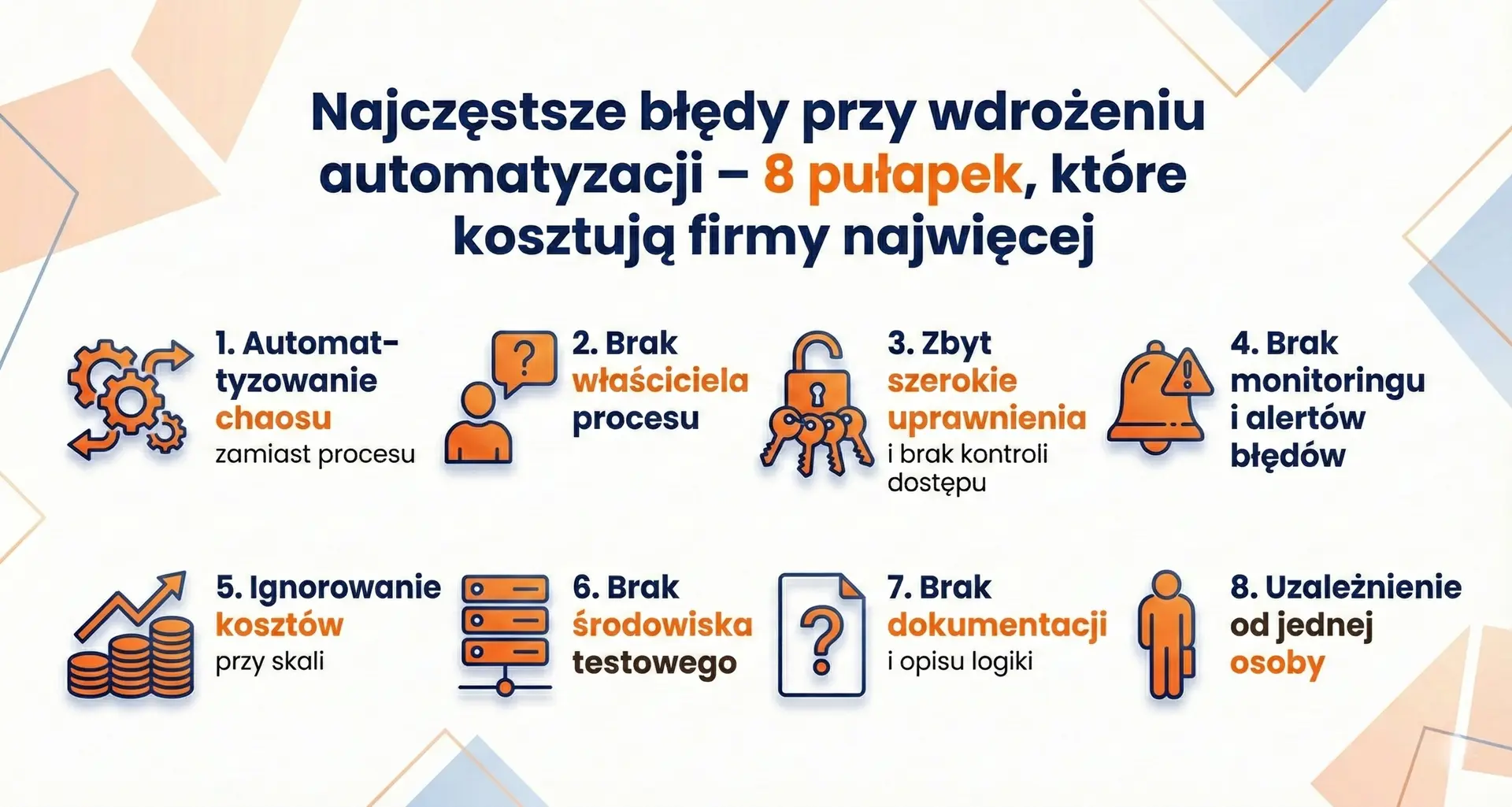
The most common mistakes when implementing automation – 8 traps that cost companies the most
Automating company processes can generate real savings. But if poorly designed, it can generate chaos faster than a human can react. Below are the 8 most common mistakes that occur in SMEs, along with quick tips on how to avoid them.
Frequently asked questions
No. Most tools like Power Automate, Make, Zapier, and n8n operate in a no-code or low-code model, meaning they rely on visually building flows. Programming may be required for more advanced API integrations, but it's not necessary in typical SMB scenarios.
There's no single "best" tool. If your company uses Microsoft 365, Power Automate is often the natural choice.
When it comes to quick integrations between apps, Make or Zapier might be convenient.
If flexibility and control over your environment are important, consider n8n. Your decision should depend on your processes, data volume, and budget.
The cost depends on the billing model and the scale of use. Some tools charge per user, others per task, operation, or workflow execution. In addition to licensing, the cost of implementation, maintenance, and any integration changes must be considered. In practice, TCO can be more important than the monthly subscription fee itself.
Yes, provided it's properly configured. Key elements include data encryption, access control, user roles, audit logs, and awareness of where data is being processed (cloud vs. self-hosted). When working with sensitive data, it's also worth verifying the provider's security policy.
It's best to start with repeatable and measurable processes, such as invoice flow, lead management, recurring reports, payment reminders, and employee onboarding. Quick, visible results help build trust in automation within the team.
No. Automation doesn't replace humans in decision-making – it replaces repetitive, manual tasks. In practice, it allows teams to focus on tasks requiring analysis, customer engagement, and strategic thinking, rather than copying and pasting data between systems.
Process automation in a company isn't a fad or an "IT gadget." It's a tool for streamlining workflows, reducing errors, and scaling a business without commensurately expanding the team. However, it's not the tool itself that matters, but the approach: a structured process, a calculated total cost of ownership (TCO), and awareness of where and how data is processed.
Power Automate, Make, Zapier, and n8n differ in their licensing models, architecture, and flexibility. Each can be a good choice—provided it meets the company's real needs, not just its fleeting online popularity.
If you are wondering which solution will be reasonable in your situation and how to approach it automation without burning through the budget – get in touch. We'd love to help you look at this topic from a business perspective, not just a technological one.