Is it really you need expensive, "corporate" network equipment to ensure your business operates stably and securely? Many entrepreneurs are surprised to discover that this isn't necessarily the case. There's a solution that's been popular for years among small and medium-sized businesses, as well as internet providers—and it doesn't require an enterprise-class budget. This solution is MikroTik.
MikroTik is a brand of routers, switches, and networking software that has earned a reputation as a tool "for those who want more for less." Unlike hardware that "only works out of the box," MikroTik offers flexibility—you can customize your network exactly to your needs. It's a bit like building a set of building blocks: you have complete control over how you build your infrastructure.
In this article we will show you, why MikroTik is a real alternative to commercial network solutions in SMEs. We'll discuss its key features, products, licensing, security, and costs. You'll also learn what RouterOS implementation looks like in practice and when it's worth (or isn't) choosing this platform.
If you are looking for a solution that combines stability, performance and low costs, MikroTik may be exactly what you need.

What is MikroTik and RouterOS?
Why is it so popular among SMEs and operators?
MikroTik is a Latvian manufacturer of network equipment and operating systems RouterOS, which has gained immense popularity among small businesses, internet service providers, and administrators since the late 1990s. The company began with software for PCs acting as routers, and today its devices—from home routers to carrier-grade equipment—are used in over 140 countries.
The secret of MikroTik's popularity is that it combines high functionality with low implementation costIn practice, this means that a single MikroTik router can replace several devices from different manufacturers: it can simultaneously function as a Wi-Fi access point, firewall, network controller, and VPN server. This solution is particularly attractive for companies looking to expand their infrastructure without overpaying for a brand name.
MikroTik has also distinguished itself for years open approach – gives the administrator access to all features without artificially dividing them into expensive licenses. For this reason, RouterOS is sometimes called "Linux for networkers": it offers powerful capabilities if you know how to use them.
The most important elements of RouterOS v7 in practice
RouterOS is the operating system that manages MikroTik devices. The latest line – RouterOS v7 – has brought huge changes and improvements that make it much more business-friendly.
Here are the functions that are really useful in everyday work:
• Advanced firewall and routing – allows you to segment your network, filter traffic, create security rules and set QoS priorities.
• Next-Generation VPN (WireGuard) – a very fast and easy to configure tunnel that has gained the recognition of administrators thanks to its stability and performance.
• ZeroTier Service – enables secure connections between locations without complicated routing, ideal for remote work.
• New BGP and EVPN stack – carrier-grade features that are faster and more stable in version 7, which will be appreciated by larger networks.
• CAPsMAN and Wi-Fi 6 – central management of access points and modern wireless standard in models such as hAP ax3.
• Container Mode – ability to run lightweight applications, e.g. monitoring or DNS server, directly on the router.
RouterOS also provides full access to the console, WinBox interface, and web interface, allowing for both graphical and scripted configuration. This is a huge advantage for companies that want to control every element of their network.
RouterOS v7 – what do you actually gain?
Faster VPNs – thanks to the protocol WireGuard Data tunneling is up to 3–5x more efficient than in old IPsec configurations.
Stable routing between branches – Rebuilt BGP stack provides better traffic management and failover.
Greater security – simplified firewall interface and new tools for logging changes.
Cloud integration – CHR (Cloud Hosted Router) allows you to run RouterOS in environments such as AWS, Azure or Proxmox.
Modern Wi-Fi 6 – real acceleration in offices with a large number of devices.
Where MikroTik fits and where it doesn't
MikroTik is perfect for any situation where you need it flexible and efficient network within a reasonable budget – in offices, retail outlets, schools, service companies, and warehouses. Thanks to its rich functionality, you can create a complete infrastructure: from the main router to the Wi-Fi controller and VPN connections between branches.
However, it's not a "one size fits all" solution. RouterOS requires the administrator to have some understanding of networking, VLAN, and firewall rules. It may be too technical for those who just want a "click and go" solution. But if you have an IT partner or support team, MikroTik offers tremendous capabilities at a fraction of the cost of enterprise solutions.
To sum up: MikroTik is not just a cheap router. It's complete network platform, which combines flexibility, security, and advanced features in a form accessible to small and medium-sized businesses. Understanding how RouterOS works is the first step to building a stable and scalable network.
MikroTik Products: A Quick Map for the Decision Maker
MikroTik's offer is wide, but most of small and medium-sized companies only needs a few types of devices. The key is to choose equipment that's appropriate for the size of your office, the number of users, and your internet connection type.
Most frequently chosen by SMEs
• hAP ax³ – office router with Wifi 6 and a 2.5G port. Ideal for companies of up to 40-50 people. It provides high-speed internet, a VPN tunnel, and full network control in a single device.
• L009 – cheaper cable model (no Wi-Fi), great as a router in a small office or warehouse.
• CRS326/CRS310 – managed switches with support VLAN and SFP+ ports if your company needs network segmentation.
• Chateau LTE12 / 5G – a router with a built-in mobile modem. It works well as a backup connection or as internet access in temporary locations.
• CHR (Cloud Hosted Router) – RouterOS running in the cloud, e.g. as a central VPN point connecting several branches.
For most SME companies…
Enough one hAP ax³ router and possibly simple CRS switchto build a complete network with Wi-Fi 6, VPN, and traffic segregation. CCR series models or large switches are only needed for extensive infrastructures or operating on a 1-10 Gb/s connection.
| Family | Sample models | Application | Advantages for SMEs |
|---|---|---|---|
| hAP | hAP ax³ | Office, Wi-Fi 6, VPN | High performance, simplicity |
| L009 | L009UiGS | Wired router | Low price, stability |
| CRS | CRS326 | Small business network | VLAN, fast ports |
| Chateau | LTE12 / 5G | Internet backup | Remote work, mobility |
| CHR | p1/p10 | Virtual router | Merging branches, tests |
Functionality in practice: what does business gain?
The biggest strength of MikroTik is that one device can replace several others – a router, firewall, VPN server, and Wi-Fi controller. This allows SMEs to benefit not only from a simpler infrastructure but also from real savings and greater control over their network.
What does RouterOS actually bring to the company?
• Secure Remote Access (VPN) – protocol WireGuard allows employees to connect from the office and from home without losing speed.
• Network segmentation (VLAN) – separates, for example, the accounting department from the guest Wi-Fi, making data more secure and traffic more orderly.
• Firewall and filtering – blocks unauthorized traffic, protects against viruses and external attacks.
• Wi-Fi management (CAPsMAN) – allows you to control all access points from one place, without having to log in to each one separately.
• Monitoring and configuration backups – automatic reports, logs and backups make it easier to keep your network in check.
In practice, this means fewer outages, greater performance, and complete visibility into what's happening on the network. Even in a small office, the difference in stability and security is noticeable after just a few days of operation.
If you want to build a network that operates stably without daily firefighting, we will help you select and configure the right MikroTik kit for your company.
Applications in SMEs: ready-made scenarios
MikroTik excels in everyday business environments—where stability, security, and ease of use are key. Here are a few examples of applications that SME owners often encounter.
1. Service office with hybrid work
An accounting firm with 20 employees needed a secure remote connection. Using a router hAP ax³ WireGuard VPN allowed for quick server logins from home without sacrificing speed. The result? Stable operation and no need to use external cloud services to transfer client data.
2. Retail store with Wi-Fi for customers
The store owner wanted to provide Wi-Fi to customers, but without the risk of accessing payment terminals and the cash register system. MikroTik router + VLAN allowed for a separate network for clients, while the firewall blocked connections between zones. A simple yet effective solution.
3. Small manufacturing company
Machine controllers and ERP computers were working in the hall. After the router was implemented L009 with backup LTE and switch link CRS326, the company has gained resistance to internet failures and network order – the production department and the office operate independently, but with secure access to shared resources.
4. Field office with connection to headquarters
A team of mobile technicians connects to the company server via VPN MikroTik CHR in the cloud. This means that no matter where they are – in the field, in the office, or at home – everything works through one secure channel.
In each of these scenarios, MikroTik has helped companies organize the network, increase security and reduce costs, without the need to invest in expensive corporate systems.

MikroTik Costs and Licensing
How much does it cost to get into MikroTik in practice?
Here are the approximate prices of devices and licenses – in Poland and in euro, assuming an exchange rate of ~4.5 PLN/€ for rough valuation (Prices valid as of October 2025 – you can find the current prices at manufacturer's website):
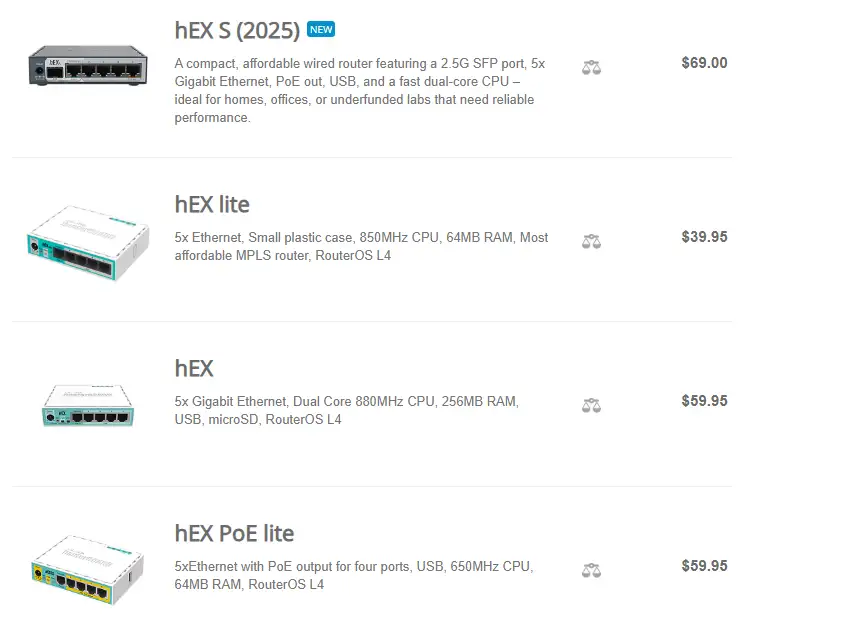
• MikroTik hAP lite – the cheapest model ("budget") approx. 95 PLN.
• MikroTik RB951Ui‑2HnD – wired router/small office, approx. 242 PLN.
• MikroTik hEX PoE – solid router with PoE, approx. 309 PLN.
• MikroTik RB4011IGS+RM – more powerful model, approx. 798 PLN.
• In the case of the model MikroTik CCR2004‑1G‑12S+2XS (upper class) prices are already ~2,099 PLN.
• Example from a specific store: the MikroTik hAP ax³ model costs approx. 515 PLN including VAT in Poland.
These prices show that investing in this solution doesn't have to break the bank – even good models start at just a few hundred zlotys. Of course, the higher the requirements (more users, VPN, multiple branches), the higher the hardware and, potentially, support costs.
RouterOS Licensing – What You Need to Know
• MikroTik physical devices have a built-in RouterOS license (e.g. Level 4, Level 5, Level 6) – you don't always pay for it separately.
• Example: model L009UiGS-RM suggested price ~$119 (≈ ~450 PLN) in the specification. mikrotik.com+1
• Virtual version: CHR (Cloud Hosted Router)Licenses: free (trial), p1, p10, p-unlimited – depending on bandwidth and feature needs.
• When choosing for SMEs, a lower license level is usually sufficient – the savings are real.
Performance and equipment selection
When choosing a router, it's not about the number of features, but about whether it will support your networkPerformance depends mainly on three elements: CPU power, port speeds, and VPN/firewall load.
How to choose a router for your company size
• Up to 20 users - enough hAP ax³ or L009that will support Wi-Fi 6, VLANs and VPNs without any speed drops.
• Up to 50–80 users – it's worth considering RB4011 or CCR2004, if the company uses multiple VPN tunnels or servers.
• Over 100 users – only then are more powerful models from the series needed CCR (e.g. 2116), usually in headquarters or server rooms.
What to remember when selecting equipment?
• Wifi 6 (e.g. in hAP ax³) really increases efficiency in offices with a large number of laptops and smartphones.
• 2.5G port useful if you have a high-speed fiber optic connection or NAS on your local network.
• CPU matters with VPN – the more employees work remotely, the more powerful the router processor is needed.
• Switch CRS It's worth adding when your network grows - it reduces the load on the router and improves cable organization.
In practice, most SMEs operate seamlessly with a single hAP ax³ router. Only as the network grows should it be worth adding additional devices. This solution offers flexibility – you can start with a simple setup and expand it later without replacing any hardware.
Corporate Network Security: How to Stay Resilient in 2026
Security in corporate networks today is not a one-time configuration, but continuous process of maintaining immunityMikroTik provides tools that help small and medium-sized businesses protect their data without the need to invest in expensive enterprise-class systems.
1. Configuration and access rules
The most common threats result from incorrect settings.
• Block access to the administration panel from the Internet – use it for management VPN or trusted addresses.
• Use strong passwords and SSH keys, preferably with login restrictions for administrators only.
• Turn on address-list firewallto control traffic between networks (e.g. office, guests, IoT).
2. Regular updates and backups
RouterOS is evolving rapidly – new versions bring security and stability improvements. It's worth updating it quarterly:
• update the system to the latest stable version,
• perform configuration backup, preferably automatic and saved in a safe place,
• check logs for unusual login attempts or errors.
3. VPN as a secure entry point into the company
Instead of sharing ports or servers externally, it is better to provide employees with access via WireGuard VPN or IPsec.
This tunnel encrypts traffic, preventing customer data and documents from leaking onto the public network. WireGuard is lightweight, stable, and works even with poor connections – which is why it's increasingly replacing older solutions.
If you want to make sure your MikroTik configuration is truly secure, we can audit your settings and propose a plan to strengthen your protection.
An alternative to MikroTik – OPNsense
If you are wondering, How does MikroTik compare to other solutions?, we have prepared a separate comparison with a popular alternative – OPNsenseThere you will find specific differences, advantages, and application scenarios for both systems.
OPNsense vs MikroTik
Frequently asked questions
Yes, provided it's configured correctly. Regular RouterOS updates, strong passwords, limited remote access, and a VPN provide a level of security sufficient for most SMBs.
No. Most MikroTik devices come with a built-in license included in the hardware price. Fees only apply to the virtual CHR (Cloud Hosted Router) version, but they are one-time charges based on bandwidth.
Yes, that's the perfect range. Model hAP ax³ with Wi-Fi 6 and VPN, WireGuard will easily handle a network of this size, ensuring stability and performance.
It doesn't have to be. For basic settings, the WinBox graphical interface or a browser will suffice. However, more advanced functions (e.g., VLAN, VPN) should be entrusted to an IT specialist – this will allow the router to utilize its full capabilities.
Most often: a central office router with Wi-Fi 6, secure VPN access for remote work, network segmentation into departments, backup LTE/5G connection and real-time network monitoring.
RouterOS allows you to restore a configuration backup. If no backup exists, the device can be easily reset to its default settings. We can also assist with full configuration recovery if necessary.
MikroTik is a solution that perfectly combines business-class functionality at a price affordable for small and medium-sized businessesIt provides flexible configuration, security, and operational stability, while not requiring large investments in hardware or licenses.
For business owners who want greater control over their network and independence from limited off-the-shelf solutions, MikroTik offers a viable alternative. It's hardware that grows with your business—you can start with a single router and then add additional components without replacing the entire system. infrastructure.
If this topic concerns your company – contact usWe'll help you select the right equipment, configure it securely, and prepare your network for years to come.