
Introduction
Many companies believe that because backups run daily and the report shows a "success" status, their data is safe. The problem is that during a modern ransomware attack, cybercriminals often attempt to delete or encrypt backups first. In practice, this means a company may have a backup and still be unable to recover the data.
Immutable cloud backup was created to mitigate this risk. This solution blocks the ability to delete or modify backups for a specified period of time. Even if an attacker takes over an administrative account or accesses the backup environment, the last secure copy of the data can still be accessible.
This is where Azure Blob Storage, Amazon S3, and Google Cloud Storage come in. Major cloud providers now offer immutable storage mechanisms that help build backups resistant to ransomware, administrator errors, and accidental data deletion.
In this article we show:
- • how does immutable backup differ from regular backup,
- • why cloud synchronization alone is not enough,
- • how WORM and retention mechanisms work,
- • what to pay attention to when configuring,
- • and how companies are using Azure, Amazon S3 and Google Cloud to protect data from ransomware.
Why might a simple backup not be enough against ransomware?
For years, the fundamental question was: Does the company have a backup? Today, that's not enough. A more relevant question is: Is the backup isolated, erasure-proof, recoverable, and regularly tested? This makes a big difference, as many environments have backups that technically exist, but are exposed to the same risks as production data.
The simplest example is a backup stored on a local NAS connected to a domain, accessible by an administrator account, and visible on the corporate network. If an attacker takes over a high-privilege account, they can not only encrypt files on the server but also delete or corrupt copies. A similar problem can occur with a backup repository on a USB drive, an SMB share, or a poorly secured cloud resource.
The second problem is overwriting healthy copies with encrypted data. If an organization has a short retention period and doesn't immediately notice an incident, the backup system might continue to back up already encrypted files for several days. After some time, it turns out that the last healthy version of the data has disappeared from the schedule or falls outside the retention period.
The third problem is the lack of account separation. In practice, a single administrative account often has access to servers, the backup system, the repository, the cloud console, and management tools. This is convenient, but dangerous. With ransomware, the administrator's convenience can become the attacker's.
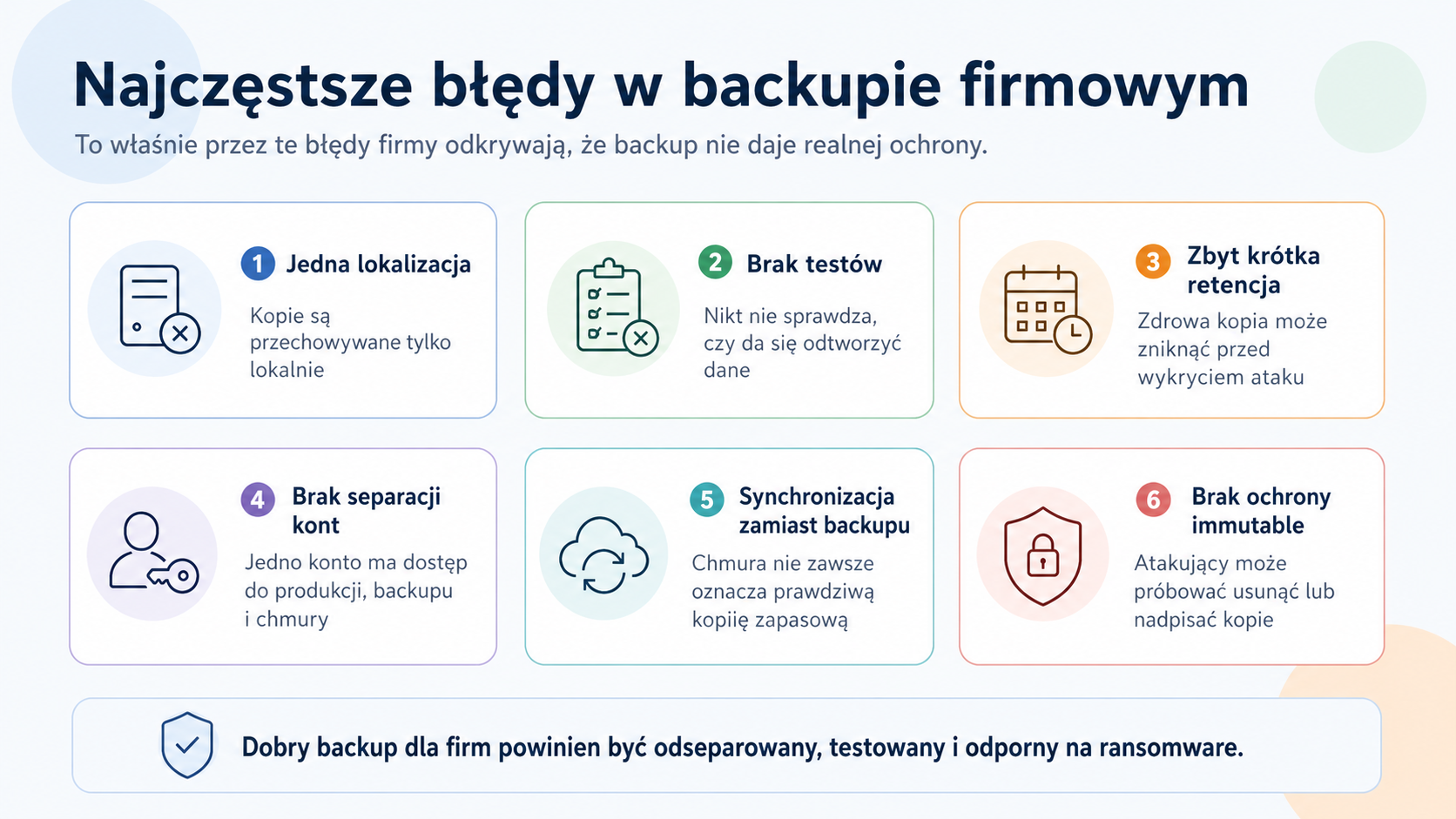
- • the backup is located on the same network as the production data
- • the backup repository is accessible from the compromised administrator account
- • retention is too short to return to the pre-attack state
- • the copies are not tested, so the company does not know if they can be reproduced
- • synchronization to the cloud is confused with real backup
- • there are no alerts about copy deletion, job errors or unusual data growth
The biggest mistake isn't the lack of backup itself, but a false sense of security. A company can have a daily backup report and yet have no real protection against an attack. Therefore, immutable backup should be considered a response to a specific risk: an attempt to delete or overwrite backups. This is why a corporate backup audit often begins with a question about whether the backup is resistant to ransomware, not just whether the backup job is successful.
What is immutable backup?
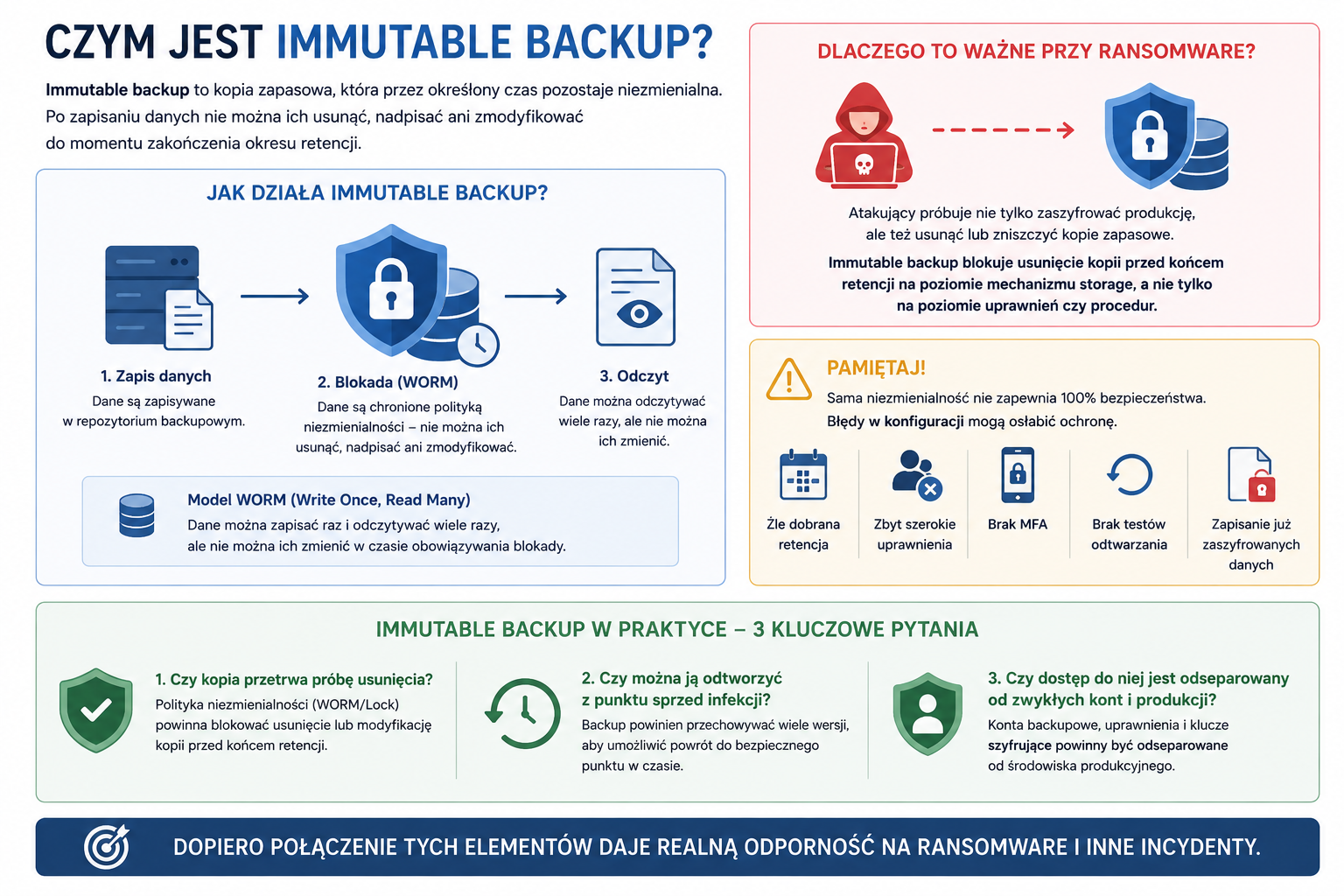
An immutable backup is a backup that remains unchanged for a specified period. This means that once the data is saved, it cannot be deleted, overwritten, or modified until the retention period expires. The most common model used here is the WORM (Write Once, Read Many) model – data can be written once and read many times, but cannot be changed during the retention period.
This is crucial in the case of ransomware, as the attacker typically attempts not only to encrypt production but also to deprive the company of the ability to restore data. If a backup copy is protected by an immutability policy, deletion before the retention period expires should be blocked at the storage mechanism level, not just at the administrator's discretion.
It's worth being clear, however: immutable backup doesn't automatically mean your configuration is secure. If you choose the wrong retention, provide too broad permissions, don't enable MFA, don't test recovery, or save already encrypted data to the cloud, immutability alone won't solve all problems. It's a strong layer of protection, but it's still part of a larger strategy.
In practice, an immutable backup should answer three questions: First, will the copy survive a deletion attempt? Second, can it be restored to a point before the infection? Third, is access to it separated from regular administrative accounts and the production environment? Only the combination of these elements provides true resilience.
Cloud backup and synchronization – an important difference
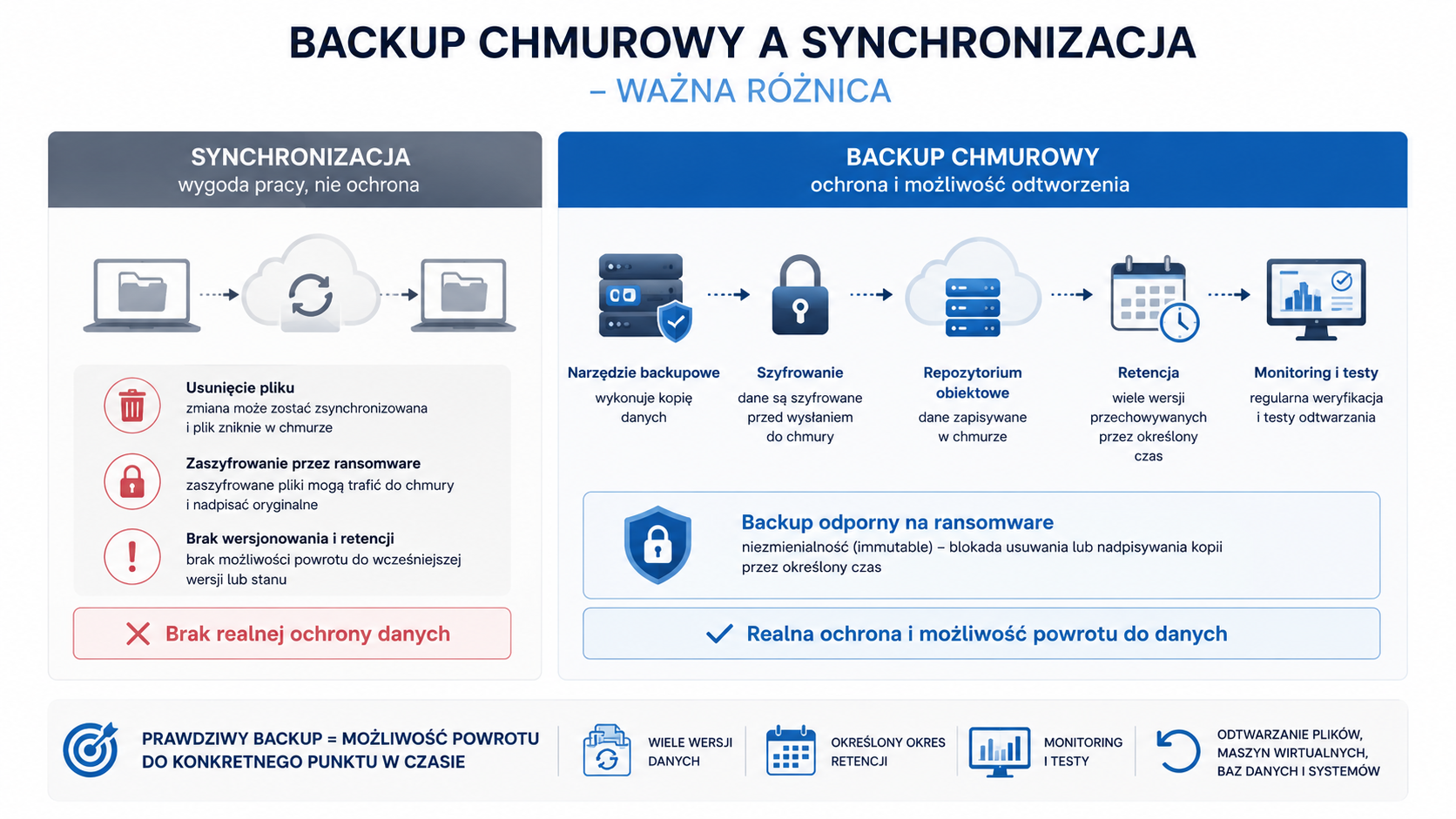
Many companies claim to have cloud backups, but upon closer inspection, it turns out they're just file synchronization. They're not the same thing. Synchronization is used to conveniently work with up-to-date data. If a user deletes a file, the change can be synchronized. If ransomware encrypts documents, the encrypted versions can be sent to the cloud. Without versioning, retention, and recovery procedures, a company may be left with a problem despite having an "online copy.".
A true backup should allow for point-in-time recovery. It should store multiple versions, have a defined retention period, be monitored, and tested. A ransomware-resistant solution also includes an element of immutability, meaning the backup cannot be deleted or overwritten for a specified period.
Therefore, cloud backup shouldn't be designed as a simple "throw data into the cloud." It's better to think of it as a controlled process: the backup tool makes a copy, encrypts the data, saves it to an object repository, applies retention, and the administrator regularly checks whether files, virtual machines, databases, or entire systems can be restored.
Azure Blob, Amazon S3 and Google Cloud Storage - what do they have in common?
Azure Blob Storage, Amazon S3, and Google Cloud Storage are popular object storage services. In the context of backup, this means that data is saved as objects in the cloud, rather than as traditional files on a network share. This approach is well-suited for storing large numbers of copies, long-term retention, off-site storage, and integration with modern backup systems.
Most importantly, each of these providers offers mechanisms to help enforce data retention and immutability. Microsoft has Immutable Blob Storage for Azure Blob Storage, Amazon offers S3 Object Lock, and Google Cloud Storage offers Bucket Lock and Object Retention Lock. The names and technical details vary, but the goal is similar: to restrict the deletion or modification of objects for a defined period of time.
It's also important to remember that a storage service alone doesn't replace backup software. Azure Blob, S3, or Google Cloud Storage are where data is stored. A separate tool, such as Veeam, Nakivo, Commvault, Acronis, NAS solutions, or other systems supporting object repositories, is responsible for the backup logic. This tool decides what to copy, when, how long to retain, how to encrypt, and how to restore.
S
Comparison of immutable mechanisms in the largest clouds
Platform | Mechanism | What protects | What to watch out for |
Azure Blob Storage | Immutable Blob Storage, WORM policies, time retention, legal hold | Protects blob data from modification and deletion within a specified retention period. | It's worth planning some settings at the account or container creation stage. Permissions and retention should be monitored. |
Amazon S3 | S3 Object Lock, Governance Mode, Compliance Mode, retention period, legal hold | Protects object versions from being overwritten or deleted. In Compliance Mode, protection is very restrictive. | Object Lock requires versioning. Compliance mode can be difficult to undo, so retention must be chosen carefully. |
Google Cloud Storage | Bucket Lock, Object Retention Lock, retention policy | Allows you to force objects to be stored for a specific period of time at the bucket or object level. | Locked-in retention policies can be permanent. Be careful about costs and incorrect retention periods. |
The table highlights the key conceptual differences. In practical implementation, compatibility with the specific backup tool, cloud region, retention requirements, storage costs, and recovery procedure must also be verified.
How does immutable backup help after a ransomware attack?
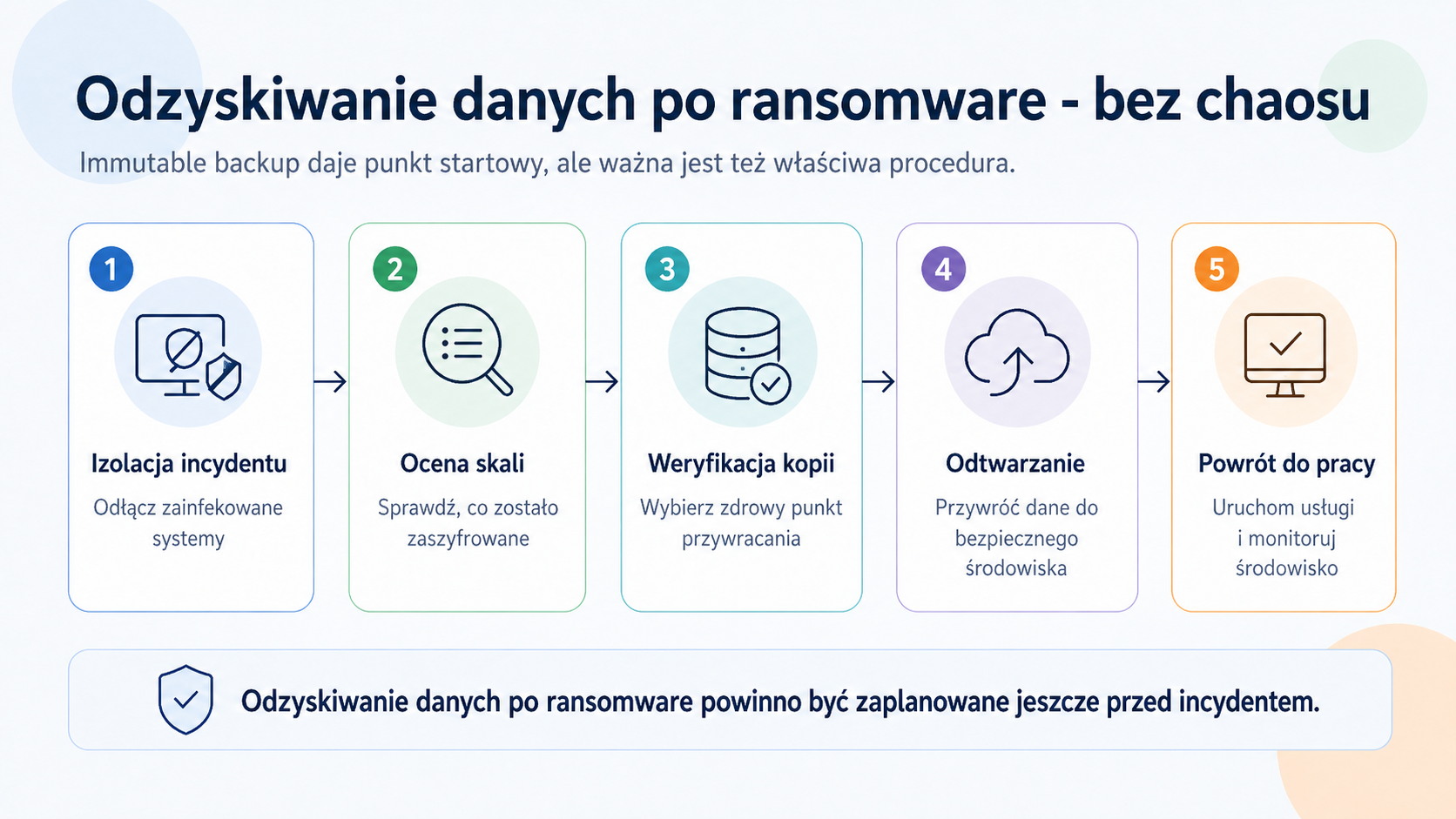
Imagine a company where ransomware has encrypted a file server and some virtual machines. Employees lose access to documents, their accounting software stops working, and a ransom note appears on their desktops. The key question at this point is: is there a healthy copy of the data from before the attack, and can it be restored?
If the backup was stored only locally and was accessible from a compromised account, the attacker may have previously deleted the restore points. If the company only had file synchronization, encrypted versions may already be present in the cloud. If retention was too short, a healthy backup from several days ago may have been overwritten.
In the immutable model, a portion of the backup is placed in a repository that prevents objects from being deleted or modified before the retention period expires. This doesn't automatically restore the company to operations, but it does provide administrators with a crucial resource: a baseline from which to begin recovery. Instead of negotiating with the perpetrators, the company can focus on isolating the incident, cleaning up the environment, and restoring services in a controlled manner.
Of course, restoring data after ransomware still requires a procedure. Data should not be recklessly restored to an infected environment. First, determine the scope of the attack, shut down the infected systems, change credentials, verify backups, verify the restore point, and only then restart services. Immutable backups provide a means of recovery, but they do not replace a disaster recovery plan.
What to watch out for when configuring immutable backup?
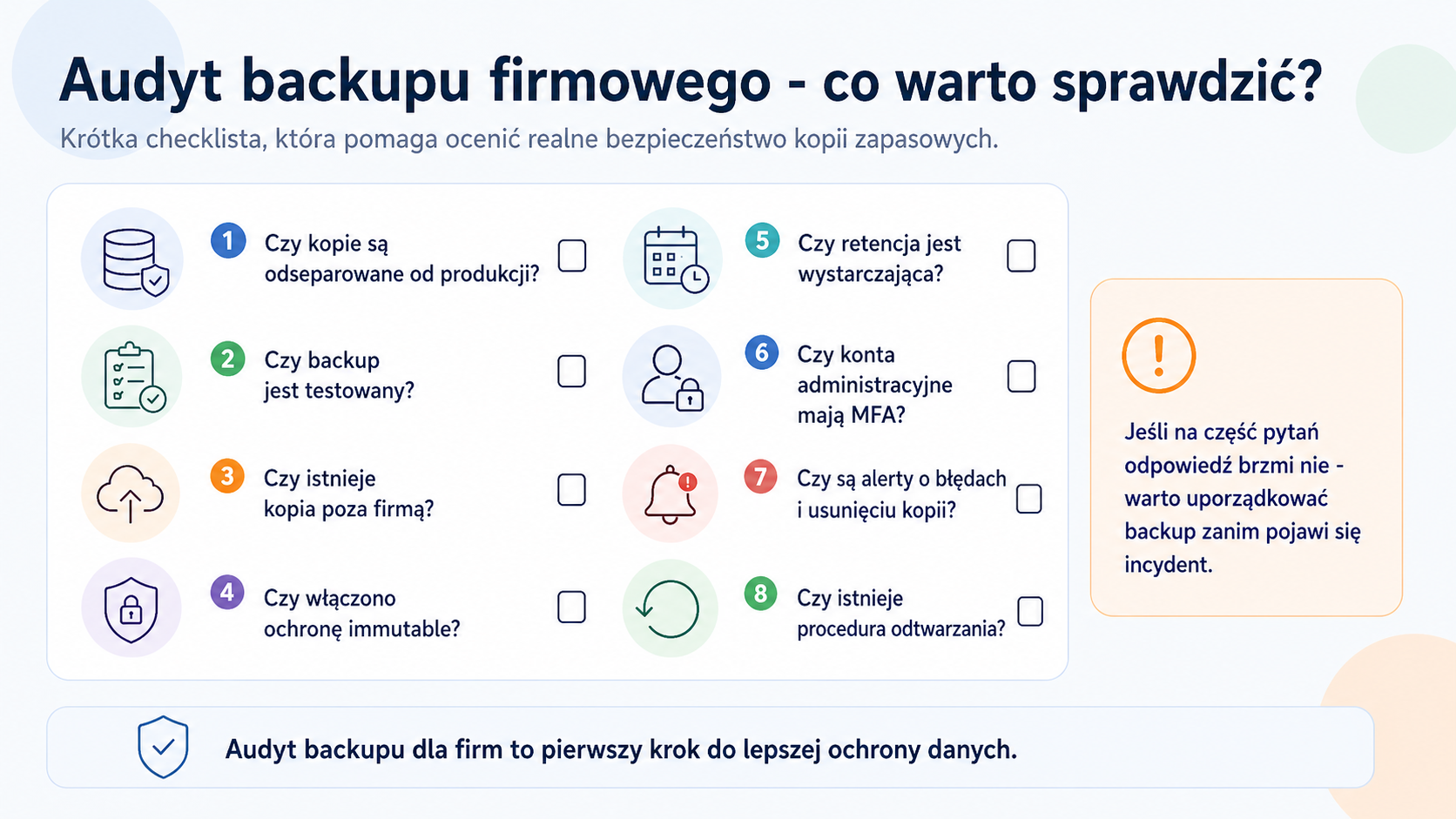
The biggest risk when implementing immutable backup is treating it as a single switch in a dashboard. In reality, proper implementation requires consideration of retention, permissions, costs, encryption, alerts, and the recovery process. A design error can result in a backup that is either underprotected or locked down for too long and too expensive to maintain.
The first element is retention. Too short a retention period may be insufficient if an attack is detected after a few or more days. Too long a retention period can unnecessarily increase costs and complicate management. Therefore, it's worth establishing separate policies for different data: different ones for critical databases, different ones for user files, and different ones for long-term archives.
The second element is permissions. The account performing the backup should not have full administrative rights to the entire cloud. Access should be limited to what's necessary, secured with MFA, and separated from standard accounts used for daily administration. It's also worth separating roles: who can create the repository, who can change retention, who can restore data, and who only monitors status.
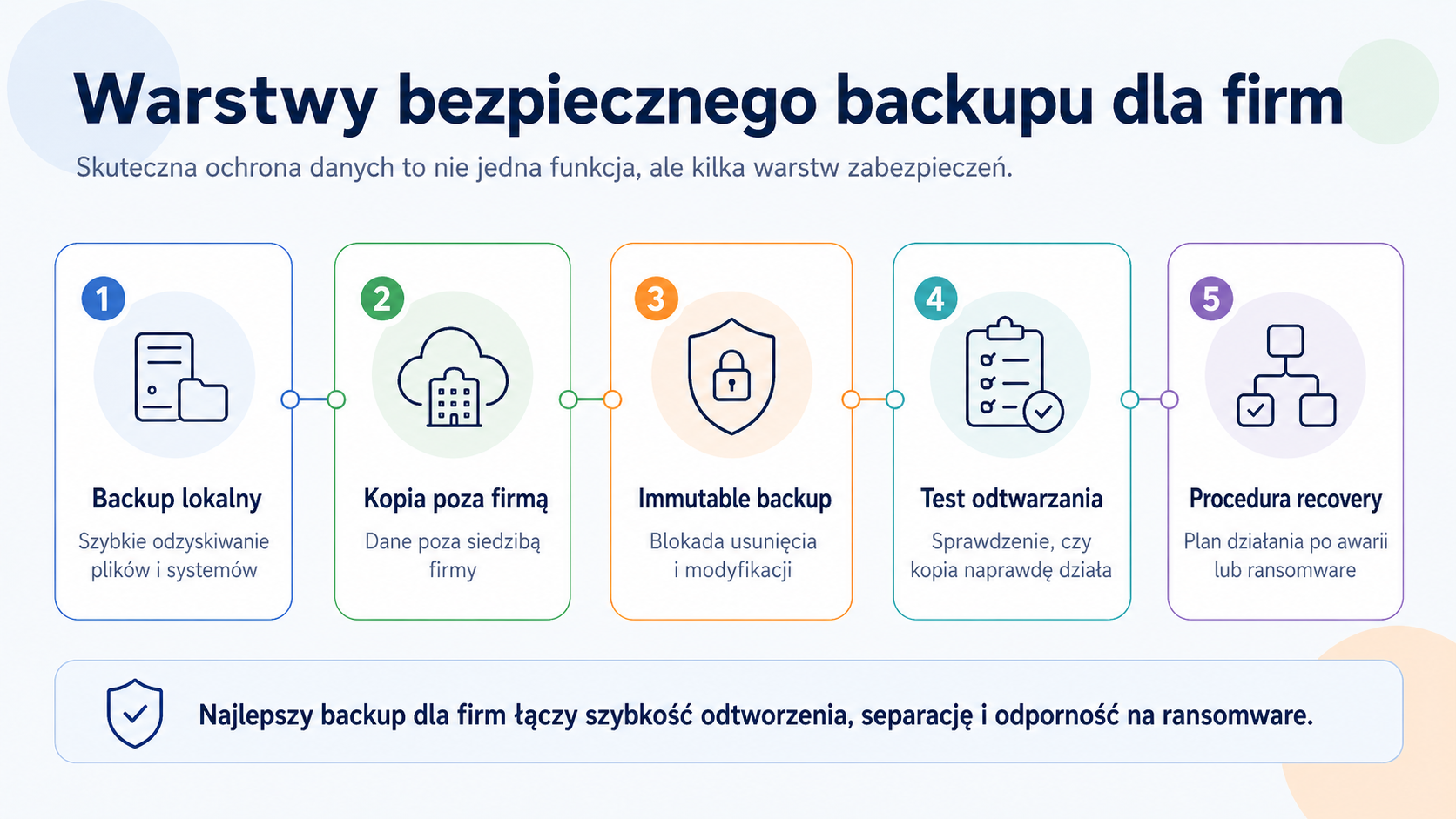
No. Immutable backup doesn't replace the 3-2-1 rule; it only reinforces it. The classic rule calls for maintaining multiple copies of data, on different media or in different locations, with one copy kept off-site. Modern approaches increasingly often add an additional element: one copy should be immutable or offline, meaning it should be resistant to deletion and overwriting.
That's why you might encounter the extension 3-2-1-1-0. In simple terms, it means: three copies of data, two different media types or locations, one off-site copy, one immutable or offline copy, and zero errors in recovery tests. This last point is especially important, because simply having a copy isn't enough if recovery errors occur.
In practice, a company might have a local copy for fast recovery of individual files or machines, a second copy on another device or repository, and an immutable cloud copy as a worst-case scenario. This arrangement allows for a combination of recovery speed and resilience to local failures and ransomware.
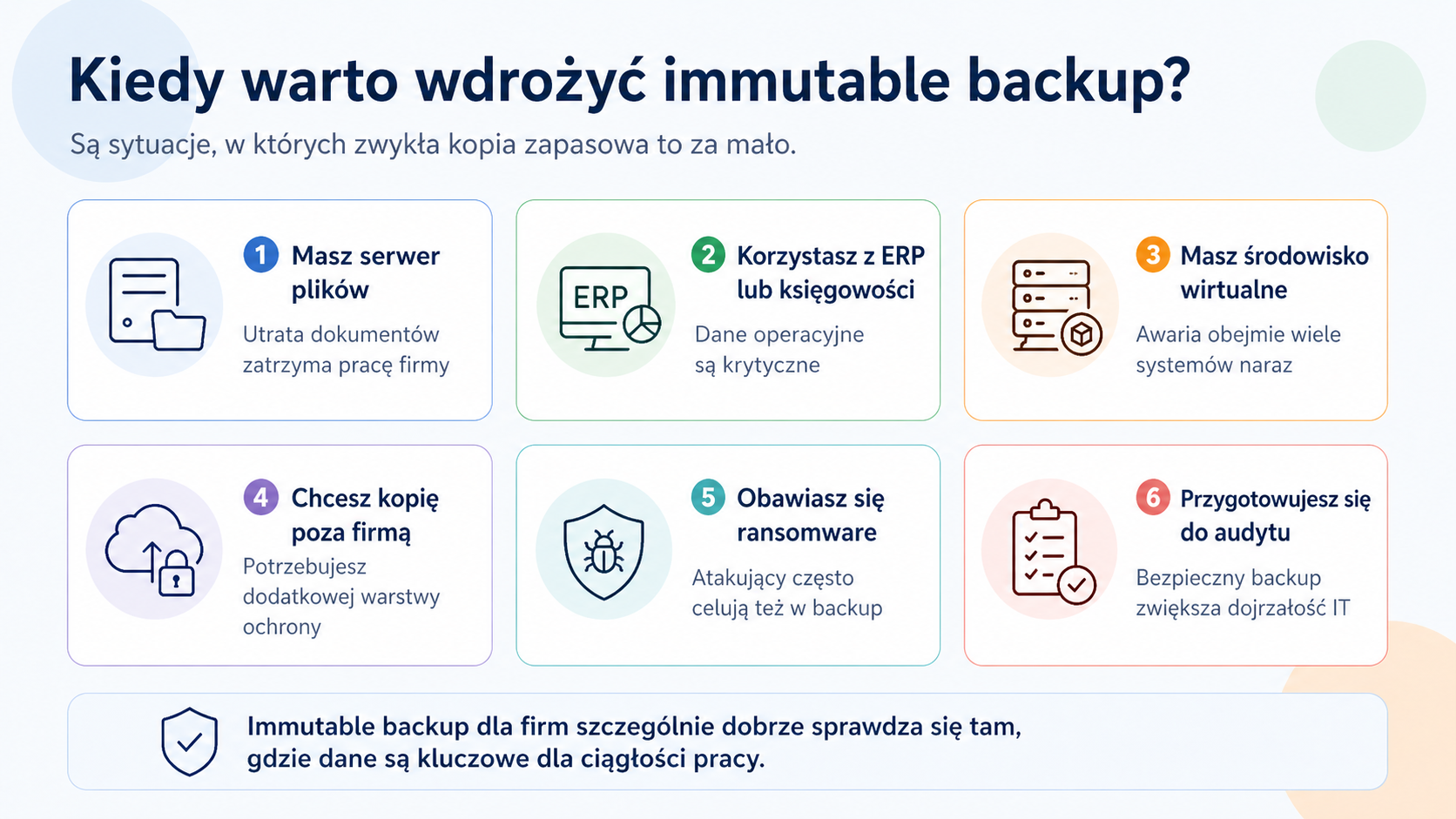
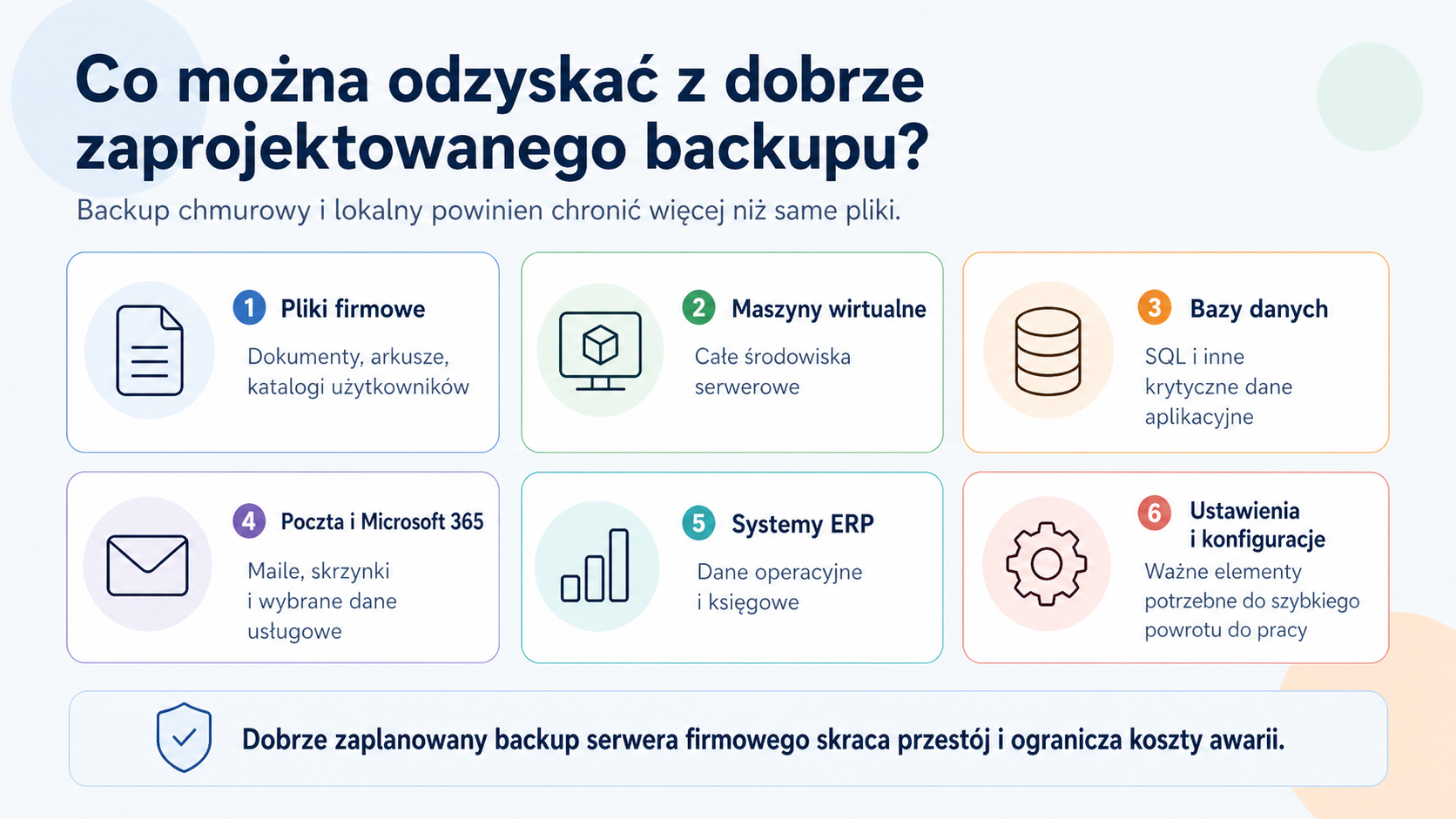
Cloud backup with unchangeable data makes sense especially where data is critical to company operations. This isn't limited to large organizations. A small business that loses access to documents, accounting software, customer databases, orders, projects, or an ERP system can also experience significant downtime and real costs.
This solution is particularly worth considering for companies that use local servers, virtual environments, production systems, SQL databases, design files, accounting documentation, HR data, or large network shares. The more a company depends on data continuity, the more important a deletion-resistant backup becomes.
Object cloud backup also works well as an off-site layer. If a fire, flood, equipment theft, server failure, or NAS issue occurs in the office, a local copy alone may not be enough. The cloud allows for off-site data storage, and immutable mechanisms provide additional protection against intentional or accidental deletion.
- • accounting offices and law firms storing client documents
- • manufacturing companies using ERP systems, technological files and databases
- • logistics companies dependent on the continuity of operational systems and shipping documents
- • online stores and e-commerce companies with order databases and integrations
- • software houses and design offices working on repositories and design files
- • companies with local file servers, Hyper-V, VMware or NAS environments
- • organizations that already use Veeam, Synology, QNAP or another backup tool
- • companies that want to organize their backup policy before auditing, cyber insurance or implementing security procedures
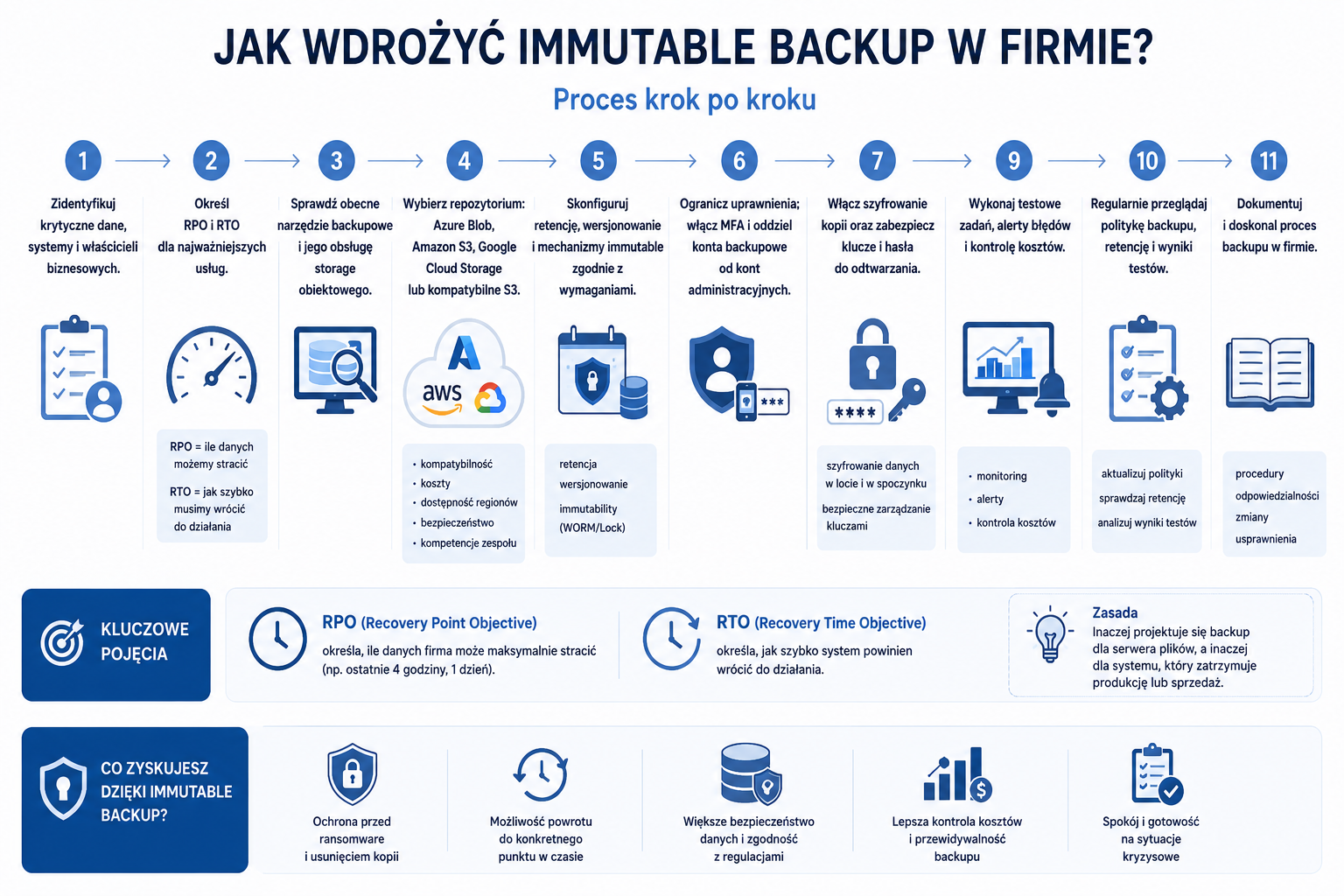
A good implementation should begin with an audit, not with purchasing cloud storage space. First, determine what data is critical, where it resides, who is responsible for it, how quickly it must be restored after a failure, and how much data loss the company is willing to accept. Only then can a backup tool, repository, and retention policy be selected.
Imagine a service company employing several dozen people. Data was stored on a file server and several virtual machines. Backups were performed daily to a local repository, and once a week, some data was copied to a NAS. For a long time, everything seemed fine. Reports arrived via email, and recovery tests were limited to the occasional recovery of a single file.
The problem arose after a ransomware infection. The attackers gained access to a high-privilege account and deleted some restore points before activating the encryption. The local NAS was also accessible from the network, so some backups were corrupted. The company had a backup, but it didn't have a separate, unalterable copy that could serve as a safe recovery point.
After the environment was cleaned up, an additional copy was deployed to the object repository with immutable retention, administrative accounts were separated, permissions were limited, MFA was enabled, and a recovery procedure was established. The biggest change wasn't "backup moving to the cloud." The key was that the company began treating backup as a component of incident resilience, not just a technical task performed overnight.