Buying a computer for your business is rarely a simple decision. On the one hand, you want the hardware to be fast and reliable, but on the other, there's no point in overpaying for features that no one will use in their daily work. Adding to this are conflicting advice, marketing descriptions, and "ideal configurations" that often bear little resemblance to the realities of working in a company.
Many entrepreneurs ask themselves the same question: what computer to choose for your business, so that it serves you well for several years, doesn't generate any problems, and is a sound financial decision. Is it better to choose a desktop computer, a mini PC, or perhaps a laptop? Which components actually impact work comfort, and which are just specs additions?
In this article, we'll take a practical look at the topic. No shortcuts or "magic" configurations. We'll explain step by step, what computer will work best for your company, depending on your budget, type of work and expectations, providing specific examples, estimated costs, and honest recommendations. This will quickly help you assess what truly makes sense for your business—and why.
How to choose a computer for your company depending on your position and actual needs
Choosing a computer for your business is rarely just a technical decision. In practice, it's combination of the type of work, user expectations and budget, that you have. So instead of looking for one "perfect configuration," it's much better to start by understanding, what positions exist in your company and what actually works in them.
It is this stage that most often determines whether the computer will be a work tool or a source of everyday problems.
Different positions – different equipment needs
A computer used primarily for email, documents, and videoconferencing has completely different requirements than an accounting, sales, or technical position. In the office, smooth operation with multiple open applications is crucial; in accounting, stability and fast data processing are key; and in sales, the power reserves needed to simultaneously manage multiple systems.
IT, analytical, and graphics workstations, on the other hand, are in a different league altogether – their equipment must handle heavy workloads and often operates intensively for many hours a day. Attempting to "average" these demands with a single setup rarely ends well.
What in practice has the greatest impact on work comfort?
Although technical specifications may seem complicated, in corporate use, several elements are almost always repeated:
• RAM memory – its deficiency causes slowdowns the fastest, especially when working on ERP systems or with multiple tabs in the browser,
• fast SSD drive – affects the startup of the system, programs and work with files,
• stable business-class processor – predictability is more important than marketing „turbo”.
These are the elements that should be treated as a starting point, not specific models or "magic configurations".
Minimum, recommendations and reserve for the future
In every company, there are three levels of approach to equipment:
• technical minimum, which allows you to work here and now,
• recommended configuration, providing comfort and stability for several years,
• power reserve, needed for more demanding positions or intensive use.
Not every company needs to invest in the highest-end solution right away. On the other hand, cutting costs too far often results in the need for rapid hardware replacement or ongoing problems in daily operations.
Why is there no single „golden” company kit?
Because every company works differently. The sensible choice will be different for a five-person service office, a different one for a trading company, and yet another for an organization where part of the team works mobile or technically. Equally important as the components themselves are the budget, the planned lifespan of the equipment, and whether the computers will be easy to service and upgrade later.
Therefore, instead of copying ready-made configurations from the Internet, it is much better adapt the equipment to the real needs of a specific company. In practice, this often means several computer standards instead of a single universal solution.
If you want, we can go through this process together – analyzing roles, workflows, and budgets, and then proposing solutions that actually make business sense.
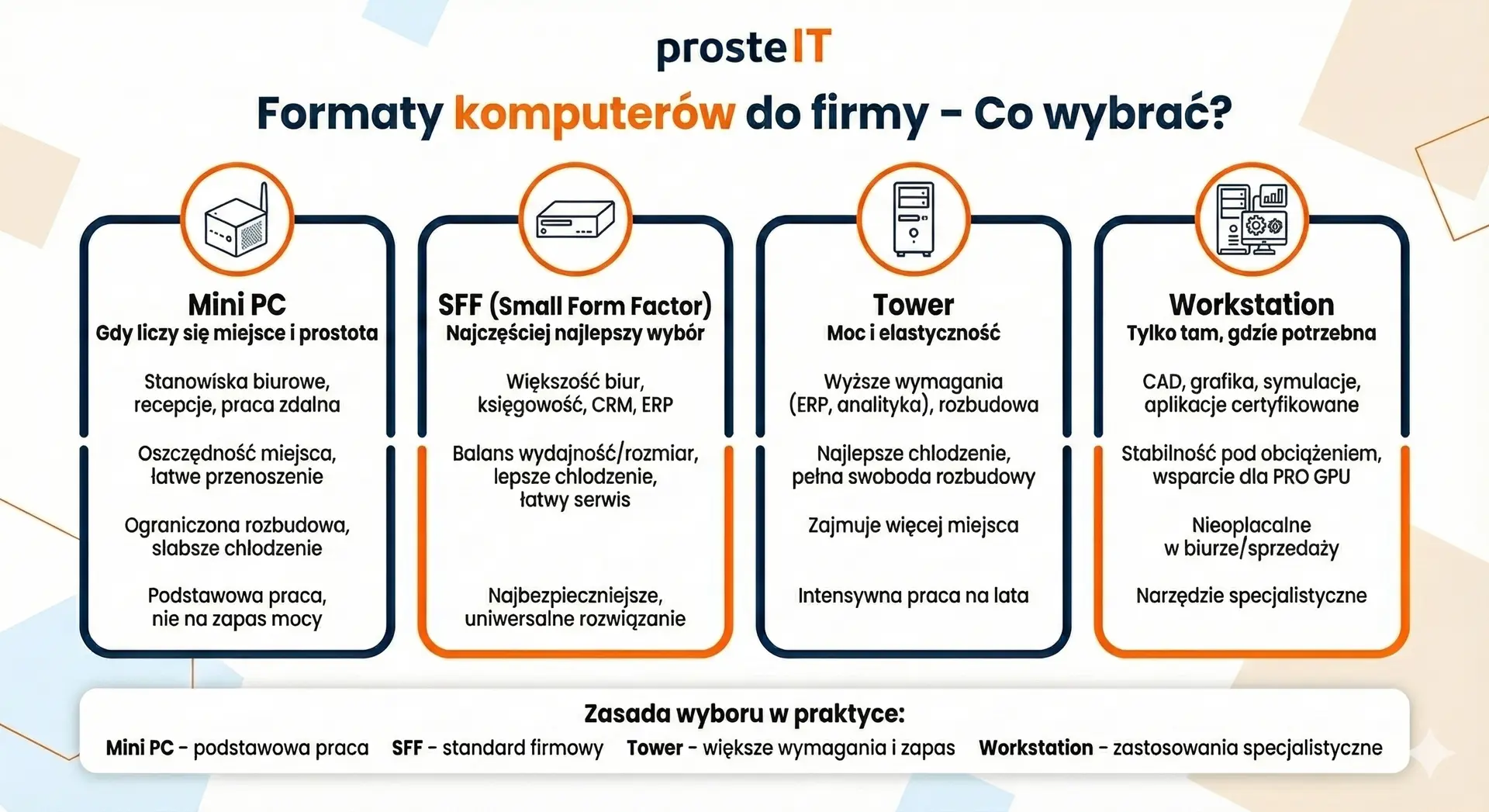
Business computer formats – mini PC, SFF, tower, and workstation. What to choose and when?
Once you know, what positions do you have in the company, the next step is choosing the computer format. And it's not a matter of aesthetics or fashion. The format directly affects performance, expandability, work culture and service costs in the following years.
Below you will find specific applications, not generalities.
Mini PC – when space and simplicity matter
When it makes sense:
• office and administrative positions,
• reception desks, service points, call center,
• offices with limited space,
• remote or hybrid work (easy transfer).
What to watch out for:
• limited expansion (often only RAM and disk),
• weaker cooling under long load,
• not every model is suitable for ERP or multitasking.
Practical conclusion:
Mini PC will work well wherever a computer is to be a tool for basic work, not a machine "for spare power".
SFF (Small Form Factor) – most often the best choice for a company
When it makes sense:
• most office and accounting positions,
• trade, sales, CRM, ERP,
• companies that want consistent and easy-to-service equipment.
Why companies choose SFF:
• good balance between performance and size,
• better cooling than in a mini PC,
• possibility of expanding RAM and disks,
• easier and cheaper service.
Practical conclusion:
If you don't know, what format to choose for your company, SFF will very often be the safest and most universal solution.
Tower – when you need power and flexibility
When it makes sense:
• positions with higher requirements (ERP, analytics),
• when you plan to expand in the future,
• where work culture and cooling are important.
Advantages in practice:
• best cooling and stability under load,
• full expansion freedom (RAM, disks, GPU),
• easy repair and access to components.
Cons worth knowing about:
• takes up more space,
• rarely needed in a typical office.
Practical conclusion:
Tower is a good choice when the computer is to work intensively for many years or when you don't want to be limited by format.
Workstation – only where it is really needed
When it makes sense:
• CAD, graphics, video, design,
• analytics, simulations, test environments,
• applications requiring certified drivers.
What makes it different:
• stability under heavy loads,
• support for professional graphics cards,
• longer equipment life cycle.
What not to do:
• don't buy a workstation "just in case",
• makes no sense in the office, accounting or sales.
Practical conclusion:
A workstation is a specialized tool. Great for when you need power – completely uneconomical in other cases.
How to choose a computer format for your company in practice?
If we were to simplify it to one rule:
• mini PC – basic work and space saving,
• SFF – company standard in most cases,
• tower – greater demands and reserves for the future,
• workstation – only for specific, specialized applications.
There is no single format that works for everyone. The best results are achieved by connecting several types of computers in one company, tailored to positions and real needs.
Components that really make a difference in a business computer
When choosing a computer for your business, it's easy to focus on the processor names and spec numbers. The problem is that not all components have the same importance in everyday work. Some elements actually speed up the team's work, others just look good in the offer description.
Below we discuss those components that actually make a difference in a corporate environment.
RAM – the most common source of problems in companies
If we were to point out one element that is most often responsible for slowdowns in office work, it would be too little RAM. A multi-tab browser, email, Teams, ERP, and CRM all run simultaneously, and each of these applications consumes resources.
What does it look like in practice:
• 8 GB RAM – today it is the absolute technical minimum, mainly for very simple workstations,
• 16 GB RAM – a reasonable company standard,
• 32 GB RAM – recommended for ERP, accounting, sales and multitasking,
• 64 GB RAM – technical stations, analytics, virtual machines.
In the company, RAM makes a bigger difference in work comfort than paying extra for a higher-class processor.
SSD – speed you can really feel
The second key element is the hard drive. In corporate computers SSD is a necessity today, not an option. It is responsible for the startup time of the system, programs, and work on files.
What to pay attention to:
• NVMe SSD is significantly faster than older SATA SSDs,
• 256 GB quickly proves to be too small for the company,
• 512 GB is the minimum recommended,
• 1 TB provides comfort and a supply for several years.
In practice, a fast disk often „rejuvenates” a computer more than replacing the processor.
Processor – stability is more important than top shelf
In the company the processor is to be predictable and stable, and not just fast in tests. For most office and business applications, top-of-the-line units are not needed.
A healthy business approach:
• Core i5 / Ryzen 5 – the standard for most companies,
• Core i7 / Ryzen 7 – for more demanding roles,
• higher models – only where applications actually require it.
It is better to choose a solid business-class processor and invest in RAM and disk than to overpay for the "most powerful CPU".
Graphics card – needed less often than you think
Contrary to popular opinion most business computers do not need a dedicated graphics card. Integrated systems easily handle office work, video conferencing, and multi-monitor operation.
Dedicated graphics only make sense when:
• graphics and video,
• CAD and design,
• specialized 3D applications.
In other cases, it is an unnecessary cost and an additional source of noise and energy consumption.
Motherboard and power supply – invisible but crucial
These are components that rarely appear in marketing offers, yet they are crucial for stability. Cheap motherboards and weak power supplies are a common cause of problems, restarts, and crashes.
In the company it is worth paying attention to:
• branded power supply with power reserve,
• business class motherboard,
• port availability and manufacturer support.
It's an investment in calm and predictability, not in performance on paper.
Cooling and work culture – especially in the office
A noisy computer in the office quickly becomes a problem. Good cooling means not only quiet operation but also longer component life.
In practice:
• better cooling = more stable operation under load,
• silence is important in office work and videoconferencing,
• too small enclosures can cause overheating.
How to approach components wisely?
When choosing a computer for your company, it is worth thinking not in terms of "the most powerful", but best fit. In most cases:
• RAM and SSD give the greatest effect,
• the processor should be solid, but not necessarily top-of-the-line,
• graphics card only when really needed.
In the next chapter we will move on to specific budgets and sample configurations, showing, What is worth investing in for low, medium and high budgets?, and where the additional payment does not make much business sense.
Configurations and costs: low, medium, and high budget
Prices of computers for the company are not constant today. They can change from month to month, and sometimes even week to week. This is due to factors such as fluctuating component prices (especially RAM and hard drives), processor availability, and currency fluctuations. Therefore, the following lists should be taken with a grain of salt and with market stability in mind.
| Budget | For whom most often | Format | What should be inside (example) | Example gross range (PL) |
|---|---|---|---|---|
| Short | office, reception, simple CRM, mail, Teams | mini PC / SFF / post-lease SFF | i3/i5 class CPU, 16 GB RAM, 512 GB NVMe SSD, integrated graphics | ~1,800-3,000 PLN |
| Mediocre | accounting, ERP, trade, power user„ | SFF / tower | i5 (newer) or i7 CPU, 32 GB RAM, 1 TB NVMe SSD, lots of ports | ~3,200-5,000 PLN |
| Tall | CAD, graphics, video, analytics | workstation (tower) | i7-class CPU, 32-64 GB RAM, 1 TB SSD, dedicated pro graphics, on-site service | ~9,000-12,000 PLN |
Why can prices vary – even with the „same” configuration?
In practice, the same computer can cost significantly more or less depending on when it was purchased. This is most often influenced by:
• price fluctuations RAM (this is one of the most variable elements),
• availability of processors and graphics cards,
• differences in warranty and service (standard vs. on-site),
• presence of the system Windows 11 Pro included in the price.
Therefore, when planning company purchases, it is worth taking into account market trend, and not just on one offer found on the internet.
How to approach the budget sensibly?
The best approach is not "let's buy everything now," but:
• defining the real needs of the positions,
• verification, which components are actually profitable,
• matching the moment of purchase to the market situation.
If you don't want to keep up to date with RAM prices, disks or availability of specific models, we can do it for you. We stay up to date with the hardware market and help you choose the right configuration when needed. the price-performance ratio is the best.
What is worth remembering from this chapter?
• The price range is real, but the hardware market is dynamic,
• the same position can be sensibly submitted in different budgets,
• the best hardware decisions are made when you combine the company's needs with the current market situation, not a rigid specification.
Security and Management of Company Computers – Why Windows 11 Pro is a Reasonable Standard
The security of company computers is rarely a priority at the hardware purchasing stage. Until a real problem arises: a lost computer, data theft, system failure, or an inability to respond quickly. Therefore, in this chapter, we focus solely on what really matters in everyday life IT support, without technical elaborations.
Windows 11 Pro – what does it offer to the company in practice?
In the business environment Windows 11 Pro is not a "better version for advanced users", but a tool for managing and securing computers. Compared to the Home edition, it offers features that really make working in the company easier:
• the ability to centrally manage computers (e.g. via domain or cloud tools),
• data encryption (BitLocker),
• greater control over updates and security policies,
• better integration with IT services and management systems.
For companies that use IT support or plan to do so in the future, the Pro edition is simply the logical choice.
Data encryption – security that is invisible but protects your business
Disk encryption means that the data on the computer is useless to a third party, even if the equipment falls into the wrong hands. In practice:
• protects documents, databases and access to systems,
• reduces the risk of corporate data leakage,
• it is sometimes required when cooperating with larger contractors.
BitLocker, available in Windows 11 Pro, runs in the background and does not affect the comfort of everyday work, so there is no reason to give it up in company computers.
Why is this important from an IT perspective?
From a perspective IT services It is crucial that computers in the company:
• had a consistent operating system,
• could be centrally managed,
• allowed for a quick response to failures or incidents.
Windows 11 Pro makes it easier to standardize your IT environment, which translates into faster support, less downtime and lower IT support costs in the long run.
In short – what is worth remembering?
Windows 11 Pro is standard in the company, not a whim,
• Data encryption protects the company, not hinders work,
• a coherent environment facilitates IT support and services,
• It is worth taking safety into account already at the stage of purchasing equipment.
A laptop in the company – when does it make sense and how to "plug" it into the office so that it doesn't hurt
A laptop in the office can be tempting. It's portable, takes up little space, and seems like a "do-it-all" solution. In practice, however, is not always the best choice – and if implemented incorrectly, it can be more of a hindrance than a help. Therefore, it's worth clearly defining, when a laptop actually makes business sense, and when a desktop computer will simply be more convenient and cheaper to maintain.
When is a laptop in the company a good idea?
The laptop will be useful especially where mobility is a real need, and not just an addition:
• in sales and trade, where work takes place in the field,
• in hybrid and remote work,
• for owners and managers who frequently change their workplace,
• in companies with hot desks or limited office space.
In such cases, a laptop offers flexibility that a desktop computer cannot provide – and this is its greatest advantage.
When does a laptop start to „hurt”?
Problems arise when the laptop is intended to replace the office computer, but is not properly prepared for this. The most common problems are:
• working on a small screen for many hours,
• lack of ergonomics (keyboard, mouse, screen height),
• constant reconnecting of cables,
• limited performance under prolonged load.
As a result, a laptop that was supposed to make work easier begins to slow down and tire the user.
How to sensibly "plug" a laptop into the office?
If the laptop is to be the main work tool, accessories are key, not the computer itself. In practice, a well-designed workstation looks like this:
• docking station or USB-C hub – one connection instead of several cables,
• external monitor or two monitors – real increase in work comfort,
• full-size keyboard and mouse,
• power supply adapted to office work (no constant charging).
Thanks to this, the laptop, when connected to the office, behaves like a desktop computer, and when disconnected, like a mobile tool for work in the field.
Laptop or desktop computer – how to approach the topic sensibly?
In many companies it works best mixed model:
• desktop computers (mini PC, SFF or tower) on permanent stations,
• laptops only where mobility is actually needed.
This approach allows optimize costs, simplify IT support and avoid compromises that impact the team's daily work.
If you're not sure where a laptop makes sense and where it's an unnecessary expense, it's worth reviewing it with someone who looks at it from a different perspective. real work in the company, not just technical specifications.

Laptop as a "background" - a work model that works best in companies
In many companies, a laptop works best not as the only computer, but as part of a larger, well-designed workstation. The "laptop + docking station + monitors" model combines mobility with the convenience of office work and allows you to avoid most of the compromises associated with working solely on a laptop.
What does this work model involve?
In practice, the laptop plays the role the user's personal computer, and in the office it is "expanded" by:
• docking station or USB-C hub,
• one or two external monitors,
• full-size keyboard and mouse.
The user comes to the office, connects one cable and works in comfortable conditions. When they leave, they take their laptop with them and retain access to the same data and applications.
Why does this work better than "laptop only"?
This model solves the most common problems:
• eliminates working on a small screen,
• improves ergonomics and concentration,
• simplifies connecting equipment,
• reduces port wear and the risk of damage.
What is important, does not require purchasing very expensive laptops, because most of the work is done on external monitors.
When is this the best solution for your company?
This model works particularly well:
• in hybrid work,
• for salespeople and managers working partly in the office,
• in companies with hot desks,
• where order and standardization of positions are important.
From the point of view of IT services it is also easier equipment management and less cable chaos.
What is worth planning right away?
To ensure this model works without frustration, it is worth taking care of:
• consistent standard of docking stations in the company,
• monitors with the same resolution and connectors,
• USB-C charging where possible.
A well-designed stand makes the laptop actually a flexible tool, not a source of compromise.
Frequently asked questions about choosing a business computer
For most office environments, small form factor (SFF) or mini PCs with a modern i5 processor, 16 GB of RAM, and a fast NVMe SSD are the best choice. This configuration ensures smooth operation of email, browsers, and video conferencing tools, without unnecessary costs or hassles in everyday use.
It depends on how you work. A desktop computer is usually cheaper, more convenient, and more durable for a permanent office desk. A laptop makes sense primarily where mobility is a real need – for hybrid work, retail, or for those who frequently work outside the office.
For simple office workstations, a reasonable minimum is 16 GB of RAM. When working with ERP systems, accounting, or multiple applications simultaneously, it's better to plan for 32 GB of RAM. More memory significantly improves work comfort and stability.
In a business environment, Windows 11 Pro is highly recommended. It enables data encryption, centralized computer management, and simplified IT management. This provides the company with greater security and fewer future issues.
Yes. As part of our IT services, we help select computers tailored to roles, budgets, and current market conditions. We advise on configuration and purchase timing, and support companies in hardware standardization and subsequent IT support.
We provide IT support and services locally for companies in Warsaw and the surrounding areas, including Ożarów Mazowiecki, Błonie, Pruszków, and Łomianki, as well as remotely for companies across Poland. This allows us to support both local offices and distributed organizations.
Choosing a computer for your business isn't about finding the "most powerful hardware for the price." The best decisions are made when you will adjust the computer to the actual needs of the positions, budget and team's way of working. For some, the best choice will be a simple office computer, for others a powerful tower or workstation, and a laptop will be useful mainly in situations where mobility is truly important.
If you are facing a decision, what computer to choose for your business, you don't have to do it blindly or rely on random configurations from the internet. We can help you choose equipment wisely and tailored to your organization – from job analysis, to budget, to the current market situation.
If this topic applies to your company, please get in touch. We'd be happy to help.