Imagine a potential customer visiting your company website, trying to submit an inquiry via a form... and seeing the message "Not Secure." A moment's hesitation is enough for them to close the tab and choose a competitor. In a world where trust is built in seconds, technical details can have a real impact on sales.
This is why the topic of HTTPS and website security has ceased to be an "e-commerce option" and has become a standard for every company present on the web. SSL Certificate Today, it is not just a padlock in the browser bar, but the foundation of secure communication between the user and your website.
In this article, you'll learn the basics—what SSL is, how it works, its types, whether a free certificate makes sense, how to check its validity, and when it's worth investing in a more advanced solution. Specifically, without marketing myths or technical jargon.
What is SSL/TLS and what does it actually do on the website?
If you are just starting your adventure with website security, it is worth first separating a few concepts that are often used interchangeably, although they mean slightly different things – but in practice, modern websites work together as one protection mechanism.
What is SSL and TLS?
SSL (eng. Secure Sockets Layer) is the original network protocol used to secure communication between a browser and a web server. In practice, however, it has long been replaced by its successor – TLS (eng. Transport Layer Security), which is more secure and modern. However, in common usage, it is still called an "SSL certificate," even though it technically works on the basis of the TLS protocol.
The simplest way to put it is this: TLS is the modern version of SSL, and all the encryption and authentication mechanism you see in your domain works thanks to the TLS protocol.
How does SSL/TLS work in practice?
When a user enters an SSL/TLS secured website, a so-called "secure connection" is established between his browser and the server – marked in the address bar as HTTPS and often a lock icon. HTTPS is simply HTTP running with SSL/TLS encryption layer.
During this communication, the SSL/TLS protocol:
• encrypts data, which are exchanged between the user and the server – thanks to this, even if they fall into the hands of third parties, they are unreadable;
• authenticates the server, which allows your browser to confirm that the website you are connecting to is actually what it claims to be;
• ensures data integrity, i.e. it protects against someone modifying them along the way.
In practice, it looks like this: before data starts being transferred:
the browser and server negotiate the encryption method,
the server presents a certificate (public key),
after positive verification, the session encryption key is established,
and only then does secure information exchange take place – all these steps are performed by TLS/SSL.
HTTPS – the secure standard today
If you see in the address bar HTTPS instead of the usual HTTP, this means the connection is encrypted using the SSL/TLS protocol. This padlock isn't just a pretty symbol—it guarantees that data such as passwords, forms, or information submitted by the user isn't transmitted in clear text that anyone could intercept.
Why is this crucial?
Without SSL/TLS, data transferred on your website is transmitted in plaintext, meaning anyone with technical skills can intercept or replace it. SSL/TLS creates an encrypted channel that effectively hinders such activities, increasing the security and privacy of users visiting your website.
Is SSL necessary for every website – and what does it affect in practice?
In many companies there is still a belief that SSL certificate This solution is only needed by large online stores or portals processing financial data. This is not true – today HTTPS has become the standard for virtually every modern website, whether you sell online, run a company blog or present a portfolio.
Safety standard – more than just a formality
Without the transactional incentive of your website, the lack of an SSL certificate means that data sent between the user and the server is transmitted in clear text—technically, anyone can intercept or modify it. SSL/TLS encrypts this communication, minimizing the risk of man-in-the-middle attacks and other eavesdropping threats.
This same encryption is the main reason why browsers mark non-HTTPS sites as ”"unsecured"” – This message also appears when the website doesn't transmit any sensitive data. Such a warning can undermine visitors' trust in the first few seconds of interaction.
User trust – a real impact on behavior
For users, a padlock icon and an address starting with HTTPS It's a sign that "we care about security here." The absence of these elements can cause users to leave the site early, abandon form submissions, or disengage with content. This directly translates into UX metrics like bounce rate and average time spent on the page—which, in turn, impact SEO effectiveness.
SEO – better visibility and ranking
Google has been confirming for years that HTTPS is ranking factor, although "light" compared to other signals. This means that, all other things being equal, HTTPS-secured sites may be favored in search results. Furthermore, indexing tools for secure sites visit and index them more efficiently.
What's more, HTTPS normalization means it's practically expected as a standard—the lack of a certificate makes a website appear "lower quality" to algorithms. most of the pages in the top 10 search results use HTTPS, which shows how widespread this standard has become.
Impact on conversions and image
The "https://" symbol and padlock enhance the perception of a website as professional and trustworthy. In practice, this can translate into:
• a larger number of completed contact forms,
• higher newsletter subscription rate,
• greater trust in the brand from the first contact.
Such consequences have a real impact on business – the level of trust translates into conversion rates, even if the site does not sell products.
Not only e-commerce – it is always worth having SSL
Although in e-commerce an SSL certificate is mandatory (and often required by regulations, e.g. in the field of online payments or data protection), All website owners should treat SSL as a fundamental element of good internet practices.. This is a step that improves your website's security, image, and search engine results, and the absence of which – in 2025 – is increasingly difficult to explain to visitors or algorithms.
Types of SSL certificates – what to choose and for whom?
In context SSL certificates It's important to understand that not all of them are the same. They are different. the level of verification of who receives them, and scope of protection of domains and subdomains. Choosing the right certificate affects both the security and the image of your website in the eyes of users.
Validation Levels – DV, OV and EV
The basic division concerns level of verification, i.e. how carefully the certification authority checks the identity of the website owner:
• Domain Validated (DV) – this is the simplest and fastest SSL certificate. Certification Authority it only checks if you have control over the domain, meaning you are its owner or administrator. This allows you to obtain a certificate very quickly, often automatically. This is a good solution for blogs, business card sites, and small businesses that don't process sensitive data.
• Organization Validated (OV) – here the certification authority verifies not only the domain, but also company or organization details, who wants a certificate. This provides a higher level of trust, as the user can be more confident that the website belongs to a legitimate entity. OV certificates are a good choice for business and corporate websites.
• Extended Validation (EV) – this is the highest level of validation. The process checks identity and legal existence of the organization, as well as company documents and structure. Previously, this type of certificate displayed the company name in the address bar, significantly increasing user confidence. Today, the visual differences between EV and OV in browsers are less pronounced, but EV still offers the most formal proof of verification.
Summary of validation levels:
• DV – faster issuance, basic protection, minimal verification;
• OV – medium trust level, company verification;
• EV – the highest verification of an organization's identity and formal proof of credibility.
Scope of protection – Single Domain, Wildcard and Multi-Domain
The second division is range of domains and subdomains, that a given certificate can secure.
• Single Domain – protects only one domain (e.g.
yourcompany.pl). This is the most common choice for individual company websites or landing pages.• Wildcard – secures the main domain and all of its first-level subdomains (e.g.
*.yourcompany.plincludeswww.yourcompany.pl,sklep.twojafirma.pl,blog.yourcompany.pletc.). This is a great solution when you have a lot of subdomains and want to avoid installing separate certificates for each one.• Multi-Domain (SAN/UCC) – this certificate can protect many different domains and subdomains at the same time, which may not be directly related to each other (e.g.
yourcompany.pl,yourcompany.eu,services-twojafirma.pl). This is a practical solution when you handle several projects at different addresses.
How to choose an SSL certificate for your needs
The choice of the appropriate certificate depends on the nature of your website and the level of trust you want to convey to users:
• A simple blog or business card – usually a certificate is enough DV Single Domain – fast, cheap (sometimes free) and sufficient to ensure data encryption.
• Company website with basic contact forms – it's worth considering OV, because additional verification of the company adds credibility and builds greater trust.
• E-commerce, login systems or trading platforms – it will work here OV or EV, because users expect maximum security and formal confirmation of the company's identity.
• Sites with multiple subdomains – Instead of installing multiple individual certificates, consider Wildcard or Multi-Domain (SAN) for simplified management and potential savings.
| Certificate type | What does it verify? | Scope of protection | When is it worth it? |
|---|---|---|---|
| DV | domain only | single | blog, business card |
| OV | domain + company | single | company website |
| EV | domain + extensive company verification | single | e-commerce, larger brands |
| Wildcard | domain + subdomains | all subdomains | many subdomains |
| Multi-Domain | multiple domains | various domains | several pages at different addresses |
In practice, for most small and medium-sized internet projects a DV certificate for one domain or a Wildcard for subdomains is enough. However, if you run a business in which customer trust is crucial, even choosing an OV certificate can positively impact the perception of your brand.
Free SSL certificate – is it safe and when is it enough?
In the "free or paid" debate SSL certificate” there is often concern about the security and validity of choosing a free solution. Today, most websites – from small business cards to blogs or small shops – can use free certificates without risk, but it is worth understanding, when a free solution is fully sufficient and when it is worth considering something more.
What is a free SSL certificate?
The most popular free solution on the market is Let's Encrypt – a non-profit organization that issues SSL certificates free of charge. These certificates are recognized by all major browsers and allow for encrypted connection between the visitor and the server. Let's Encrypt certificates, like most SSL certificates from trusted providers, are issued in accordance with the Domain Validation (DV) standard, which confirms that the website is the actual domain you claim to belong to, but they do not additionally verify the company data.
Is free SSL secure?
Yes – a free Let's Encrypt certificate provides the same basic data encryption protection as paid DV certificates. This means that data transferred between the user and your website is encrypted using the same modern algorithms – the difference lies not in the strength of the encryption, but in the additional features and level of verification.
This is why From a technical point of view, Let's Encrypt SSL is secure, and the browser will mark the page as HTTPS and display a padlock – which means to the user that the communication is encrypted.
The biggest advantages of free SSL certificates
• No costs – you can encrypt your website without spending any money, which is especially beneficial for small businesses and websites with a limited budget.
• Automation and ease of installation – certificates can be automatically issued and renewed (e.g. every 90 days), minimizing administrative work.
• Accepted everywhere – Let's Encrypt certificates are recognized and accepted by all popular browsers.
• No entry barrier – even a small website, blog or hobby project can immediately use HTTPS.
Limitations and aspects worth knowing
While free SSL is technologically secure, it also has some practical limitations:
• Shorter validity period Let's Encrypt certificates are typically valid for about 90 days, requiring automatic renewal. Without automation, the certificate may expire and the browser will once again flag the site as unsecure.
• No financial guarantee – unlike many paid certificates, the free solution does not offer insurance or financial support if the certificate is compromised.
• Basic validation only – Free SSL DV doesn't confirm a company's identity (i.e., data like the company name). If you care about formal brand credibility or audits, a paid OV/EV certificate may be important.
• No technical support from CA – Let's Encrypt does not offer dedicated support, so if you have any problems you have to use the documentation or the community.
When is free SSL sufficient?
A free SSL certificate works great for most common uses:
- • Company websites, blogs, information portals – data encryption and user trust are ensured at no additional cost.
- • Small online stores and contact forms – data transmission protection works identically to paid DV certificates.
- • Startup, non-profit, hobby projects – no fees and simple installation are a big advantage.
In practice, free SSL is sufficient for the vast majority of sites, if you care about basic data security and signaling to users that you are using HTTPS.
When should you consider a paid SSL certificate?
While free SSL covers basic needs, there are situations when it is worth investing in a paid certificate:
• Large stores and transaction systems – additional verification and guarantees can increase trust.
• Formal verification of the company in the certificate (OV/EV) – useful in regulated industries or where the image of trust is of strategic importance.
• Certificate manufacturer support and warranty – with complex technical or business implementations, it is worth having access to help.
A free SSL certificate (e.g. from Let's Encrypt) is a safe, widely accepted and sufficient solution for most websites. It offers modern encryption and a visible padlock in the browser, and its installation and renewal can be automated.
However, if your website requires formal verification of company identity or certification support, it is worth considering a paid certificate with a higher level of validation.
How to check if the certificate is valid and implemented correctly?
Possession SSL certificate that's one thing - but it's equally important that this certificate is valid, properly installed and correctly configured. An invalid or incorrectly implemented certificate can cause browser warnings, a drop in user confidence, or technical errors that negatively impact your website's experience. Below, I've outlined practical, step-by-step methods you can implement.
Method 1 – Quick Browser Check
The easiest way to assess the status of a certificate is to check it directly in your browser:
Open the page you want to check.
Click on the icon padlocks on the left side of the address bar.
Select the certificate information – often labeled "Certificate" or "Secure Connection".
Check the most important certificate details: validity date, for which domain it was issued and by which institution.
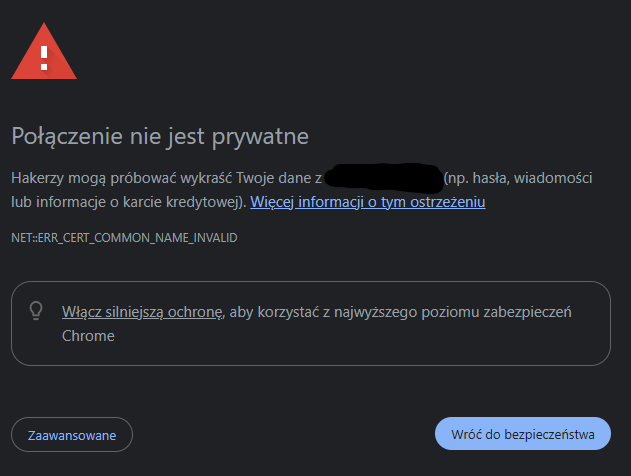
If the certificate has expired or is invalid (e.g., for a different domain), the browser may show a warning about an unsecure page.
Method 2 – Free Online Tools
If you want broader analysis than just the expiration date, you can use online tools that check the certificate automatically and report more details:
• Qualys SSL Labs – SSL Server Test – one of the most popular and accurate tools for testing certificate and TLS configurations on a server. Simply enter a domain and receive a report assessing the configuration, encryption algorithms, and other parameters.
• DigiCert SSL Checker – a diagnostic tool that checks certificate installation and indicates potential problems.
• SSL Checker / SSL Shopper / HEXSSL Checker – free pages that show the expiration date, certificate issuer, scope of protected domains and possible configuration errors.
Such tools often also provide information about the full certificate chain (whether the intermediate certificate has been correctly attached), which is important for the certificate to be recognized by all browsers.
Method 3 – Validity Period Monitoring
SSL certificates have specific validity period, after which browsers consider them invalid. For free certificates (e.g. Let's Encrypt), this is usually around 90 days – so it's important to:
• regularly check the certificate validity date,
• set a reminder or monitoring tool that notifies you in advance.
In online tools and in your hosting panel, you can often read the exact "from" and "to" expiration dates - it's worth checking this at least once a month.
Method 4 – Detailed Technical Verification
For administrators or technical people in the company it is possible to perform deeper tests with tools such as testssl.sh or OpenSSL on the server. These allow you to check:
• whether the certificate has been correctly mounted on the server,
• whether the private key and certificate match,
• supported TLS protocol versions and encryption strength.
This approach requires technical knowledge or IT team support, but provides a very accurate diagnosis.
What else is worth paying attention to?
• Check if the certificate matches the domain – the certificate must be issued for the exact domain or subdomain that you enter in the browser.
• Make sure the certificate chain is complete – lack of intermediate certificates may cause errors in some browsers.
• Pay attention to the OCSP status – some tools show whether the certificate has not been previously revoked by a certification authority (OCSP status).
Checking your SSL certificate can be started by simply clicking the padlock icon in your browser, but professional analysis uses online tools like Qualys SSL Labs or specialized "SSL Checkers." Regularly checking the expiration date and configuration helps avoid user warnings and technical issues that negatively impact the trust and experience of your website visitors.
Decision Checklist – Which SSL for Which Company?
Choice SSL certificate it's not just a technical issue - it's a decision that affects level of customer trust, brand image and ease of implementation and maintenance of the website. Below you'll find a practical checklist to help you determine, which SSL certificate will be the best for your company website or online project.
Step 1 – Assess the nature of your website
A simple business card, blog, or landing page
• Main purpose: to inform or present an offer, without advanced forms and login.
• Choice: Domain Validated (DV) – a certificate issued quickly, without formal company verification. This is a basic level of security and encryption, ideal for those who prioritize HTTPS.
Company website with contact forms and newsletter signup
• It is worth building trust and showing that the company really exists.
• Choice: Organization Validated (OV) – the certificate verifies the existence of the organization and its data, which can increase user comfort.
E-commerce, login systems, or payment processing
• Even basic HTTPS is the minimum here, but communicating your company's identity can be important to customers.
• Choice: OV or EV (Extended Validation) – EV is the highest level of verification and formal confirmation of a company with a certificate, which increases trust in online transactions.
Step 2 – Evaluate the scope of sites you want to protect
One domain
• Classic small business or project situation.
• Enough Single Domain SSL – secures exactly one domain.
One domain + multiple subdomains
• Example:
blog.firma.pl,sklep.firma.pl,panel.firma.pl.• Worth considering Wildcard SSL – A single certificate secures the root domain and all first-level subdomains. This simplifies administration and often reduces costs.
Several different domains (SAN/UCC)
• You have more than one brand or several projects at different addresses.
• Solution: Multi-Domain SSL – allows you to secure different domains with one certificate.
Step 3 – Assess how much attention you want to devote to the implementation process
Quick and easy implementation
• If you want to enable HTTPS immediately and do not want any formalities – DV SSL is the best choice.
You want formal verification of your company
• Certificates OV and EV require the provision of documents confirming the existence and data of the organization, which takes longer but increases credibility in the eyes of the user.
Step 4 – Assess what signal of trust you want to send to your users
Minimum signal - data encryption
• If the priority is only the protection of data transmission and the "padlock" in the URL bar - DV SSL will meet your needs.
You want to emphasize the credibility of your company
• For companies that regularly receive customer data or conduct transactions, certificates OV or EV They provide more information about the site owner, which can increase visitor trust.
Frequently asked questions
Formally, not every website is legally required to have SSL. In practice, however, the absence of HTTPS triggers browser warnings and reduces user confidence. Today, it's considered standard, not optional.
Yes. A free certificate (e.g., Let's Encrypt) provides the same encryption as a paid DV certificate. The difference is primarily in the company's level of verification, warranty, and technical support, not in the encryption strength.
Yes, but in moderation. HTTPS is an official Google ranking factor, but it doesn't replace content quality or site optimization. However, the lack of SSL can indirectly lower results by reducing trust and conversions.
- DV only confirms control over the domain.
- OV additionally verifies the existence of the company.
- EV is the highest level of organizational verification and formal identity confirmation.
The browser will display a warning about an unsecure connection. Users may be unable to access the site or may abandon it altogether. Therefore, automatic renewal and expiration date monitoring are crucial.
No. An SSL certificate encrypts data transmission between the user and the server. It doesn't protect against server hacking, malware, or coding errors. It's one security element, but not the entire protection strategy.
Today SSL certificate it's not a technical addition, but an absolute foundation professional website. It ensures data encryption, builds user trust, and eliminates browser warnings that can effectively deter potential customers. In most cases, a well-implemented DV certificate with automatic renewal is sufficient, but for more demanding projects, OV or EV are worth considering.
However, the most important thing is not just "having SSL", but its correct configuration and constant monitoring.
If you're unsure whether your website is properly secured, please contact us. We'll be happy to help you verify your configuration and select the right solution for your business.