Before you move your company files to the cloud, you probably ask yourself one simple question: is it safe? After all, we're talking about data that's crucial to your company's operations, image, and regulatory compliance. And while the cloud promises convenience, flexibility, and savings, online reviews often echo understatements and uncertainty—from stories of data leaks, to concerns about lack of control, to questions about GDPR and regulatory compliance.
The truth is that the cloud can be safe, but security never happens on its own—it depends on both the provider's technology and the decisions you make within your company. In this article, we'll honestly answer the most important concerns about cloud security and show you what's really worth considering to ensure your data is protected and risk is minimized.
What does a "secure cloud" mean in practice – and where companies most often get it wrong
When companies talk about cloud security, we often see two poles: either they naively trust that "the provider will take care of everything", or they are afraid Clouds are like an unknown monster. In practice, cloud security is something in between – it involves specific technologies, processes, and the division of responsibilities that must be understood and skillfully implemented. Only then will this technology truly begin to operate safely for business.
Cloud security doesn't mean a single magic shield protecting your data. a set of principles, technologies, procedures and practices designed to protect data, applications, and services in the cloud environment from unauthorized access, leaks, breaches, and other cyber threats. The primary goal? Ensuring confidentiality, integrity and availability of resources, i.e. what is most important in digital security.
What exactly does cloud security cover?
A secure cloud is more than just data encryption. It encompasses a whole set of elements, including:
• user access and identity control,
• data encryption mechanisms at rest and in transit,
• monitoring and detecting security incidents,
• log audit and configuration review,
• compliance with legal and regulatory requirements.
Each of these elements is important, but most often it is not unreliable technology that is the source of the problem, but the way it is applied – for example, incorrect configuration of permissions or lack of monitoring.
Shared Responsibility Model
One of the biggest misconceptions is that because data is in the cloud, it all security lies with the supplier. This is not true. The Shared Responsibility Model itself shows that security is a task shared between the service provider and the client.
The supplier is typically responsible for:
• physical security of data centers,
• infrastructure and network layer,
• updates and patches at the hardware and base environment level.
However, the client must take care of:
• security of your data,
• configuration of services and permissions,
• identity and access management,
• data encryption and access policies.
In practice, this is what oversights on the client's side (e.g. incorrect permissions, lack of MFA or activity logging) are the main source of cloud-related incidents – not because the technology is of poor quality, but because proper security and control rules have not been implemented.
A secure cloud isn't a state that automatically "occurs" as soon as you transfer your data to a service provider. enabling security through proper configuration, processes and awareness of the division of responsibilities. Understanding that the cloud model means shared responsibility between the provider and the customer is a key step towards truly securing your data.

Who is responsible for what – Shared Responsibility
When we talk about data security in in the cloud, the key issue is not only technology, but who is really responsible for what. In practice, even the best provider won't secure everything for you—you need to understand where their role ends and yours begins. A shared responsibility model helps clearly delineate this, helping you avoid common mistakes and security gaps.
Cloud security isn't a single package that you get "ready and complete" from your service provider. Instead, it works according to the principle shared responsibility, That is shared responsibility model – a mental contract between you and the cloud provider that defines which security elements each party is responsible for. This is a fundamental principle without which it is impossible to properly secure your cloud environment.
What does „cloud security” mean in this model?
In simple terms, this model divides responsibility into two parts:
• Security of the Cloud – refers to what the cloud provider secures, i.e. the entire cloud infrastructure: physical data centers, network, servers, virtualization layers and core services.
• Security in the Cloud – this is the part for which you as the customer are responsible: data, applications, service configurations, user accounts and access control mechanisms.
This distinction is crucial – the supplier gives you a safe „chassis”, but it is up to you to ensure, what are you building on this chassis? and how you configure it.
The role of the cloud service provider
The cloud provider is primarily responsible for:
• safety physical infrastructure (server rooms, power supply, cooling, fire protection),
• safety system and network layers,
• maintaining and updating the basic elements of the cloud system,
• tools and mechanisms supporting security (e.g. encryption, monitoring, logging).
This means that the provider secures the foundations of the platform, creating an environment that is resistant to most common technical threats.
Your responsibility as a customer
Your responsibilities begin where the cloud foundations end. Your key responsibilities include:
• data protection and classification – what is sensitive and how it should be protected;
• access and identity management – who can access resources and how;
• configuration of services and applications – security settings, permissions, segmentation;
• data encryption at rest and in transit as business needs require;
• monitoring and response for irregularities and correct logging of events.
This means that even if your data is with a trusted provider, You decide about how safely you store them, who sees them and how they are protected.
Why is understanding this model so important?
Many business owners and administrators mistakenly assume that moving systems to the cloud means "outsourcing" all security. In reality, however, the provider is responsible Just for the infrastructure layer and ensuring a safe environment, while the responsibility for what you do with it remains yours.
These "transitions of responsibility"—for example, when a vendor provides a database and you're tasked with securing accounts accessing it—are the most common cause of security breaches. If one party assumes the other is responsible, it creates a loophole that cybercriminals can exploit.
The shared responsibility model is not just a theory – it is practical framework defining who is responsible for what in the cloud environment. The provider ensures secure chassis, but you are in control what you build on it and you need to secure it. Understanding this model is not a luxury, but a necessary condition, to make the cloud truly safe for your business.
Key Security Threats in Cloud Environments
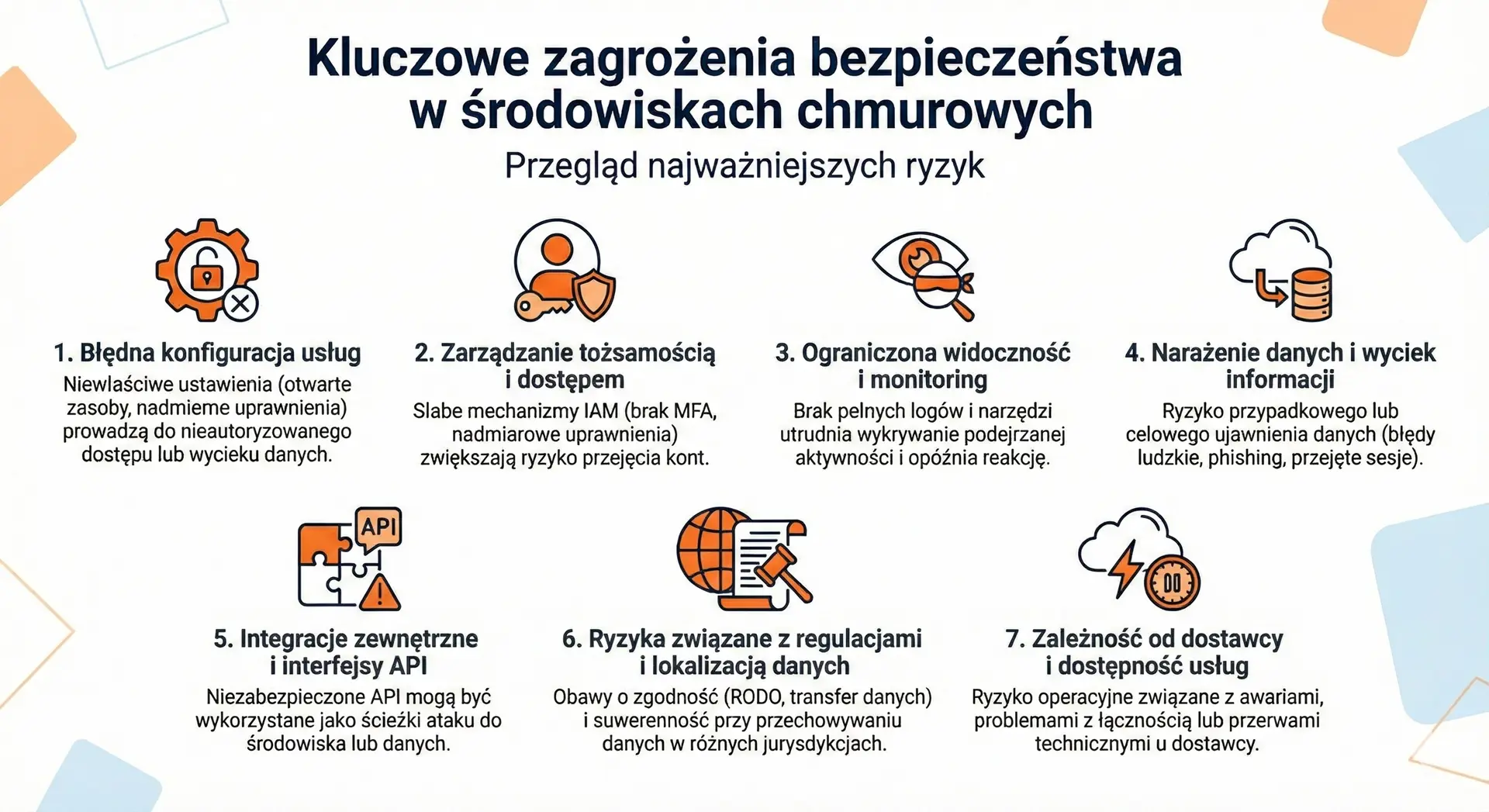
Before you decide to move your data or systems to the cloud, it is worth honestly answering the following question: what risks are actually associated with this? It's not about creating an atmosphere of threat, but about consciously understanding the areas that require control. In practice, most problems in cloud environments stem not from the technology itself, but from configuration errors, lack of procedures, or insufficient access controls. Below, you'll find the most important threats that should be on your checklist.
1) Service misconfiguration
One of the most common and dangerous sources of problems is incorrect configuration of cloud services – for example, open resources, excessive permissions, or default settings that remain active in the production environment. Such errors can lead to unauthorized access or disclosure of data, even though the vendor's technology itself is secure.
2) Identity and Access Management
Weak identity management (IAM) mechanisms—such as a lack of multi-factor authentication or excessive permissions—significantly increase the risk of user or administrator account compromise. This is especially important because account attacks are often the first step in more serious breaches.
3) Limited visibility and monitoring
In a cloud environment, it is difficult to detect problems without access to full logs and tools. monitoring. Limited visibility makes it difficult to identify suspicious activity, which can delay incident response and increase damage.
4) Data exposure and information leakage
The risk of accidental or intentional data disclosure remains a critical issue—whether through human error, phishing attacks, or sessions hijacked by cybercriminals. This applies to both data at rest and data being transferred between systems.
5) External Integrations and APIs
Cloud services often integrate with other solutions and tools via APIs. If these interfaces are not properly secured, they can be exploited as access paths to the environment or data.
6) Risks related to regulations and data localization
Storing data in different jurisdictions may raise concerns about compliance with GDPR or other regulations (e.g. data transfer outside the EU) as well as issues of sovereignty and audit requirements.
7) Provider dependency and service availability
A cloud service may be unavailable due to outages, connectivity issues, or technical interruptions – this is an “operational risk” that must be considered when planning your business and incident recovery strategy.
No IT environment is risk-free. In the cloud, the specific nature of threats stems from its flexibility, scale, and resource access. The key to security isn't eliminating all risks (which is impossible), but consciously recognize which of them are most important for your company and how to control them through processes, tools and security policies.
Cloud Security Assessment – A Practical Decision-Making Model
The decision to move data to the cloud shouldn't be based on marketing promises or fear of change. The most sensible approach is a cool-headed analysis: what data you have, what legal obligations you have, and what security processes operate in your organization. Below, you'll find a simple business evaluation model that helps you understand the topic without the technical jargon.
1) Start by classifying your data
Not all data is equally sensitive. You treat public marketing materials differently than financial data, HR data, or customer records.
Ask yourself three questions:
• Will the loss of this data paralyze the company?
• Will their disclosure violate GDPR or trade secrets?
• Do they need to be available 24/7?
If the answer is yes to two or three of these, you need a higher level of security, access control, and data recovery plan.
2) Check the responsibility model and scope of control
Every cloud service operates under a shared responsibility model. It's crucial to establish:
• Who is responsible for the infrastructure?
• Who manages backups?
• Do you have access to logs and activity reports?
• Can you define security policies yourself?
If you don't know who's responsible for which area, that's a warning sign. Without a clear division of responsibilities, it's difficult to truly ensure safety.
3) Verify minimum technical standards
A secure cloud environment should enable at least:
• multi-factor authentication (MFA),
• granular permission management,
• data encryption in transit and at rest,
• full event logging and monitoring,
• the ability to export data in the event of termination of cooperation.
If any of these elements are not available or not enabled, security is only a declaration, not a real state.
4) Assess organizational readiness
Technology is only part of the puzzle. Processes and people are equally important.
Consider this:
• Does the company have a procedure for revoking access for employees leaving the organization?
• Does anyone regularly review user permissions?
• Do you test data recovery from backup?
Failure to do so increases the risk much more than the decision to choose the cloud itself.
5) Consider legal and regulatory aspects
If you process personal or customer data, you must ensure that:
• a data processing agreement is concluded,
• you know the location of data processing,
• the supplier meets the regulatory requirements specific to your industry.
Without this, even the best technical security measures will not ensure full business security.
The cloud is secure when it meets three conditions simultaneously:
Technical safeguards are in place, responsibilities are clearly defined, and the organization has control processes in place.
If any of these elements are omitted, the risk increases – regardless of the supplier's reputation.
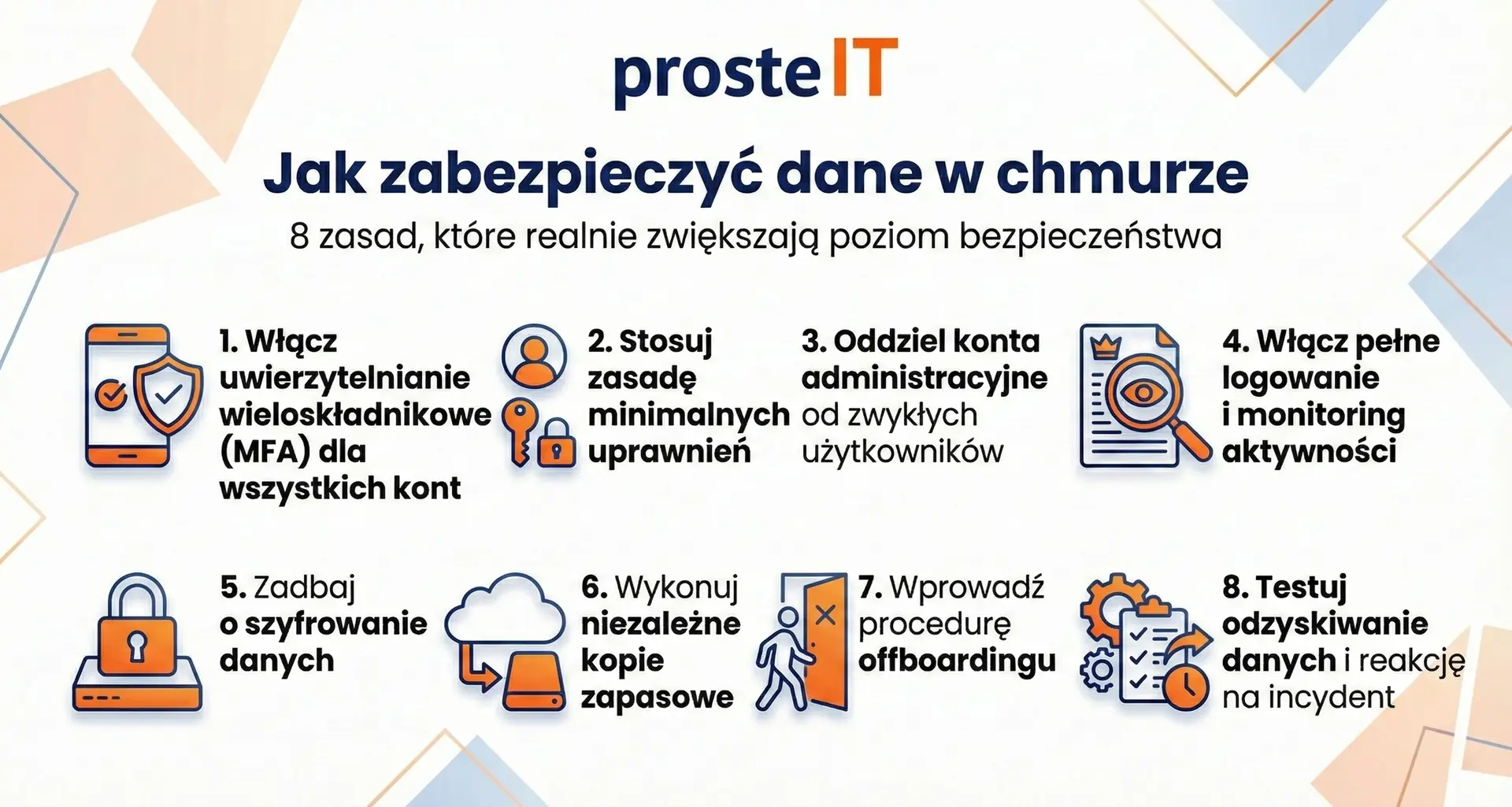
How to secure data in the cloud – 8 rules that really increase the level of security
Cloud data security isn't the result of a single setting or feature. It's the result of consistently implementing a few basic principles. The good news is that most of them don't require huge budgets—they require discipline and awareness. Below, you'll find eight practical rules that make the biggest difference in real-world enterprise environments.
Frequently asked questions
It can be—provided that proper configuration and access control are in place. Large vendors invest heavily in infrastructure and security measures that most companies can't replicate locally. However, a lack of MFA, redundant permissions, and a lack of cloud backup will negate this advantage.
Yes, but compliance doesn't stem from the mere fact of using the cloud. The key factors are: a data processing agreement, the location of processing, and appropriate organizational and technical safeguards. Legal responsibility still rests with the company as the data controller.
No. Synchronization is not a backup. If a file is deleted or encrypted by malware, the change can be synchronized across all devices. A standalone backup is essential for true data protection.
The most common causes include: lack of multi-factor authentication, excessive permissions, incorrect service configuration, and lack of activity monitoring. In most cases, the problem isn't the technology itself, but rather how it's implemented and managed.
Definitely yes. Audit It allows you to assess your company's risk level, data classification, and organizational readiness. This makes cloud migration a controlled process, not an experiment.
Yes. We support companies in risk assessment, security configuration, and the implementation of MFA, access policies, and backups. We help structure their environments so that the cloud supports their business, not creates uncertainty.