In many companies, IT "works" until someone leaves, a new employee joins, or a security incident occurs. Suddenly, it turns out that no one really knows who has access to which systems, where accounts are, or how to quickly retrieve them. This is the point where technology stops being a support and starts being a risk.
This is where concepts such as Active Directory and Microsoft Entra ID. To some, it sounds like something very technical, "for large corporations." To others, it's just another name from the Microsoft ecosystem, difficult to distinguish. The truth is much simpler – these are tools for organizing identity, login and access in the company.
It can be compared to the reception desk in an office building.
Active Directory works like reception at the company headquarters – issues IDs, guards doors, and decides who has access to specific rooms on site. Microsoft Entra ID, in turn, is digital reception in the cloud – allows you to log in to apps and services from anywhere, but with clearly defined rules. Both concepts solve a similar problem, just in different worlds.
This article was created to:
• explain in a simple way, what is Active Directory and what is Microsoft Entra ID,
• show real differences and applications, without marketing hype,
• help you assess, does your company actually need it?, or would it be a triumph of style over substance.
We won't scare anyone or "sell technology for technology's sake." We'll focus on the practicalities, costs, scenarios, and decisions that make sense from the owner's or management's perspective. If, after reading this, you find it easier to decide which direction to take, then this text has served its purpose.

Why are companies starting to lose control over user access and accounts?
Just a few years ago, in many small and medium-sized businesses, everything was simple: one computer, one server, a few programs, and shared passwords "just in case." This worked because the scale was small, and most of the work took place in one place – the office.
Today, this model simply doesn't scale. Companies rely on Microsoft 365, cloud-based accounting applications, CRM systems, team collaboration platforms, and tools accessible from anywhere. Add to this remote and hybrid work, and frequent employee turnover. The result? The number of accounts and access points is growing faster than anyone can manage them.
At this point it is worth returning to the analogy. reception, because it shows well where the problem occurs.
Imagine a company without a reception desk. Everyone enters wherever they please, doors are keyed, and keys are circulated among employees. For a long time, no one notices the problem – until someone leaves the company, but access remains. Or when a new employee can't work on their first day because "someone forgot to give them permission.".
In the IT world, the lack looks exactly the same user directory.
There is no single place that answers simple questions:
• who is an employee,
• what does he have access to,
• what device you are logging in from,
• what should happen when someone changes roles or leaves the company.
Active Directory and Microsoft Entra ID play the role such a reception, but in two different realities.
Active Directory is an "on-site" reception desk—it tracks who logs in to company computers, servers, and local resources. It works great where everything revolves around the office and internal infrastructure.
Microsoft Entra ID is a cloud-based reception desk that monitors access to online applications, email, files, and systems from anywhere. It prevents anyone from entering, even if they know the password. It can verify where someone is logging in from, what device they're using, and whether they meet specific security requirements.
The problem in SMEs is that many companies stuck in between.
They no longer have a single office and a single server, but they still manage access manually. Accounts are created incidentally, passwords are reset ad hoc, and access revocation is sometimes postponed. This isn't a matter of ill will—there's simply no central mechanism to organize the whole thing.
That's why the topic of user directories comes up so often in conversations with owners and management today. Not because it's a buzzword, but because without it:
• security is based on trust, not rules,
• onboarding and offboarding takes too much time,
• one mistake can give you access to too many systems.
In the following chapters we will show, what exactly is Active Directory, what is Microsoft Entra ID and what kind of "reception" are they building in the company

What is Active Directory and what role does it play in a corporate network?
If Active Directory had one purpose, it would be know who is who in the company network. Who is an employee, who is an administrator, what computers and resources they have access to, and what devices they can log in from. Without this, every access decision becomes manual, chaotic, and difficult to control.
Returning to the analogy – Active Directory is a reception desk operating within the company.
Each employee receives an ID badge, and the receptionist checks it upon entering the building, specific rooms, and systems. If someone changes position, the receptionist updates the access. If someone leaves, the badge ceases to function.
In the IT world, this „building” is:
• employee computers,
• company servers,
• printers, files and applications running on the local network.
Active Directory stores information about users, computers and groups and then decides who has access to what. This means you don't have to set everything up individually on each computer – the rules are central and consistent.
In practice, it looks like this: the employee logs into the computer the same account, that he uses every day. He doesn't have to remember separate passwords for a printer, network folder, or server-based application. Active Directory confirms his identity and only lets him in where he should have access.
Importantly, Active Directory works best in an environment that:
• is based on Windows computers,
• uses local servers or applications running on the company network,
• requires consistent rules for all workstations (e.g. pendrive locking, password settings, automatic system configuration).
This is why, for years, Active Directory has been the foundation of corporate IT infrastructure. It provided order, predictability, and control – everything was "in place," under one roof.
At the same time, it must be clearly stated that Active Directory was designed with the office and local network in mind. This is a reception desk that's great at keeping an eye on building doors, but it wasn't designed to manage access to cloud-based applications or work from anywhere in the world.
And it is at this point that a natural question arises:
What to do when a company works less and less "on-site" and more and more often in online applications?
The answer to this problem is Microsoft Entra ID – a cloud-based reception solution. We'll cover it in the next chapter.
Microsoft Entra ID – login and access control to cloud services
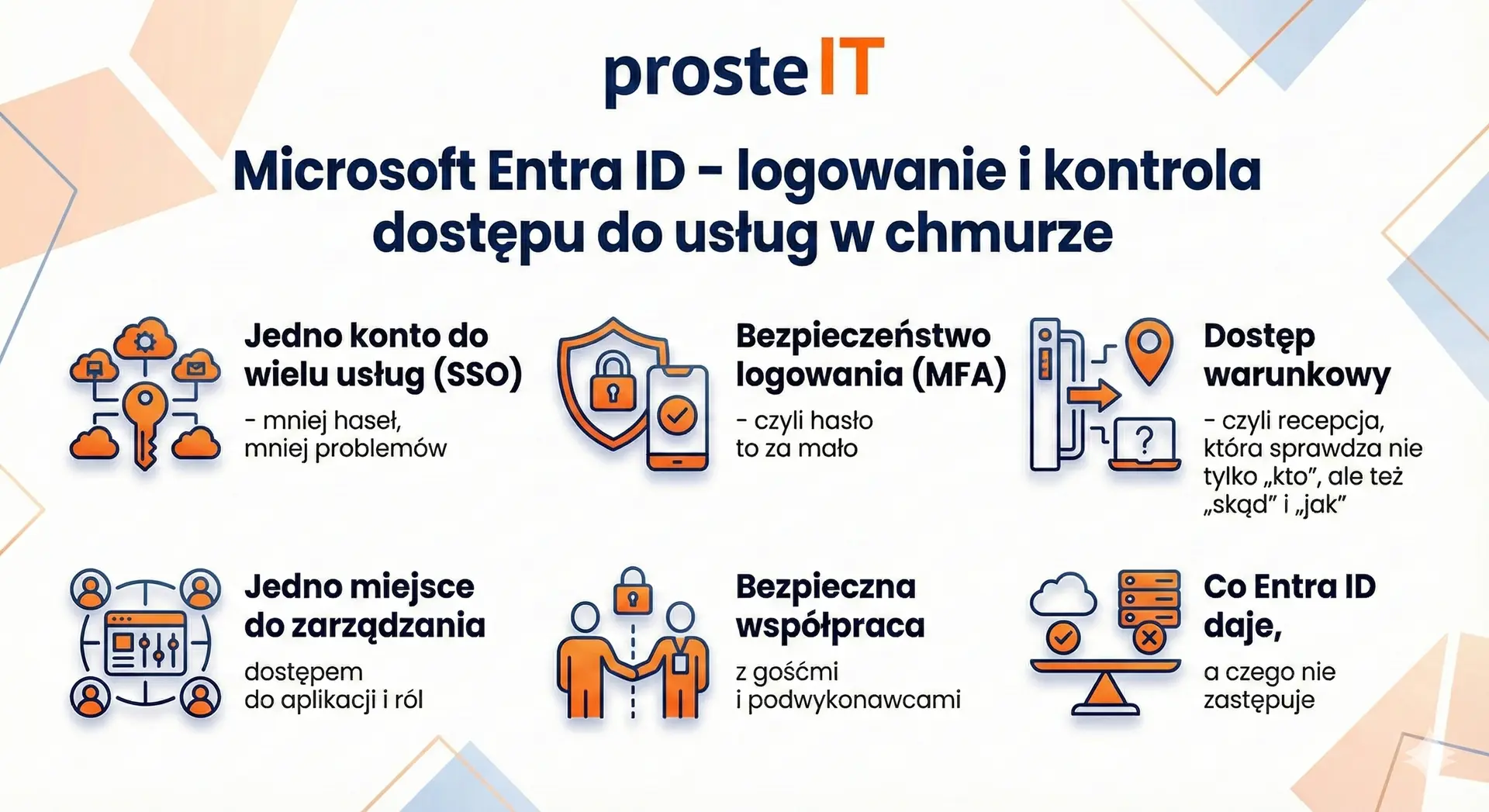
(Infographic below)
If Active Directory is the "reception desk in the company building", then Microsoft Entra ID is a reception desk that operates where many SMEs work today – in the cloud. That is, in services such as Microsoft 365, online accounting applications, CRM, electronic signature tools, document workflow systems, and collaboration platforms. Entra ID ensures, Who logs in, for what, from what place and on what terms.
It is worth clarifying the name right away. Microsoft Entra ID is the new name for the solution previously known as Azure Active Directory (Azure AD). Functionally, we're talking about the same "sign-in center" for Microsoft services and thousands of third-party applications. For the company, the most important thing isn't what it's called, but what it solves: the problem of account and access chaos as work moves online.
1) One account for multiple services (SSO) – fewer passwords, fewer problems
The most noticeable benefit at the start is the so-called. SSO (Single Sign-On), meaning logging in once and then using multiple applications without having to re-enter your password. Users log in to their company account and gain access to email, Teams, SharePoint, and often external applications. This saves time but also reduces the risk of someone keeping passwords on a sticky note or using the same password everywhere.
Importantly, SSO isn't magic or an "IT convenience." It's real order within the company: a single place where you know who has an account and which systems they're assigned to. This makes onboarding new employees and revoking access after an employee leaves faster and more consistent.
2) Login security (MFA) – or a password is not enough
The second major advantage of Entra ID is the possibility of implementation MFA (Multi-Factor Authentication), which involves logging in with additional confirmation. Typically, in addition to a password, the user confirms the login in the app on their phone or with a code. This is a simple change that can dramatically reduce the risk of account takeover following a password leak.
For SMEs, this is often a turning point, as many attacks begin with the takeover of an email or Microsoft 365 account. Entra ID allows for a systematic approach to this, rather than a "post-incident request.".
3) Conditional access – i.e. a reception desk that checks not only "who", but also "where from" and "how"„
The next step is the so-called. conditional access. It sounds technical, but the idea is simple: the reception desk not only recognizes the employee but also considers the circumstances. For example, logging in from Poland using a company laptop is OK, but logging in from a suspicious location or an unknown device may require additional verification or be blocked.
These kinds of policies make the difference between a company that "has passwords" and one that controls access. Importantly, they can be implemented gradually, starting with the most critical accounts, such as administrative ones.
4) One place to manage access to applications and roles
Entra ID lets you assign users to groups and roles, and then assign permissions across services based on those groups. Instead of manually adding access in ten places, you create the logic: "the accounting department has access to X, the sales department to Y." Changing an employee's position no longer requires a series of phone calls and manual corrections.
This is especially important as the company grows. With 10 people, it can be managed "with memory and a notebook." With 30-50 people, it starts to become a costly mess: someone has too many permissions, someone has none at all, and IT is putting out fires instead of organizing processes.
5) Safe cooperation with guests and subcontractors
SMEs often work with accounting firms, law firms, marketing agencies, freelancers, and implementation companies. Entra ID allows you to grant access guests in a controlled manner – so they only get what they need, and only as much as you specify. This is much better than sending files to private email addresses or sharing links "for anyone with an address.".
Additionally, it's easier to monitor whether access is still needed. In many companies, the problem isn't simply granting access, but rather failing to properly revoke access after the collaboration ends.
6) What Entra ID does and does not replace
It is worth drawing the line honestly. Entra ID is not a replacement for everything that classic Active Directory does in the office, especially if you have on-premises servers, network shares, and resources that require a Windows domain. Entra ID is great for logging in and controlling access to cloud services, but it doesn't automatically "replace" your company's on-premises infrastructure.
Therefore, in practice, companies most often choose one of three models: Entra ID only (when the company is heavily cloud-based), Active Directory only (when everything is on-premises), or a hybrid approach. In the next section, we'll explain these differences directly and without ambiguity, as this is where false assumptions are most easily made.
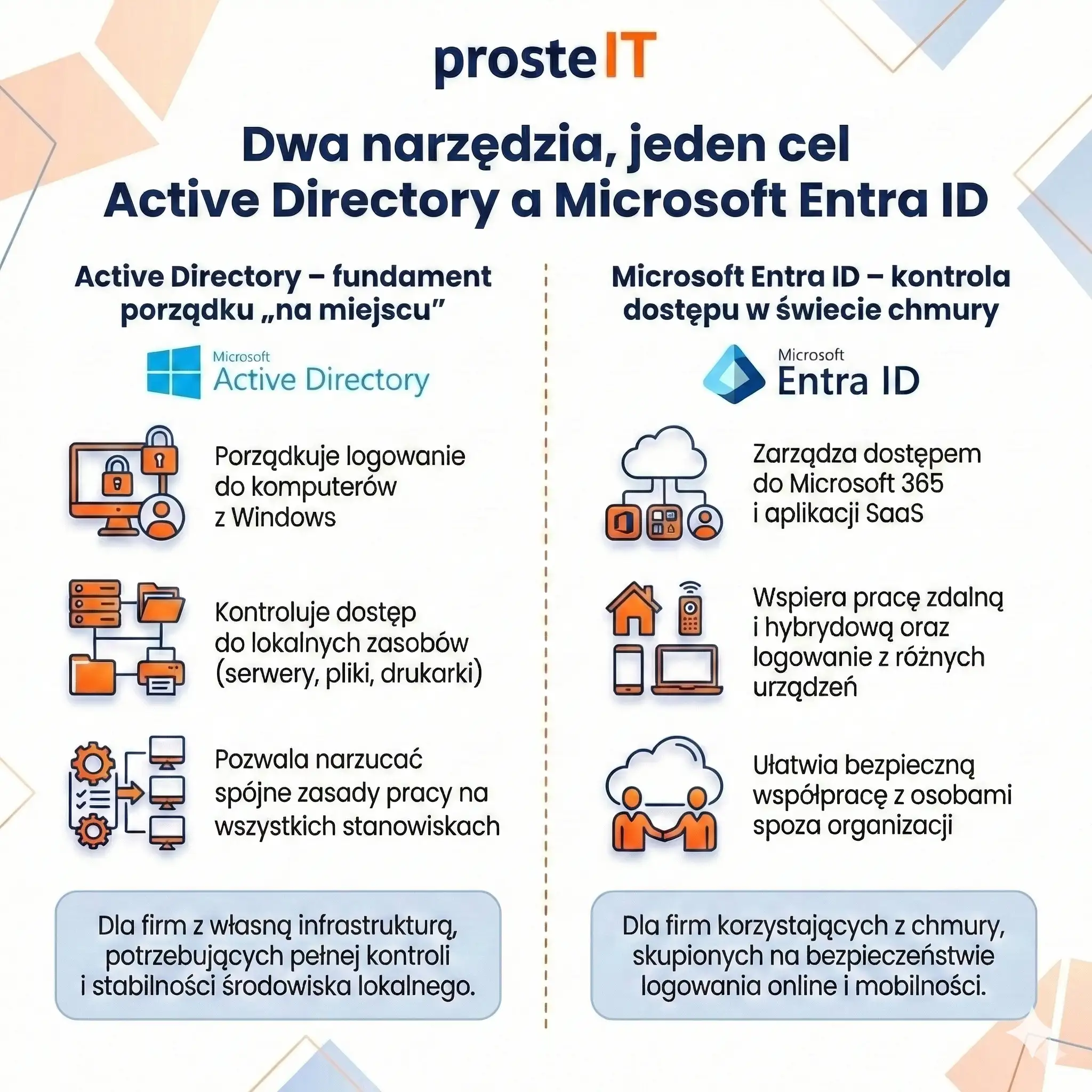
Active Directory and Microsoft Entra ID – two different tools, one common goal
At this stage it is worth stating one thing clearly: Active Directory and Microsoft Entra ID are not competitors. This isn't an "either-or" choice like with two similar systems. two different tools, designed to work in different environments, which very often complement each other in one company.
If you look at it from a business perspective, both solutions have a common goal – organize user identities and access – but they do it in a different context.
Active Directory – the foundation of order on site„
Active Directory is best suited where the company has own infrastructure: office, servers, computers on one network. This is a tool that:
• organizes login to Windows computers,
• controls access to local resources (servers, files, printers),
• allows for the imposition of consistent work rules at all positions.
In practice, AD is the foundation where the company wants to be full control over the local environment. It works well in organizations that have their own systems running "in-house" and need stability and predictability.
Microsoft Entra ID – access control in the cloud world
Microsoft Entra ID operates in a completely different world. Its natural habitat is:
• Microsoft 365,
• SaaS applications,
• remote and hybrid work,
• logging in from different locations and devices.
This tool focuses on who and under what conditions can log in to online services. It doesn't manage computers on the local network, but it handles login security, application access, and collaboration with people outside the organization.
What to implement first?
This is one of the most common questions and… the answer depends on the company's starting point.
• If the company works mainly in the cloud, uses Microsoft 365 and online applications, and does not have its own servers – Entra ID is a natural first step. Organizes accounts, logins, and security without building on-premises infrastructure.
• If the company has servers, local applications and office computers, and everything revolves around the company network – Active Directory will be the base, on which the rest of the environment is based.
In practice, it's rare to start "from scratch." Most often, implementation involves organizing what already exists, and only then extending control to other areas.
Is it worth having both tools in one company?
In many cases – yes, and it makes a lot of sense. This is a so-called hybrid model in which:
• Active Directory organizes the local world,
• Entra ID organizes the cloud world,
• the user has one consistent account and one login experience.
This model is particularly popular in companies that:
• have an office and local infrastructure,
• but at the same time they intensively use Microsoft 365 and remote work,
• want to increase login security without disrupting the existing environment.
From the user's perspective, everything works "as one." From the company's perspective, each area is managed by the tool that best fits its specific world.
The most common mistake: trying to replace one with the other
One common mistake is to assume that Entra ID will "replace" Active Directory, or vice versa. This leads to disappointment, as each tool is designed for different purposes. A much better approach is to ask: What environment does my company operate in and where am I losing control over access today?
Costs and licenses – what's included and what you pay extra for
Before you start implementing Active Directory or Microsoft Entra ID, it is worth doing one exercise: separate the license cost from the maintenance cost. Because in practice, the latter (time, administration, risk of downtime) often hurts more than the invoice itself.
Below you have a reliable picture of "what's included" and what requires additional payment - no guesswork, just based on official Microsoft information.
1) Microsoft Entra ID – what you get for free
Good news for many SMEs: Microsoft Entra ID Free is included with Microsoft subscriptions, including Microsoft 365. This means that if you're using Microsoft 365, you already have the foundation of a user directory in the cloud.
In practice "„for free” you get, among others:
• user and group management,
• basic SSO (single sign-in to Microsoft 365 and multiple SaaS applications),
• basic reports and mechanisms such as changing the user's password,
• ability to synchronize with the local directory (if you have a hybrid).
This is sufficient if your company is small, has simple needs, and you just want to organize your accounts and logins to Microsoft services.
2) Entra ID Premium (P1 and P2) – when the surcharge appears
When you want to go a step further with security and control, Entra ID Premium usually comes in. In SMEs, the key layer is often P1.
Entra ID P1 can be purchased separately, but it is often already included in the package – and this is an important decision point:
• Microsoft clearly states that Entra ID P1 is included with Microsoft 365 Business Premium (for SMEs) and for Microsoft 365 E3 (for enterprise).
• The official Microsoft price list (PL) shows a starting level of approximately EUR 5.60 per user/month (billed annually) for P1.
Entra ID P2 This is the next level (more "enterprise") if you need advanced protection and account risk management:
• In practice, P2 is sometimes purchased for selected roles (e.g. administrators), but this is a topic that requires conscious analysis.
• P2 prices are higher (depending on region and billing model) and change, so it is always worth using the latest Microsoft list.
Important for licensing compliance: If you use premium features (e.g. conditional access policies), the rule is simple – licenses should cover the users to whom the policy applies (not just „one item to get it turned on”).
3) Active Directory – the cost here does not end with the license
Active Directory runs "on-premises", which usually means:
• Windows Server (on a physical server or virtual machine),
• appropriate user/device access licenses (CALs),
• hardware/virtualization, backups, monitoring,
• regular administration and updates.
In its Windows Server licensing guide, Microsoft describes the server and CAL licensing model as a standard part of the Windows Server approach. Furthermore, in the context of Windows Server 2025, CALs are explicitly identified as a requirement for using server services like AD, file, and print (i.e., typical "domain" things).
And here is the most important practical difference from Entra ID:
Entra ID is a predictable cost “per user per month”, and Active Directory is an “implementation + maintenance” cost”. For many SMEs, the biggest cost isn't the Windows Server license itself, but:
• maintaining business continuity (backup, recovery tests),
• updates and security,
• IT time to handle changes, failures and development.
4) What usually pays off in SMEs – quick decision logic
The most common, reasonable cost model in SMEs looks like this:
• if your company runs primarily on Microsoft 365 and SaaS applications, you start with Entra ID (often you already have them "included") and only then add P1 if you need more control and security, e.g. conditional access, better account management or hybrid scenarios.
• if the company has servers and local resources, Active Directory may be necessary, but then it is worth calculating not only "how much the server costs", but also how much does it cost to maintain and the risk of downtime.
If you'd like, we can easily calculate this for your company: which resources are local, which are in the cloud, and where you're currently losing time or security. This makes it easier to choose a cost-effective option, not just one that "looks good in the design.".

How to implement Active Directory and Entra ID – a step-by-step plan and common pitfalls
Implementing a user directory and access control can be one of those projects that "was supposed to take a week" but ends with a series of minor login issues. This can be avoided if you approach the project as a process improvement within your company, rather than as installing yet another tool.
Below you will find a specific, practical plan and the pitfalls that most often affect SMEs.
Step-by-step implementation plan (6 steps)
Do it access audit
Take stock of what your company uses: Microsoft 365, SaaS applications, local servers, network drives, VPNs, administrative accounts. The key question is: where are the accounts today and who is manually assigning permissions?.Select your target model: Entra-only, AD-only or hybrid
If most of your work is in the cloud, you'll typically start with Entra ID. If your company relies on servers and on-premises resources, you'll start with Active Directory. If you're looking for a mix of both, consider a hybrid approach, but be smart about it.Get your identities and nomenclature in order before you move on.
It sounds boring, but it's crucial: consistent logins, valid email addresses as logins, a clear division between regular and administrative accounts, and meaningful groups (departments/roles). Without this, exceptions and manual workarounds multiply.Enable basic security and access policies
At a minimum, MFA is required for everyone (or at least for administrative accounts from day one). If possible, set policies that restrict logins from suspicious locations or unknown devices. Security is implemented in stages, but not left to the last resort.If you are doing a hybrid – plan synchronization and pilot testing
Hybrid can work brilliantly, but only when planned. First, a pilot with a small group: a few accounts, a few devices, typical work scenarios. Only then can it be rolled out company-wide. The most common mistake is a "hurry-up rollout" without testing, and then putting out fires during business hours.Establish processes that will keep things organized: onboarding and offboarding
Implementation is one thing. Maintaining order is another. Establish a simple procedure: who creates an account, when to grant access, how access is revoked upon employee departure, and who approves privileges for sensitive systems. Without this, even the best tool will return to chaos after a few months.
Common Pitfalls That Ruin Your Implementation (And How to Avoid Them)
• Mixing roles and accounts: the same user as a regular employee and administrator on a daily basis. Separate accounts – this actually reduces risk.
• Lack of coherent groups and permissions: when everything is "exceptional", it cannot be scaled later.
• Hybrid without a plan: synchronization enabled without preparing account names, tests and pilots.
• Leaving safety until last: MFA and access policies are worth implementing from the beginning, even in a minimal version.
Decision Frame: When It's Worth It and When It's Probably Not Worth It
It is worth implementing (Entra ID, AD or hybrid) if:
• the company grows and onboarding/offboarding begins to take time and generate errors,
• you work in Microsoft 365 and several SaaS applications, and login and access are "manual",
• you have local resources (servers, disks, applications) and want to standardize access and work rules,
• login security is no longer an „IT topic” but becomes a real business risk.
It's probably not worth it if:
• the company has several people, no remote work and uses 1-2 simple tools without sensitive data,
• you don't have anyone to maintain it, and at the same time you don't plan on external support,
• the implementation would be "for the sake of principle", without a real problem to be solved (this is a simple way to cost without return).
If you want, we can walk you through this plan practically – from a short audit to model selection (Entra, Active Directory, or hybrid) and a smooth pilot implementation so that users don't experience any confusion when logging in, and you have clear control over access from the start.
Frequently asked questions
No. These are two different, complementary solutions. Active Directory It is mainly used to manage logins and accesses in the company's local network (computers, servers, office resources). Microsoft Entra ID It's responsible for logging in and controlling access to cloud services like Microsoft 365 and SaaS applications. For many companies, they work best together, in a hybrid model.
Yes, if your company operates primarily in the cloud. If you use Microsoft 365, online applications, and don't have on-premises servers or applications requiring a Windows domain, Entra ID is often sufficient. In this scenario, it simplifies IT and reduces the costs of maintaining your on-premises infrastructure.
Active Directory remains a very good choice when a company has local servers, network shares, applications running on the corporate network, or wants to centrally manage employee computers in the office. It's effective in situations where control over the on-premises environment, not just access to online services, is crucial.
Yes. We help you choose the right model—Entra ID only, Active Directory only, or a hybrid solution—depending on how your business operates. We go through an audit, implementation plan, security configuration, and testing to ensure your users can continue working without disruption.
We operate flexibly. Many elements, particularly those related to Entra ID and Microsoft 365, can be implemented remotely. In the case of Active Directory, servers, or on-premises infrastructure, we can also come on-site and configure the environment directly on-site, if necessary.
A well-planned implementation shouldn't be burdensome. Users typically only notice easier login and improved security, such as login confirmation on their phones. The bulk of the work happens "behind the scenes"—in configuration and processes—to ensure the change is as seamless as possible for the team.
Active Directory and Microsoft Entra ID solve the same problem from two sides – identity and access control, but in different environments. Active Directory organizes the local world: computers, servers, and resources on the corporate network. Microsoft Entra ID is responsible for the world of the cloud: logging in to Microsoft 365, online applications, and working securely from anywhere.
For many SMEs, the key question is not "which is better?", but how to combine these tools with the actual way the company operates. Sometimes Entra ID alone is enough, sometimes Active Directory is essential, and very often the best solution is a hybrid model. The greatest value comes not from the technology itself, but from conscious implementation, which simplifies login, increases security and organizes processes for years.
If this topic concerns your company and you want to know, what actually makes sense in your case, and what will only be an unnecessary expense – get in touch. We'll help you translate your technology into a practical, seamless implementation tailored to your business.