
Hybrid work, personal phones, laptops bought on the spur of the moment, and access to company data from anywhere. For many companies, this is a daily occurrence, but it's also a source of quiet chaos that only emerges when something goes wrong. A lost phone, a lack of updates, an employee leaving without returning their equipment – sound familiar?
It's precisely at moments like these that the question of control arises. Not total surveillance or another complicated IT tool, but sensible rules that protect company data while not hindering team work. One solution that's increasingly coming up in conversations with SME management and owners is Microsoft Intune.
In this article, we'll explain step-by-step what Intune really is, how it works in practice, how MDM differs from MAM and UEM, and when this solution makes sense for small and medium-sized businesses. Without marketing buzzwords, we'll provide concrete facts to help you make an informed decision.
What is Microsoft Intune and where does it fit in the Microsoft 365 ecosystem?
When a company uses Microsoft 365, the question naturally arises: Microsoft Intune Is it just another tacked-on service, or is it part of a larger whole? The good news is that Intune doesn't operate in isolation from the rest of the environment. It's designed as part of an ecosystem where user identity, device health, and data access all complement each other.
Intune as a cloud service – no servers or local infrastructure required
Intune is a Microsoft cloud-based service. This means you don't need to install any servers on-site, worry about system updates, or external access. Management is centralized, and policies are automatically applied to devices—regardless of whether employees are in the office, at home, or traveling for business.
For SMBs, this is a huge difference compared to older IT management models. Instead of investing in infrastructure and its maintenance, you benefit from a ready-made platform that scales with your business. You add a user or device, and the same rules apply to them as the rest of the organization.
How Intune Works with User Identity
Identity—or user account—plays a key role in the Microsoft 365 ecosystem. It determines who a person is and what resources they have access to. Intune doesn't replace this mechanism, but it does provide crucial supplementary information: what condition is the device in?, from which the user is trying to work.
It's comparable to access control in a modern office building. An employee's card alone isn't enough if a door is damaged or an alarm reports a problem. Intune checks the device's "technical health" and relays this information, ensuring access to corporate data isn't solely based on a password.
One place to manage instead of several scattered tools
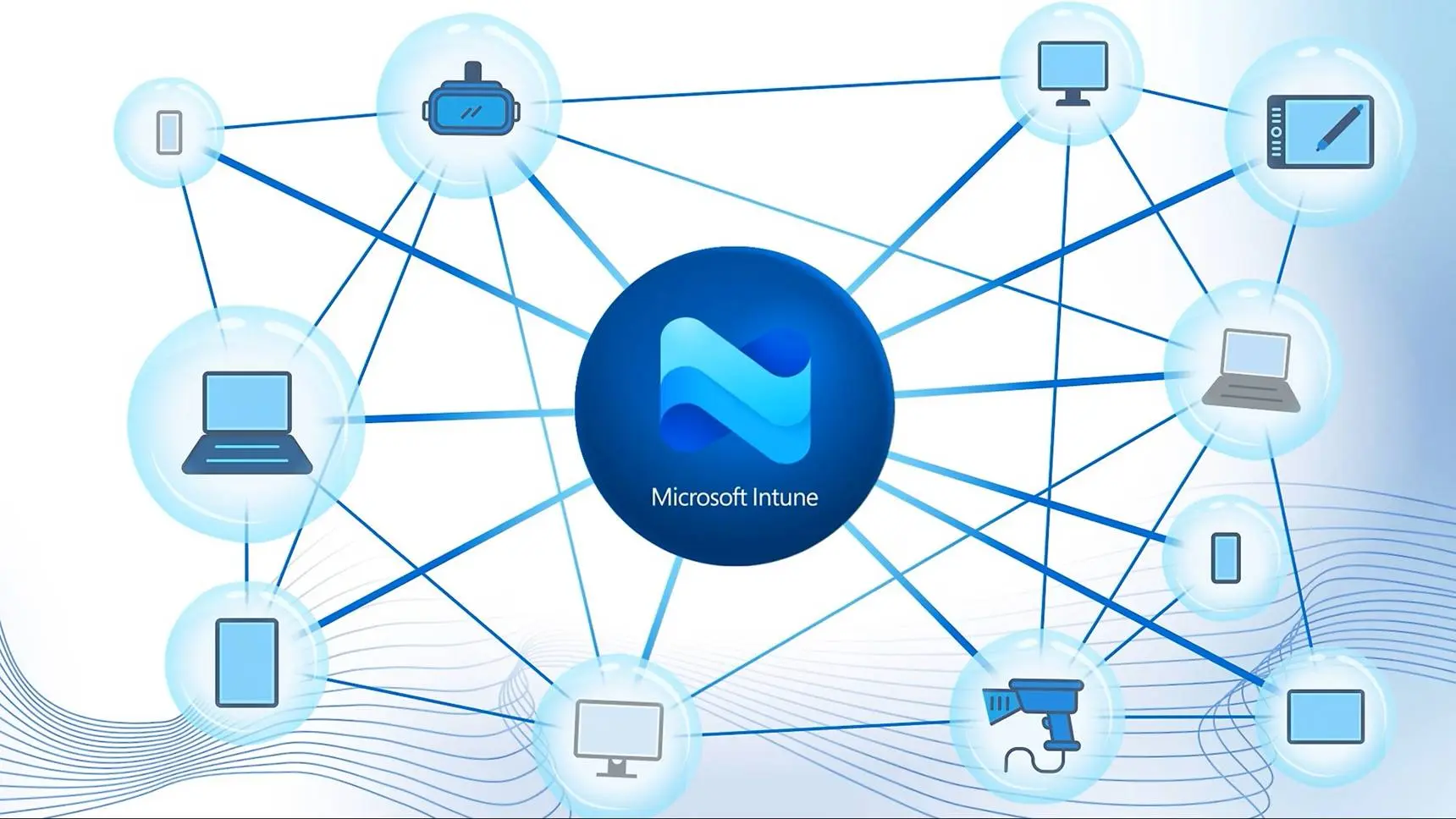
Intune is administered in a single dashboard that integrates with other Microsoft 365 services. This is important for companies without a large IT department. Instead of multiple systems for different tasks, you have a single hub where:
• you define rules for devices and applications,
• you check whether the equipment meets safety requirements,
• you respond to incidents such as a lost or stolen device.
This centralization simplifies daily work and reduces the risk of errors resulting from manual, inconsistent configurations.
Intune as part of the "don't trust by default" approach„
In practice, Intune supports an approach where access to data isn't automatically granted simply because someone knows a login and password. Context matters: who's logging in, from what device, and what state it's in. This allows companies to gradually transition from a "we trust everyone inside" model to more informed risk management, without disruption or work paralysis.
Importantly, Intune doesn't force you to stick to a single scenario. You can start with simple rules and expand them over time as your business grows and your requirements increase. That's why it fits so well into the ecosystem. Microsoft 365 – not as a separate entity, but as the glue that connects users, devices and data into one coherent whole.
Microsoft Intune from scratch - MDM, MAM and UEM in practice for SMEs
Almost everyone gets lost in the abbreviations at first. MDM, I HAVE, UEM They sound like the language of an IT department, not something a company owner or management should be concerned with. The problem is that behind these letters lie very specific business decisions: how much control you have over your equipment, how you protect your data, and how much you intrude on employee privacy. Microsoft Intune organizes these concepts and allows you to combine them sensibly – but only if you understand the differences.
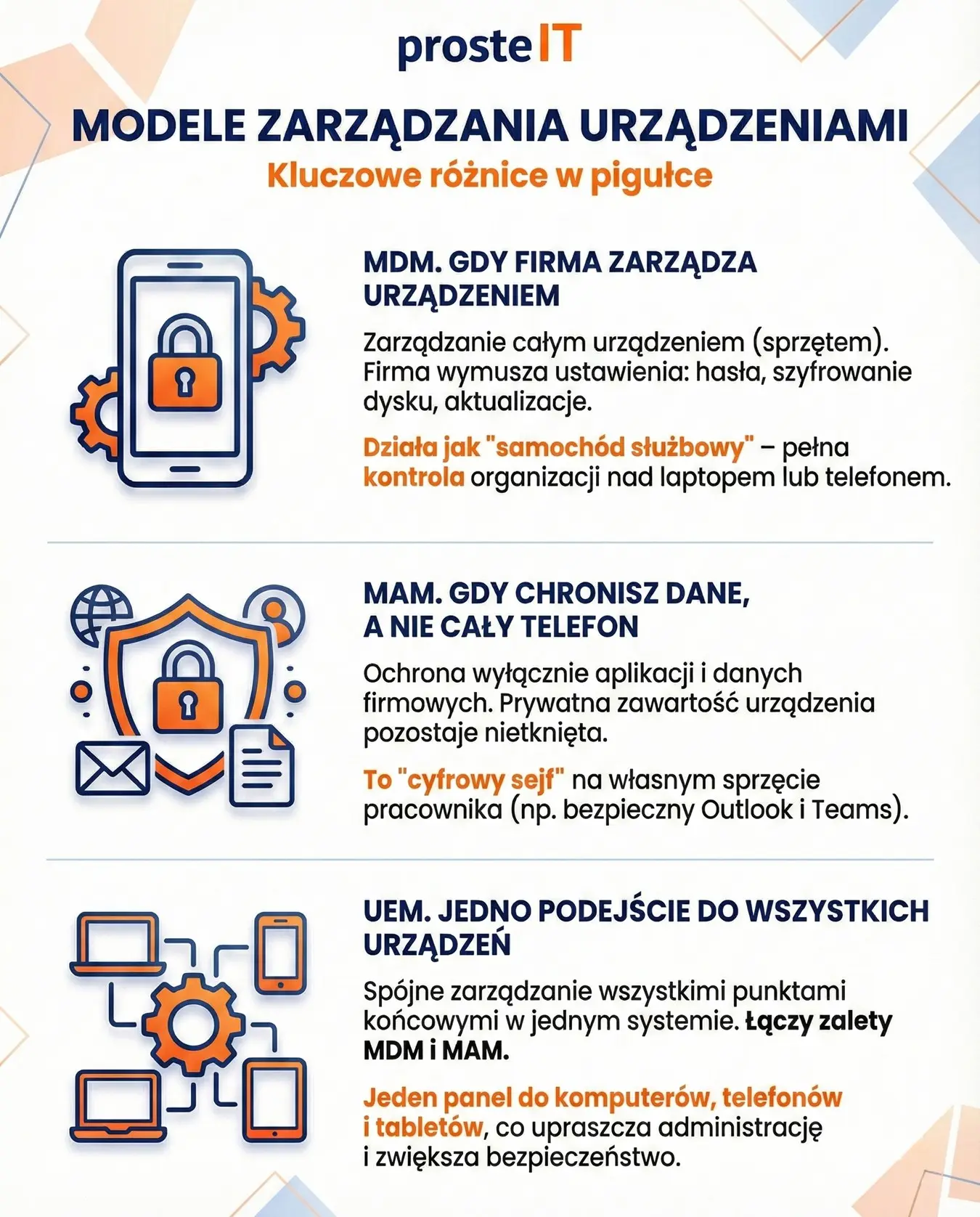
MDM – when the company manages the device
MDM (Mobile Device Management) is the management the entire device. In practice, this means that the company can enforce certain settings: screen locks, disk encryption, system updates, and the installation of company applications. These are most often used on company equipment—laptops and phones owned by the organization.
Simply put, MDM works like a company car policy. Since the car is a company car, the company sets the rules: inspections, insurance, and usage. This approach provides a great deal of control and is essential where security, audits, or regulatory compliance are important. The downside is that it can be more intrusive, so it's not always suitable for employees' personal devices.
MAM – when you protect your data, not your entire phone
MAM (Mobile Application Management) takes a different approach. Instead of managing the entire device, it focuses solely on applications and company data. Intune can secure company email, Teams, and files so that data doesn't escape from a controlled environment—even if an employee uses their own phone.
It's a bit like a safe in a private home. The company doesn't care what happens in other rooms, but the contents of the safe have their own rules: access, PIN, and no possibility of removing documents. For many SMEs, MAM is an ideal starting point, as it allows them to protect data without privacy concerns and without complicated implementation.
UEM – one approach to all devices
UEM (Unified Endpoint Management) is a broader concept. It represents a single, coherent approach to management. all endpoints: computers, phones, tablets, and sometimes other devices used at work. Intune is just such a UEM tool – it combines MDM and MAM in a single system.
For businesses, the difference is significant. Instead of separate policies for laptops, phones, and remote work, you have a single set of security rules and a single place to manage them. This means fewer exceptions, less manual work, and less risk of things getting out of control.
EMM – a concept worth knowing, but not necessarily using
EMM (Enterprise Mobility Management) is a term that for years has described a set of tools for managing mobility in companies—primarily phones, tablets, and mobile applications. In practice, it encompassed MDM and MAM, as well as additional elements related to security and access.
Today, EMM is considered a more historical concept. With the rise of hybrid work and the growing number of devices, the market has shifted toward UEM, which encompasses not only mobility but the entire work environment. Therefore, when choosing solutions like Intune, it's more important to understand MDM, MAM, and UEM than the term EMM itself.
What does this mean in practice for SMEs?
Not every company needs full MDM across all devices right away. A common scenario is:
• MDM on company equipment, where standardization and control count.
• MAM on private devices to protect data without intruding on privacy.
• Thinking in terms of UEM if the company is growing and wants to avoid chaos in the future.
The most important thing is this: Intune doesn't impose a single model. It offers flexibility, allowing you to tailor the level of control to your organization's specific needs, rather than having to mold your company to a specific tool. In the following chapters, we'll show how these approaches translate into specific features and implementation decisions.
Why does your company need Intune – a problem that is usually only visible after an incident
On a daily basis, everything works. Employees log in to email, send files, work from home or in the field. IT "somehow" manages the new laptops, and personal phones with access to company data don't particularly worry anyone. For a while. Problems with device and data management rarely cause immediate pain—usually they only become apparent when something unexpected happens.
A lost phone with email access. A laptop without updates becomes a doorway for attack. An employee leaves the company, taking with them files stored locally or in a private cloud. In such situations, a question previously put aside arises: do we even have control over this?
In many SMEs, control relies on employee goodwill and common sense. This works—as long as the company is small, the team is stable, and the risk is low. As the organization grows, work becomes hybrid, and devices proliferate, this model is no longer sufficient. Chaos doesn't stem from malicious intent, but from a lack of clear rules and tools to automatically enforce them.
And this is where it comes in Microsoft Intune. Not as a "control system," but as a way to introduce a minimum of order and predictability. Intune lets you determine which devices can be used, what state they must be in, and what happens to corporate data when something goes wrong. Without manually checking every laptop and reacting nervously after the fact.
Most importantly, Intune is proactive. Instead of putting out fires, it implements policies that reduce the risk of an incident occurring in the first place. For management and business owners, this represents a real shift in perspective: from reacting to problems to consciously managing risk before it escalates into a costly downtime or crisis.
Intune's Key Features – What You Really Get "In Practice," Not on a Slide
When you look at feature descriptions in marketing materials, Microsoft Intune It may seem like a "do-it-all" tool. In practice, its greatest strength isn't the sheer number of options, but rather the way it organizes everyday work with devices and applications within the company. Below are the features that actually matter in SMEs—no more slides.
Registration and preparation of devices for work
Intune begins working the moment the device is delivered to the user. Enrollment automatically ensures that the laptop or phone knows what rules apply to it. For the employee, this means a simple start: they log in and can work. For the company, it eliminates the need to manually configure each device from scratch and reduces the risk of errors.
In practice, this saves a huge amount of time when onboarding new staff or replacing equipment. Instead of improvisation, you have a repeatable process.
Standardization of settings and configurations
One of Intune's most underrated features is configuration policies. They allow you to set the minimum requirements for all devices: screen locks, updates, and basic security. This allows companies to stop relying on user "best practices" and instead start enforcing standards automatically.
It's a bit like checklists in aviation – not because the pilots are incompetent, but because repetition reduces risk. In SMEs, this means fewer reports and fewer "strange incidents.".
Device Compatibility – Know What's Safe and What's Not
Intune can assess whether a device meets specific security requirements. If not, it's marked as non-compliant. This gives you real visibility: you don't have to guess, you know how many devices are "fine" and how many require attention.
From the management's point of view, this is important because it is finally possible to talk about security in terms of facts, not hunches.
Application management and data protection
One of the most common scenarios for SMBs is protecting corporate data in apps—especially on personal devices. Intune allows you to enforce policies per app, not per phone or computer. Corporate data has its own rules, independent of the rest of the device.
In practice, this means a reduced risk of information leaks and fewer conflicts with employees. The company protects what belongs to it without invading users' private spaces.
Respond to incidents without panic
If a device is lost, stolen, or an employee leaves the company, Intune allows you to react quickly. You can block access, remove corporate data, or restrict app functionality—all without physically touching the device.
This feature's value is only realized in a crisis. And that's when Intune proves to be not just "another IT system," but a real loss-mitigation tool.
One platform instead of a collection of half-measures
The most important benefit doesn't lie in any single feature. Intune provides consistency. Instead of several fragmented solutions, manual procedures, and exceptions, the company gets a single mechanism that grows with it.
For SMBs, this is often the moment when they shift from reacting to problems to consciously managing their work environment. And it's this shift—not the feature list—that provides Intune's greatest practical value.
Intune in real SME scenarios – what to choose depending on the company
In theory Microsoft Intune can do a lot. In practice, the question is different: what makes sense for your business, here and now. SMEs vary in scale, work style, and IT maturity, so a good choice isn't about "doing everything at once," but rather tailoring the scope to real needs.
Below are six of the most common scenarios that regularly appear in small and medium-sized businesses – along with honest advice on what to focus on.
1. A company based mainly on Windows computers
If your team is primarily working on company laptops, consistency and predictability are key. In this scenario, it makes sense MDM on computers: uniform settings, updates, and minimal security. The result? Fewer problems when onboarding new users and less fiddling with each device individually.
2. Private phones for email and Teams
This is a very common case in SMEs. Here, the best choice is I HAVE, which means protecting data within apps without managing the entire phone. The company secures its information, and the employee maintains privacy. This is usually the easiest way to take the first step without resistance from the team.
3. Company equipment: phones or tablets
If a company issues mobile devices to employees, it is worth treating them like any other business equipment. MDM on company devices It provides control, remote response capabilities, and clear rules of use. This is a "no compromise" scenario, but one fully justified by hardware ownership.
4. Mix: office, field, remote work
In companies where part of the team works in the office and the rest in the field or from home, a chaos of exceptions begins. MDM and MAM connection and UEM thinking. Same rules, different levels of control – depending on the device and user role.
5. The company is in the growth phase
When an organization grows rapidly, improvisation ceases to be effective. Even if MAM is sufficient today, it's worth designing the environment as if it will work tomorrow. UEM as a target model allows you to avoid having to „rebuild” rules and tools from scratch later.
6. Minimalism and common sense
Not every company needs complete control from day one. Sometimes the best decision is start with one specific problem – for example, securing data on phones – and gradually expanding the scope. Intune allows this approach, without penalties for "not using everything.".
How to make a good decision?
If the hardware is proprietary, MDM usually makes sense.
If the device is private, MAM is the most reasonable compromise.
If the company is growing or works in a hybrid way, it is worth thinking in terms of UEM, even if the implementation is gradual.
If you see your business in these scenarios and you're not sure where to start – we help Select the right Intune scope, plan a phased implementation, and avoid common mistakes. This will ensure security is improved and your team's work doesn't slow down for a moment.
Licenses and Add-ons – What's "Included" and When Does Intune Suite Come In?
Licensing Conversations Microsoft Intune it's worth simplifying to one question: Do you need to buy anything extra or do you already have it in your Microsoft 365?. Only then does the topic of extensions and subsidies arise.
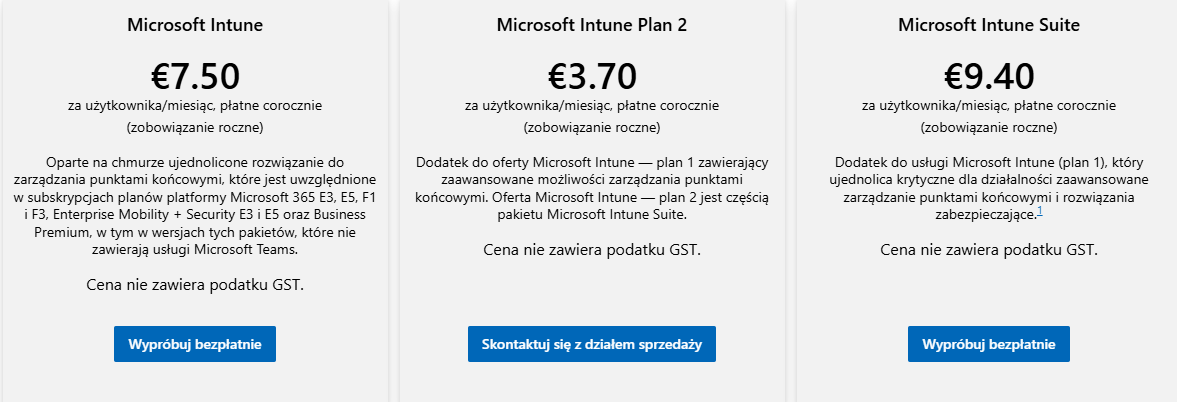
Microsoft Intune Basic (Plan 1)
This is the foundation for most SMB deployments. Plan 1 includes device management (MDM), application management (MAM), compliance policies, and integration with the Microsoft 365 ecosystem.
Currently:
• Intune Plan 1 (standalone): approx. 7.50 EUR / user / month with an annual commitment.
In practice, however, very often you don't buy it separately, because it is already included in popular packages.
Intune in Microsoft 365 Business Premium
For many companies, this is the most common and most profitable scenario. Microsoft 365 Business Premium Includes Intune Plan 1 as standard, along with email, Teams, Office, and additional security features.
Current price:
• Business Premium: approx. 20.60 EUR / user / month (annual settlement).
Therefore, in many SMEs, Intune "already exists" – it just hasn't been used yet.
Intune Suite – When You Need More
Intune Suite is a set of add-ons for more demanding environments, including remote assistance, better analytics, and administrator permissions control.
Currently:
• Intune Suite: approx. 9.40 EUR/user/month, as an add-on to Intune Plan 1.
This isn't a mandatory implementation step. It only makes sense when basic functionality is no longer sufficient for daily work.
Important note about prices
The amounts given are indicative. Always check the manufacturer's official website for current prices, billing terms, and plan availability., because Microsoft updates them regularly.
If you're not sure whether you already have Intune in your license, or which variant actually makes sense for your company, we help you quickly verify it and choose the scope so you don't overpay for features you don't really need.
How to Implement Intune – A Phased Plan, Privacy, Communication, and Pitfalls
Implementation Microsoft Intune It doesn't have to be a revolution that grinds a company to a halt. The biggest problems don't stem from technology, but from rushing, lack of planning, and poor communication. A well-designed implementation can be carried out calmly, in stages, and without unnecessary tension within the team.
Step-by-step plan – less risk, more control
The safest approach is a step-by-step implementation. First, an inventory: which devices are in the company, which are company-owned, which are private, and what they are actually used for. Then, a draft of minimum rules—not "everything possible," but only those that truly improve security and organize work.
The next step is a pilot with a small group of users. This allows you to quickly see what's working and what needs tweaking. Only then should you expand the implementation to the entire company. This approach reduces the risk of downtime and allows you to react before the problem affects everyone.
Privacy – a topic that cannot be ignored
One of the most common mistakes is the lack of a clear distinction between company and personal devices. Employees fear their devices being "snooped on," even if the company has no intention of doing so. Therefore, conscious use of MDM and MAM and clear communication are crucial., what company he sees, and what not.
If policies are transparent and data protection applies to corporate applications, not private content, team resistance is significantly reduced. Privacy isn't a barrier to implementation—provided it's well-planned.
Team communication – the silent foundation of success
A technically sound implementation can fail if employees learn about it after the fact. A brief overview: why we're doing this, what will change, and how it will impact daily work can accomplish more than the most polished policy.
It's also good practice to designate a point of contact—a person or team who can help in case of problems. This way, Intune is no longer perceived as a control tool, but rather as a means of organizing work.
The most common pitfalls that complicate implementations
The biggest mistake is trying to implement everything at once. Overly restrictive rules at the start often lead to blockages and user frustration. Equally problematic are the lack of exceptions for key roles or a lack of testing before a global rollout.
The second pitfall is a lack of accountability – when no one "owns" policies and changes. Intune requires maintenance, even though it's a cloud-based service. Without it, it quickly loses its value.
What's worth remembering
A successful Intune implementation is a process, not a single click. Steps, clear privacy policies, and team communication are more important than the number of features enabled. These are the factors that determine whether the tool will truly support the business or just be another source of problems.
If you want to implement Intune calmly, in stages and without stress in your team, we will help you plan the scope, conduct a pilot, and set policies so that security increases and daily work does not slow down.
Frequently asked questions
Microsoft Intune is a cloud-based tool for managing enterprise devices and applications. It allows you to enforce security policies, protect corporate data, and control access—without having to maintain your own IT infrastructure.
MDM focuses on managing the entire device (usually the company's), MAM focuses solely on corporate apps and data, and UEM provides a single, cohesive approach to all devices within an organization. Intune combines these models and allows for flexible customization to meet the company's specific needs.
Yes. Intune is particularly well-suited for SMBs because it's cloud-based, serverless, and can be implemented in stages. This allows businesses to start with simple scenarios and expand as their needs grow.
Yes. With MAM features, Intune lets you protect data in corporate apps without managing the entire device. The company controls work data while employee privacy remains intact.
It depends on the license. Intune Plan 1 is already included in packages like Microsoft 365 Business Premium. In other cases, it can be purchased as a separate service or expanded with Intune Suite. It's always worth checking the current prices on the official Microsoft website.
Yes. We help you choose the right model. (MDM, MAM or UEM), check your licenses, and implement Intune in stages – without downtime and unnecessary complications. If this topic applies to your company, gladly we will help.
Microsoft Intune It's not "just another IT tool," but a practical way to organize devices, applications, and data access in a modern company. When implemented well, it protects business information, reduces the risk of incidents, and simultaneously allows for seamless teamwork—regardless of whether employees use company-owned or private equipment.
Intune's greatest value is its flexibility. You can start with simple scenarios, such as app data protection, and over time expand your environment to include full device management and a consistent UEM approach. The key is informed scope selection, phased implementation, and clear communication with employees.
If this topic concerns your company and you want to have real control over security without chaos and excessive costs – get in touch. We're happy to help you choose a solution and translate Intune technology into tangible business benefits.